
- The bug: a missing JSON key
- One user, four "usernames"
- Username attributes vs alias attributes
- Which mode should you choose?
- Login identifier, handle and identity are different things
- Takeaways
While migrating Strobe, a small social app, from a monolithic Python backend to AWS Lambda, API Gateway, Cognito and DynamoDB, I hit a login bug. Valid credentials returned 401 Unauthorised, and nearly every authenticated feature failed with it: posts, comments, likes, uploads and the feed.
The fix was one line. Understanding why it was safe took longer, because the word "username" meant four different things in the same system. This post untangles them, and then looks at the Cognito design choice underneath: username attributes vs alias attributes.
The bug: a missing JSON key
Everything that needs a bearer token failed together. That looked like many unrelated breakages, but they shared one upstream dependency: logging in. When unrelated-looking features fail at once, find the dependency they share before debugging them one by one.
The client's login request carried no email key:
POST /v1/auth/register  {"username": "...", "email": "...", "password": "..."}
POST /v1/auth/login     {"username": "...", "password": "..."}      ← no "email" key
But the Lambda's login() handler only read email:
# before
email = (payload.get("email") or "").strip()
if not email or not password:
raise unauthorised_error("Invalid email or password")payload.get("email") returned None, so email became "", and the handler returned 401 at its very first check. DynamoDB and Cognito were never touched, so plausible theories about email confirmation or eventual consistency were irrelevant. What settled it was reading the actual request body instead of the API docs.
# after
email = (payload.get("email") or payload.get("username") or "").strip()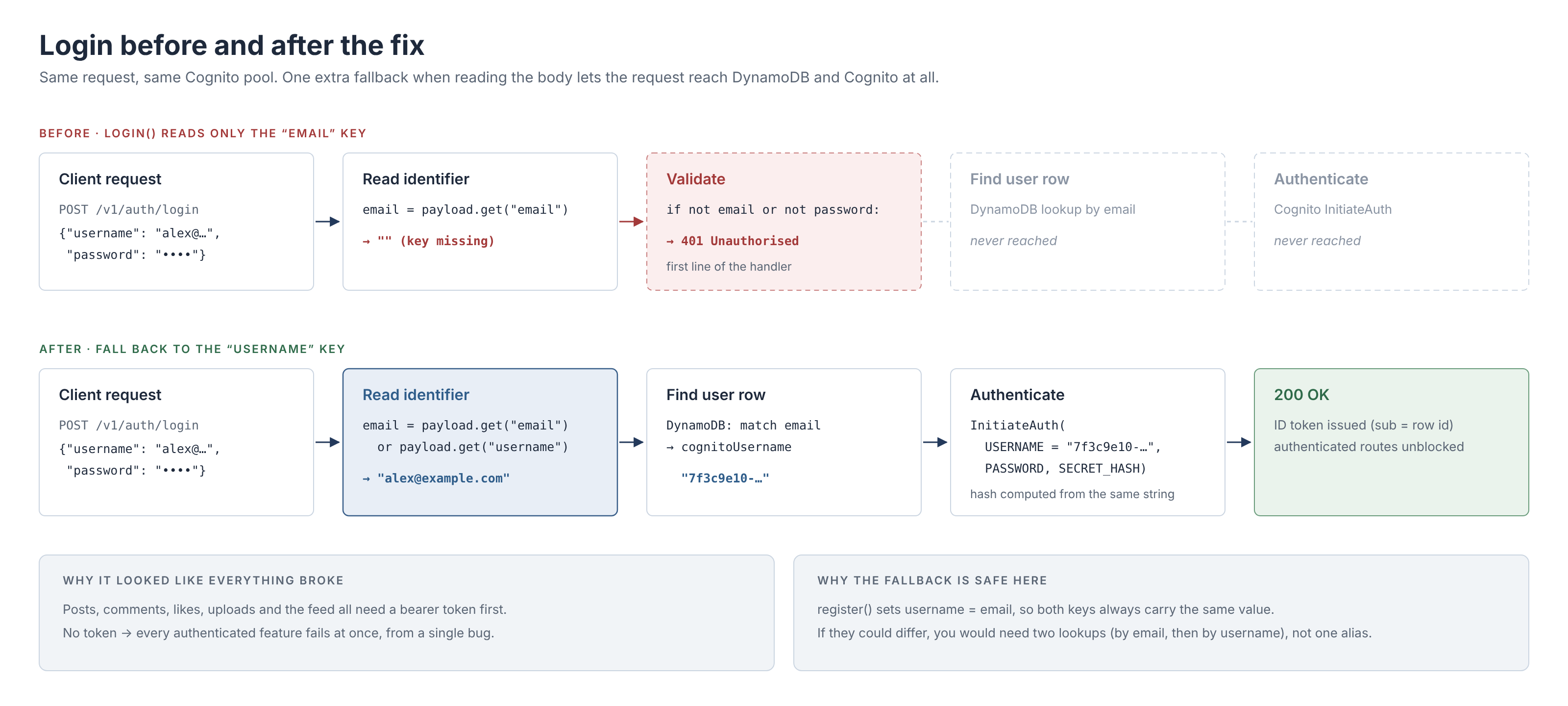
This fallback is safe only because registration always sets username = email, per the original app's contract, so both keys carry the same string. If users could choose a handle separate from their email, it would be wrong: you would need to look the value up as an email first, then as a username.
One user, four "usernames"
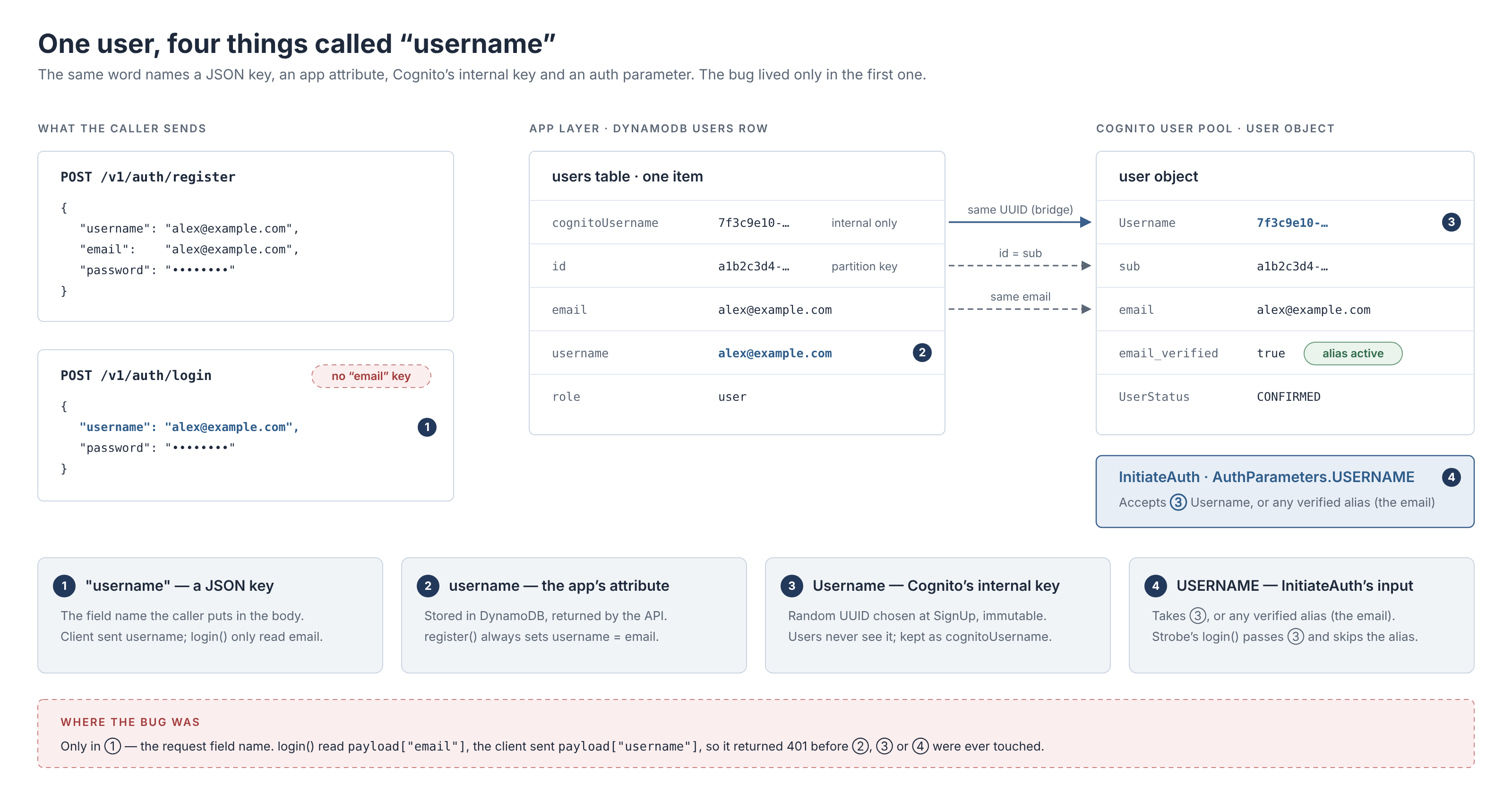
The confusing part is that one word refers to four different things:
| # | What it is | Example value | Lives in |
|---|---|---|---|
| ① | A JSON key in the request body | "username": "alex@example.com" | The HTTP request |
| ② | The app's own attribute | alex@example.com (always equal to email) | DynamoDB row, API responses |
| ③ | Cognito's Username, the pool's immutable internal key | 7f3c9e10-… (a UUID) | Cognito user object, copied to DynamoDB as cognitoUsername |
| ④ | AuthParameters.USERNAME in InitiateAuth | ③, or any verified alias such as the email | The authentication call |
There is also sub, a separate immutable UUID that Cognito generates. It isn't a username, but it is Strobe's DynamoDB partition key and the identity carried in the token.
The bug was entirely in ①. The rest of this post explains ③ and ④, and why Strobe needs a UUID it has to remember.
Username attributes vs alias attributes
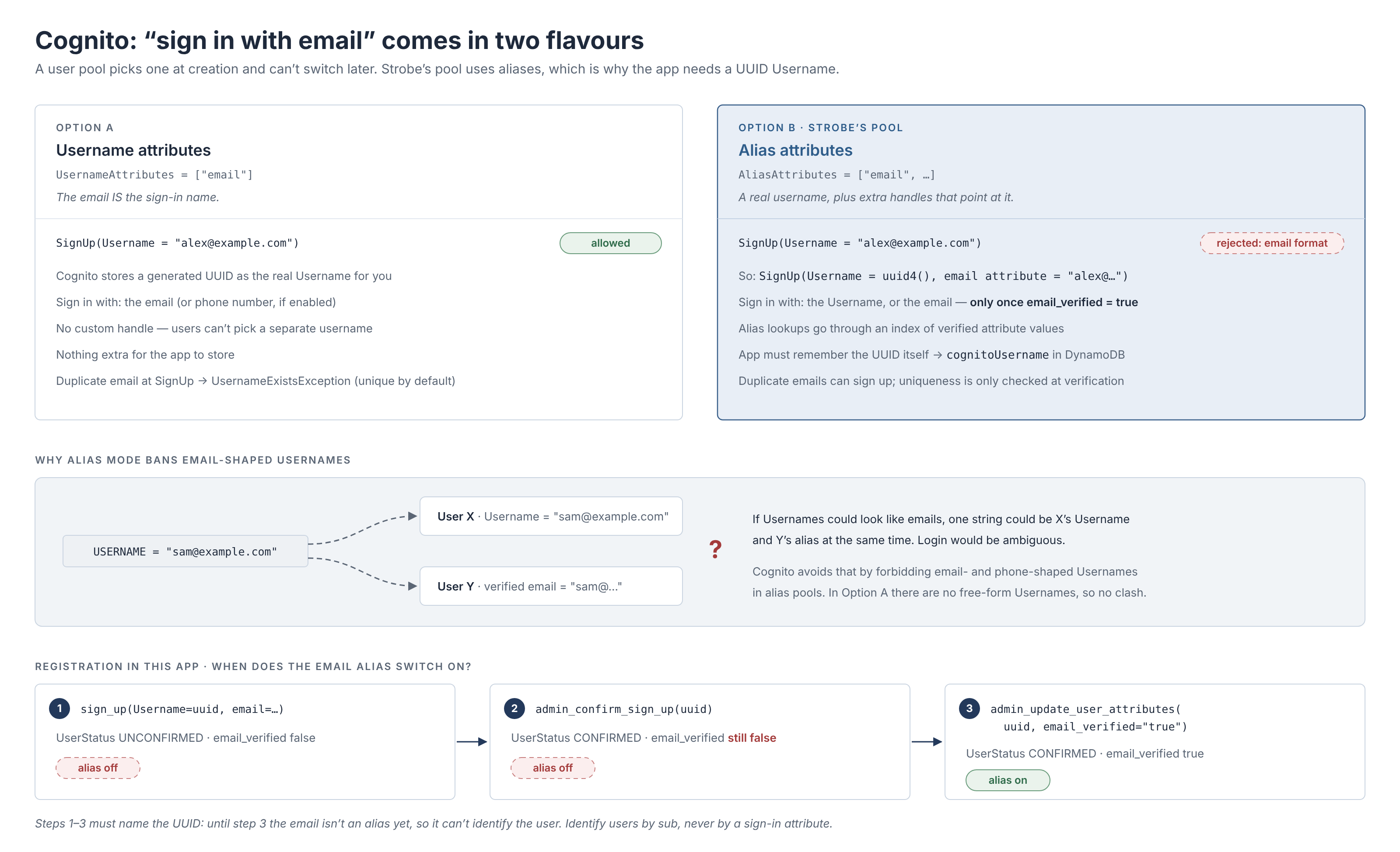
Cognito offers two ways to "sign in with email". You choose one when you create the pool, and you can't change it later.
- Username attributes (
UsernameAttributes = ["email"]). The email is the sign-in name. You pass the email toSignUp, and Cognito sets the realUsernameto a UUID equal tosub. In the console: Email ticked, User name unticked. - Alias attributes (
AliasAttributes = ["email"]). Every user has a realUsername, and the email is an extra handle that points at it. In the console: User name plus Email ticked.
A user object looks almost the same in both modes. To tell them apart, check whether aws cognito-idp describe-user-pool returns UsernameAttributes or AliasAttributes, or compare Username with sub: in username-attribute mode they are the same UUID.
What alias mode costs Strobe
Strobe's pool uses alias attributes. That one choice explains three things in the code.
1. Usernames can't look like emails, so the app generates a UUID. In an alias pool, Cognito rejects any Username in email format. Otherwise one string could be user X's Username and user Y's email alias at the same time, and login would be ambiguous. So Strobe signs up with a random UUID and attaches the email as an attribute:
cognito_username = str(uuid.uuid4())
signup_resp = cognito.sign_up(
    ClientId=APP_CLIENT_ID,
    Username=cognito_username,
    Password=password,
    SecretHash=_secret_hash(cognito_username),
    UserAttributes=[{"Name": "email", "Value": email}],
)
sub = signup_resp["UserSub"]  # immutable identity -> DynamoDB partition key
Nothing else records that UUID, so the app stores it as cognitoUsername for admin APIs it calls later, such as group membership and deletion.
2. An alias only works once it is verified. Strobe has no confirmation-code endpoint, so it confirms users server-side. But AdminConfirmSignUp only changes the user's status to CONFIRMED; it doesn't mark the email attribute as verified. A second call does that:
cognito.admin_confirm_sign_up(UserPoolId=USER_POOL_ID, Username=cognito_username)
cognito.admin_update_user_attributes(
    UserPoolId=USER_POOL_ID,
    Username=cognito_username,
    UserAttributes=[{"Name": "email_verified", "Value": "true"}],
)
Both calls must use the UUID, because until the second one finishes, the email isn't an alias and can't identify anyone.
3. Email uniqueness isn't enforced at sign-up. In username-attribute mode, a duplicate email at sign-up raises UsernameExistsException. In alias mode, duplicates can sign up, and Cognito only resolves the clash at verification, when, depending on the API, the alias can move to the newer account. Resolving "email → user" through the alias index can then land on the wrong identity, so Strobe enforces uniqueness in its own table, looks the row up by email, and authenticates with the exact UUID:
matched_user = _find_user_by_email(email)  # DynamoDB, not Cognito's alias index
if matched_user is None or "cognitoUsername" not in matched_user:
    raise unauthorised_error("Invalid email or password")

tokens = _authenticate(matched_user["cognitoUsername"], password)
This matches AWS's own guidance: when a pool uses aliases, identify users by sub, never by a sign-in attribute.
Which mode should you choose?
| Choose username attributes when… | Choose alias attributes when… |
|---|---|
| Email (or phone) is the account, as in most B2B, SaaS and internal tools | Users have a handle, as on social apps, forums or games, and may sign in with it |
| You want one sign-in identifier and less app-side bookkeeping | You are migrating users who already have usernames that must keep working |
| You want Cognito to reject duplicate emails at sign-up | You want handles users can change: add preferred_username as an alias while the real Username stays fixed |
| Users may sign in before verifying their email | Requiring verification before email sign-in suits your flow |
For Strobe, where the email is the only identifier users ever type, username attributes would have been the simpler fit: no UUID to store, no extra verification call, and unique emails enforced by Cognito. Alias mode wasn't wrong, but it added work users would never notice.
Login identifier, handle and identity are different things
Strobe keeps username = email to preserve the original API's contract. That is reasonable for a migration, but as a design it is weak:
- It leaks emails. Strobe's API returns
author.usernameon posts and comments, and user search matches on it, so every author's email address is public and searchable. - It merges three roles into one field. A login identifier (private, may change), a public handle (visible, user-chosen) and an internal identity (immutable) have different requirements. One field can't satisfy all three.
- Redundant fields drift. Two fields that must always be equal invite exactly this bug: one part of the system reads
email, another sendsusername.
A cleaner model separates the roles. The identity is sub, used for every foreign key and authorisation check. The login identifier is the email, ideally via username attributes. The display name is a separate, optional handle that is never an email, and only becomes a sign-in identifier (preferred_username as an alias) if users want to log in with it.
The same applies to a sign-in form: if the field says "Email or username", the backend must genuinely accept both, with two lookups or a single identifier field, not a field-name alias that only works while the values are equal.
Takeaways
- Read the real request bytes before theorising. The bug was a missing JSON key, not anything in Cognito.
- Name things precisely. "Username" meant a JSON key, an app attribute, Cognito's internal key and an auth parameter. Most of the confusion came from the word, not the code.
- Pick the Cognito sign-in mode on purpose. It can't be changed later, and alias mode brings email-format bans, verification gates and weaker uniqueness.
- Identify users by
sub, keep login identifiers private, and don't use an email as a public handle.