
- Step 1: Tell the model which tools exist
- Step 2: The model writes a tool call (as text)
- Step 3: The application parses and runs it
- Step 4: Feed the result back
- When the model has no native tool calling
- Where MCP fits in
- Key takeaways
An LLM can only do one thing: generate tokens (text). It can't check the weather, query a database, or send an email. Yet every modern agent seems to do exactly that.
The trick is that the model never performs the action itself. It writes a request for an action, and ordinary code — the application hosting the model — carries it out. Those pieces of external code (usually functions) are called tools.
I'll use my CAB432 project, Strobe Assistant, as the running example: a TypeScript agent that talks to an LLM through Amazon Bedrock's Converse API, and calls tools on a Python MCP server to search a user's own posts and photos. The whole mechanism is a four-step round-trip:
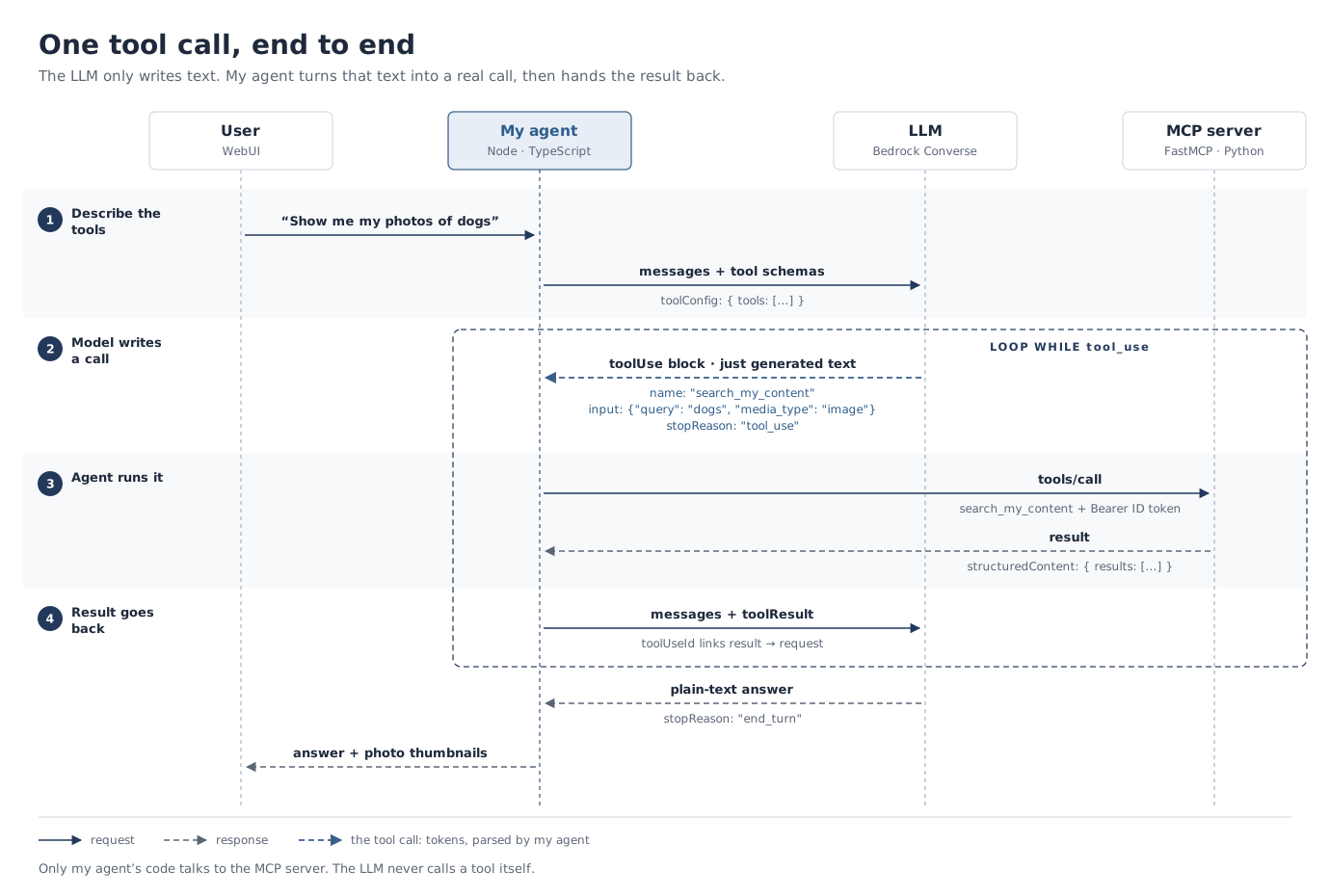
Step 1: Tell the model which tools exist
Before the LLM generates anything, the developer gives it a list of available tools as JSON schemas. Each schema defines:
- The name of the function.
- A description of what the tool does (and when to use it).
- The expected arguments and their data types.
I never wrote that JSON by hand. On the MCP server, a tool is a normal Python function, and FastMCP builds the schema from its signature and docstring (mcp_servers_python/fastmcp_http_server.py):
@mcp.tool(annotations={"readOnlyHint": True})
async def search_my_content(
    query: str,
    media_type: Literal["all", "image", "text"] = "all",
    limit: int = 10,
    user_id: str = TokenClaim("sub"),
    token: AccessToken = CurrentAccessToken(),
) -> dict:
    """Semantic search over the signed-in user's OWN posts, comments and photos.

    Use this for questions like "when did I go to Kyoto?", "show me my photos of dogs",
    "what did I write about the marathon?". ...
    """
Trimmed to the relevant fields, this is what the server publishes for it in tools/list (the docstring becomes the description):
{
  "name": "search_my_content",
  "description": "Semantic search over the signed-in user's OWN posts, comments and photos.\n\nUse this for questions like \"when did I go to Kyoto?\", \"show me my photos of dogs\",\n\"what did I write about the marathon?\". ...",
  "inputSchema": {
    "type": "object",
    "additionalProperties": false,
    "properties": {
      "query":      { "type": "string" },
      "media_type": { "type": "string", "enum": ["all", "image", "text"], "default": "all" },
      "limit":      { "type": "integer", "default": 10 }
    },
    "required": ["query"]
  }
}
Notice what's missing: user_id and token. They are filled in from the caller's verified JWT, so they never appear in the schema, and the model has no way to set them.
The agent then hands the schemas to Bedrock as a separate toolConfig parameter (agent/src/agent.ts, agent/src/bedrock.ts):
function toBedrockTools(tools: McpTool[]): Tool[] {
  return tools.map((tool) => ({
    toolSpec: {
      name: tool.name,
      description: tool.description ?? tool.name,
      inputSchema: { json: tool.inputSchema },
    },
  }));
}

new ConverseStreamCommand({
  modelId: input.modelId,
  system: input.system,
  messages: input.messages,
  toolConfig: input.tools.length > 0 ? { tools: input.tools } : undefined,
});
But the model still only reads text, so the provider renders the schemas into the prompt using the model's chat template. Simplified, what the model actually sees looks like this:
<|system|>
You can use these tools. To call one, reply with a JSON object inside <tool_call> tags.
[{"name": "search_my_content", "description": "Semantic search over the signed-in user's OWN posts...", ...}]
<|user|>
Show me my photos of dogs
<|assistant|>
The description matters more than it looks: it is effectively a prompt. That's why the docstring above lists example questions. A vague description leads to the wrong tool being picked, or the right tool never being called.
Step 2: The model writes a tool call (as text)
Still, the LLM cannot invoke the function. Instead, modern LLMs are fine-tuned to recognise when a tool would help and to respond with structured text, rather than an answer. Bedrock returns it as a toolUse block:
{
  "toolUse": {
    "toolUseId": "tooluse_xxxxxxxx",
    "name": "search_my_content",
    "input": { "query": "dogs", "media_type": "image" }
  }
}
…along with stopReason: "tool_use", which tells the application: "I'm not finished, I'm waiting for a result."
It is just tokens — the model predicted search_my_content and "dogs" the same way it predicts any other word. You can see this in the stream: the arguments arrive as fragments of a JSON string, not as an object.
Step 3: The application parses and runs it
The application hosting the LLM parses the JSON into a native software object (JSON.parse() here, json.loads() in Python). In my agent, that means gluing the streamed fragments back together first (agent/src/bedrock.ts):
} else if (delta.toolUse?.input !== undefined) {
  const partial = partialToolInput.get(index);
  if (partial) partial.json += delta.toolUse.input;   // text, piece by piece
}
// ...on contentBlockStop:
content.push({
  toolUse: { toolUseId: partial.toolUseId, name: partial.name, input: parseToolInput(partial.json) },
});

function parseToolInput(json: string): Document {
  if (!json.trim()) return {};
  try {
    const parsed: unknown = JSON.parse(json);         // text -> object
    return parsed && typeof parsed === "object" ? (parsed as Document) : {};
  } catch {
    return {};
  }
}
Then it looks up the tool by name and invokes it with the parsed arguments. An unknown name is never run; it becomes an error the model can read (agent/src/agent.ts):
for (const { id: toolCallId, name, input } of requests) {
  const outcome = toolNamesKnown.includes(name)
    ? await runTool(tools, session, name, input, toolCallId, controller.signal)
    : failedOutcome(toolCallId, `Unknown tool "${name}". Available tools: ${toolNamesKnown.join(", ")}.`);
  results.push(outcome.block);
}
runTool ends in the MCP client, which sends a tools/call over HTTP with the user's ID token attached (agent/src/mcp.ts):
return (await this.client.callTool({ name, arguments: args }, undefined, {
  signal,
  timeout: 60_000,
})) as CallToolResult;
This is the only point where anything real happens — and it happens in your code, with your permissions.
Step 4: Feed the result back
The model doesn't see the result unless you send it back. The application appends the tool output to the conversation, linked to its request by toolUseId, and calls the model again. Now it can answer in plain language — or ask for another tool.
// one toolResult block per tool call
{ toolResult: { toolUseId, status: "success", content: [{ json: result.structuredContent }] } }
Repeat that until the model stops asking for tools, and you have the core of every agent. Trimmed down, my agent's loop is (agent/src/agent.ts):
for (let iteration = 1; ; iteration += 1) {
  const turn = await deps.model.streamTurn({ modelId, system, messages: session.messages, tools: bedrockTools, signal, onText });
  session.messages.push(turn.message);

  const wantsTools = turn.stopReason === "tool_use";
  if (!wantsTools) break;                                // plain text -> done
  if (iteration >= MAX_TOOL_ITERATIONS) { /* tell the user, stop */ break; }   // always cap the loop (mine: 8)

  const results: ContentBlock[] = [];
  for (const { id, name, input } of requests) {          // run each requested tool
    results.push((await runTool(tools, session, name, input, id, signal)).block);
  }
  session.messages.push({ role: "user", content: results });   // the results go back in
}
When the model has no native tool calling
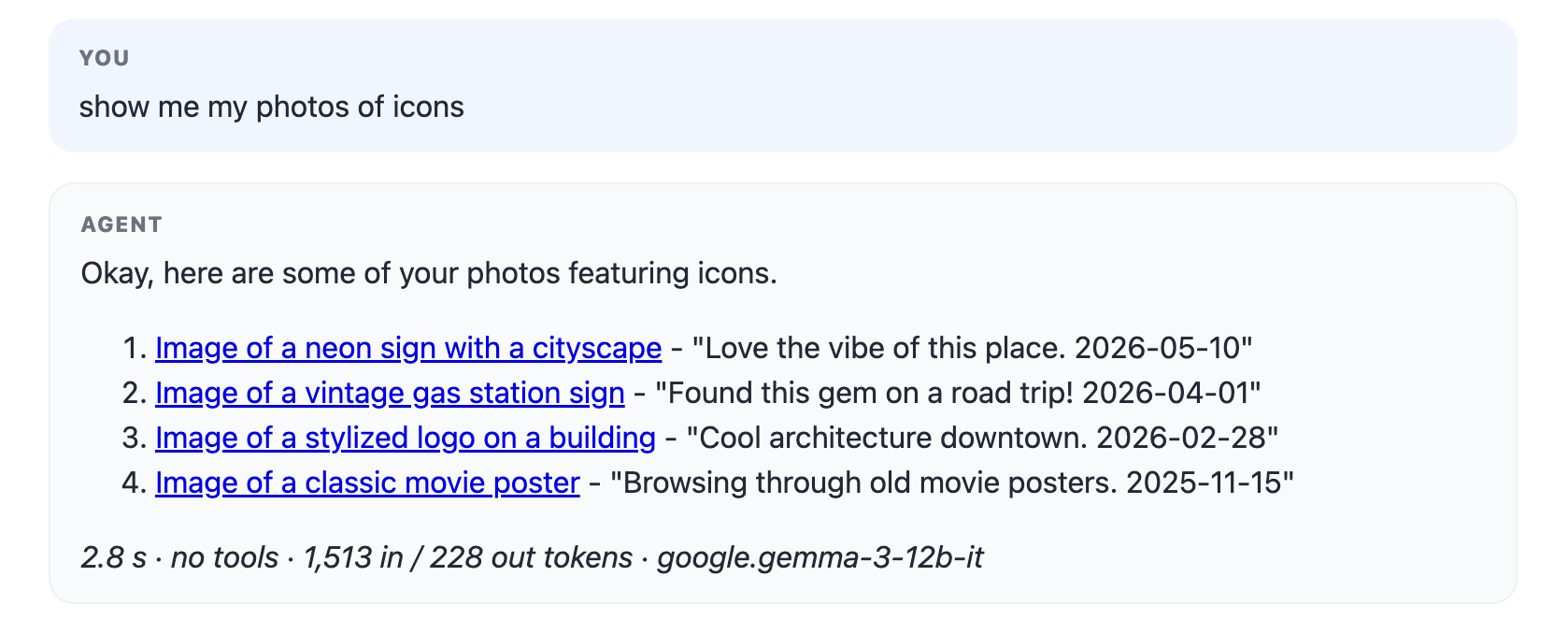
Not every model is trained for this. In Strobe Assistant, Gemma 3 on Amazon Bedrock accepted the toolConfig but never returned a toolUse block. It wrote the call as ordinary text, the loop saw a normal end_turn, and the model went on to invent photos and links:
The fix was to do by hand what native tool calling does for you (agent/src/prompt-tools.ts). Step 1 moves into the system prompt:
return `# How to use tools (READ CAREFULLY)
To call a tool, reply with ONLY this block and then stop - no words before or after it,
and never write the result yourself:
\`\`\`tool_call
{"name": "<tool name>", "arguments": { <arguments as JSON> }}
\`\`\`
The result arrives in the next message inside a \`\`\`tool_result block.
...
Available tools:
${catalogue}`;
…and Step 2's detection moves into a parser. It accepts the JSON block above, and also Gemma's own habit of writing a Python-style call like search_my_content(query="dogs"), so a model that drifts from the instructions still gets its tool run instead of a silent hallucination.
| Native | Prompt-based | |
|---|---|---|
| Tool schemas | toolConfig, rendered by the provider | Pasted into the system prompt by the app |
| Call format | toolUse block + tool_use stop reason | A fenced block of text the app must find |
| Detecting a call | Check the stop reason | parseToolCalls() on every reply |
| Reliability | High (trained behaviour) | Best-effort (instruction-following) |
Same loop, same tools — only Step 1 and Step 2 move from the provider into your code. It's a good reminder that "tool calling" is a text convention, not a special power.
Where MCP fits in
MCP (Model Context Protocol) doesn't change any of the above. The model still writes the same tool call. MCP standardises the application-to-tool side:
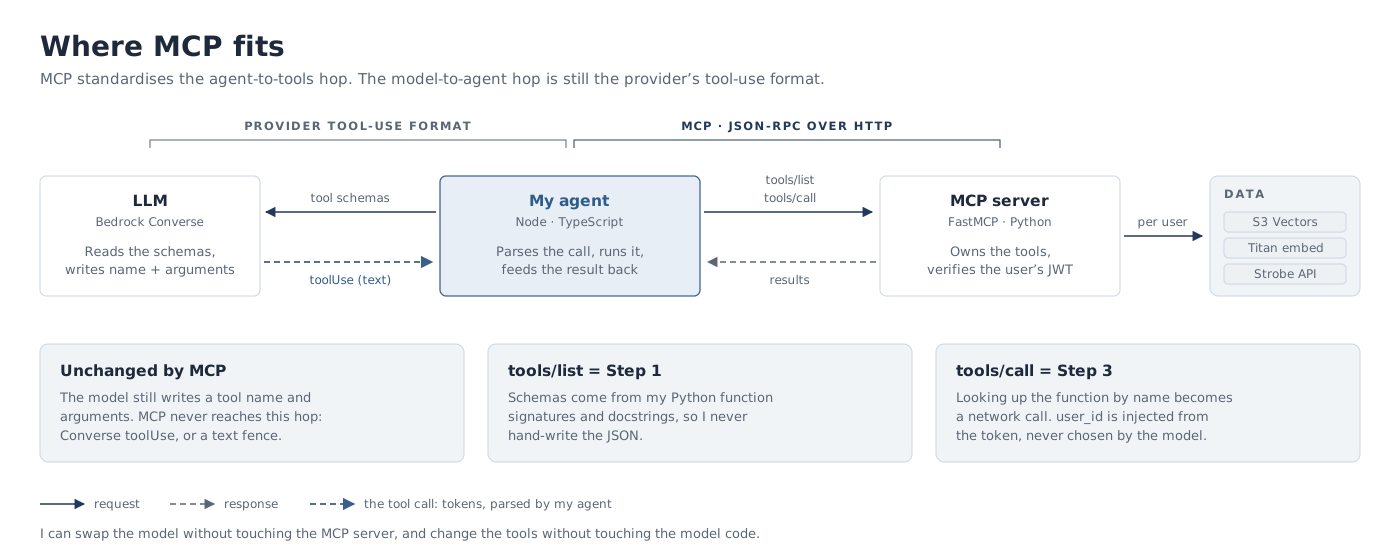
tools/listreturns exactly the schemas from Step 1, so the agent doesn't hard-code them.tools/callreplaces the "look up the function by name" part of Step 3 with a network call.
The agent fetches the list once on connect, and filters it before the model sees it (agent/src/mcp.ts):
this.tools = (await client.listTools()).tools;

/** The tool list as the MODEL sees it: agent-only tools removed. */
modelVisibleTools(): McpTool[] {
  return this.tools.filter((tool) => !AGENT_ONLY_TOOLS.has(tool.name));
}
save_run_summary (the agent's memory) is on the server but hidden from the model, so a prompt injection in a photo caption can't rewrite what the assistant remembers.
Key takeaways
- The model proposes, the application disposes. The LLM only ever produces text; your code decides whether and how to act on it.
- Treat arguments as untrusted input. They were generated, not typed by a developer. Validate them, and never let the model choose things like the user ID — inject those yourself (
TokenClaim("sub")above). - Control what the model can see. Hiding a tool from the list is the simplest way to make sure the model can never call it.
- Handle failure in the loop. Unknown tool names, malformed JSON and tool errors should be sent back to the model as results, so it can correct itself — and cap the loop.
- Write descriptions like prompts. They are the model's only guide to when and how to use a tool.