
- "Auth" is really three jobs
- What Cognito hands back after sign-in
- How a service trusts a token without asking Cognito
- User identity vs workload identity
- Where Cognito sits in the Strobe app
- Further reading
The fundamental rule is this: identity comes from a verified token, never from what a client or a model says. Cognito proves who the user is once; every service after that checks the signed token for itself; and the sub claim it recovers is the only thing that decides whose data a request can touch.
This post sticks to the foundations: what Cognito issues and how a service checks it. Part 4 then follows the token through Strobe Assistant itself.
"Auth" is really three jobs
I realised that I often say "auth" for three separate jobs. Keeping them apart makes the whole architecture much easier to follow:
| Question | Name | Who answers it | In Strobe |
|---|---|---|---|
| Who are you? | Authentication | Cognito, once, with a password | A1 auth Lambda → Cognito InitiateAuth |
| Is this token genuine and current? | Verification | Every service, on its own, with public keys | API Gateway JWT authorizer, auth.ts, FastMCP JWTVerifier |
| What may this user touch? | Authorization | The app's own code, using the verified sub | filter={"userId": sub}, post.userId == sub |
Cognito only does the first job. It knows nothing about posts, photos or vectors, so authorization is always the app's own job.
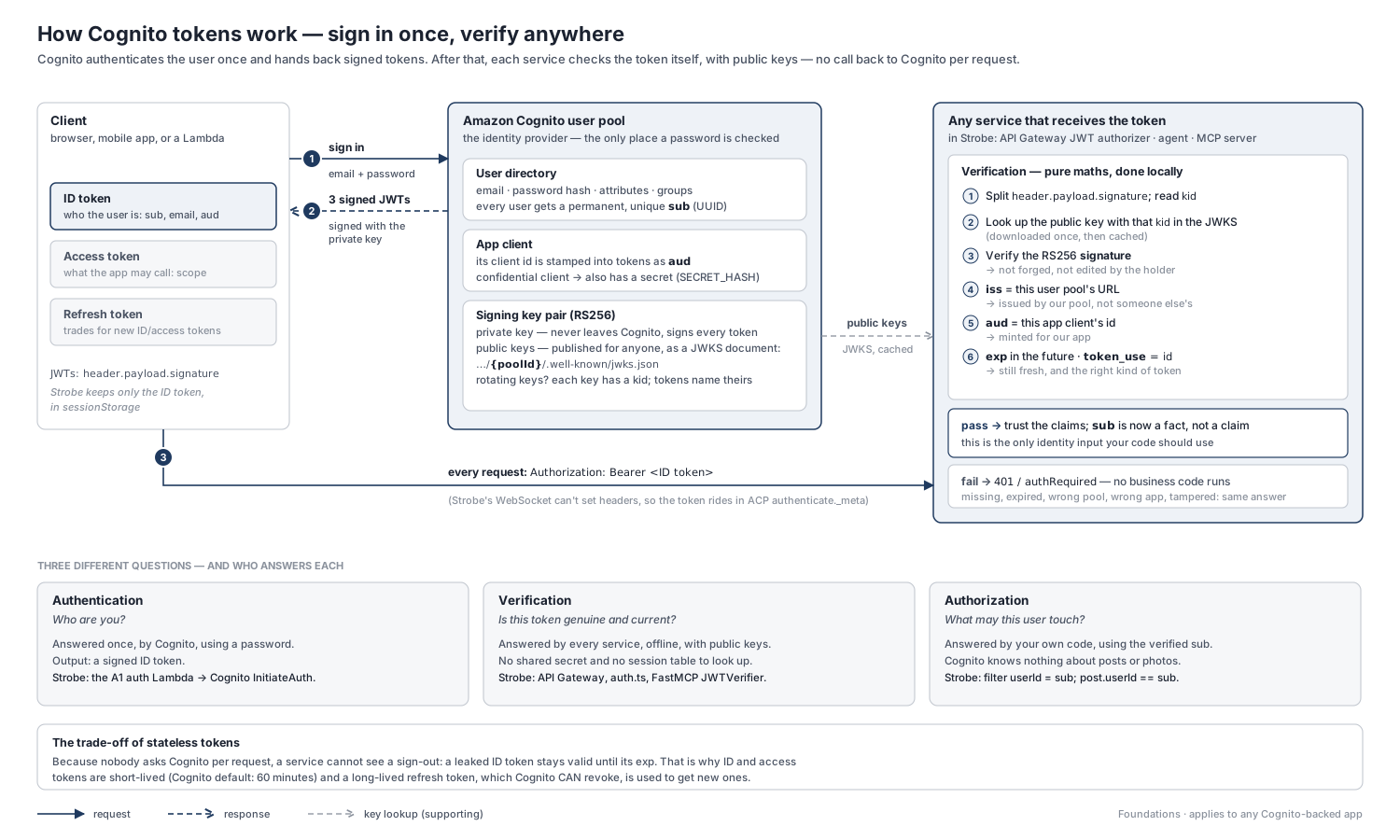
What Cognito hands back after sign-in
A user pool is a user directory plus a token issuer. When a sign-in succeeds, it returns three tokens:
- ID token: who the user is (
sub,email,cognito:username) and which app client it was minted for (aud). - Access token: what the app may call (
scope). It carriesclient_idinstead ofaud. - Refresh token: a long-lived token (30 days by default) that is traded for new ID and access tokens. It isn't a JWT you can verify: it's encrypted, only Cognito can read it, and Cognito can revoke it.
ID and access tokens are JWTs (JSON Web Tokens): three base64url-encoded parts joined by dots, header.payload.signature.
Why Strobe uses the ID token, not the access token. Strobe Assistant's verifiers (the agent's auth.ts and the MCP server's JWTVerifier) check aud against the app client id. Cognito access tokens have no aud claim, so that check rejects them by design. The ID token also carries the user details the agent uses for its display name. Both files explain this in their docstrings, and I cover why both of them verify the token in Part 3.
How a service trusts a token without asking Cognito
Cognito signs every token with a private key that never leaves Cognito, and publishes the matching public keys at a well-known URL as a JWKS (JSON Web Key Set):
https://cognito-idp.ap-southeast-2.amazonaws.com/<poolId>/.well-known/jwks.json
With those keys, a service verifies a token locally, with no call back to Cognito per request:
- Read
kidfrom the header and pick the matching public key from the JWKS (downloaded once, then cached). - Check the RS256 signature. If even one byte of the header or payload has changed, it fails.
issmust be my pool's URL. This rejects tokens from other pools, such as a classmate's.audmust be my app client id. This rejects tokens minted for a different app.expmust be in the future.token_usemust be"id"(aws-jwt-verify, used by the agent, also checks this).
Every expected value (the pool URL, the client id, the keys) is known in advance, which is why no per-request call to Cognito is needed. Once all the checks pass, the claims can be treated as facts, and sub is safe to use as the user's identity.
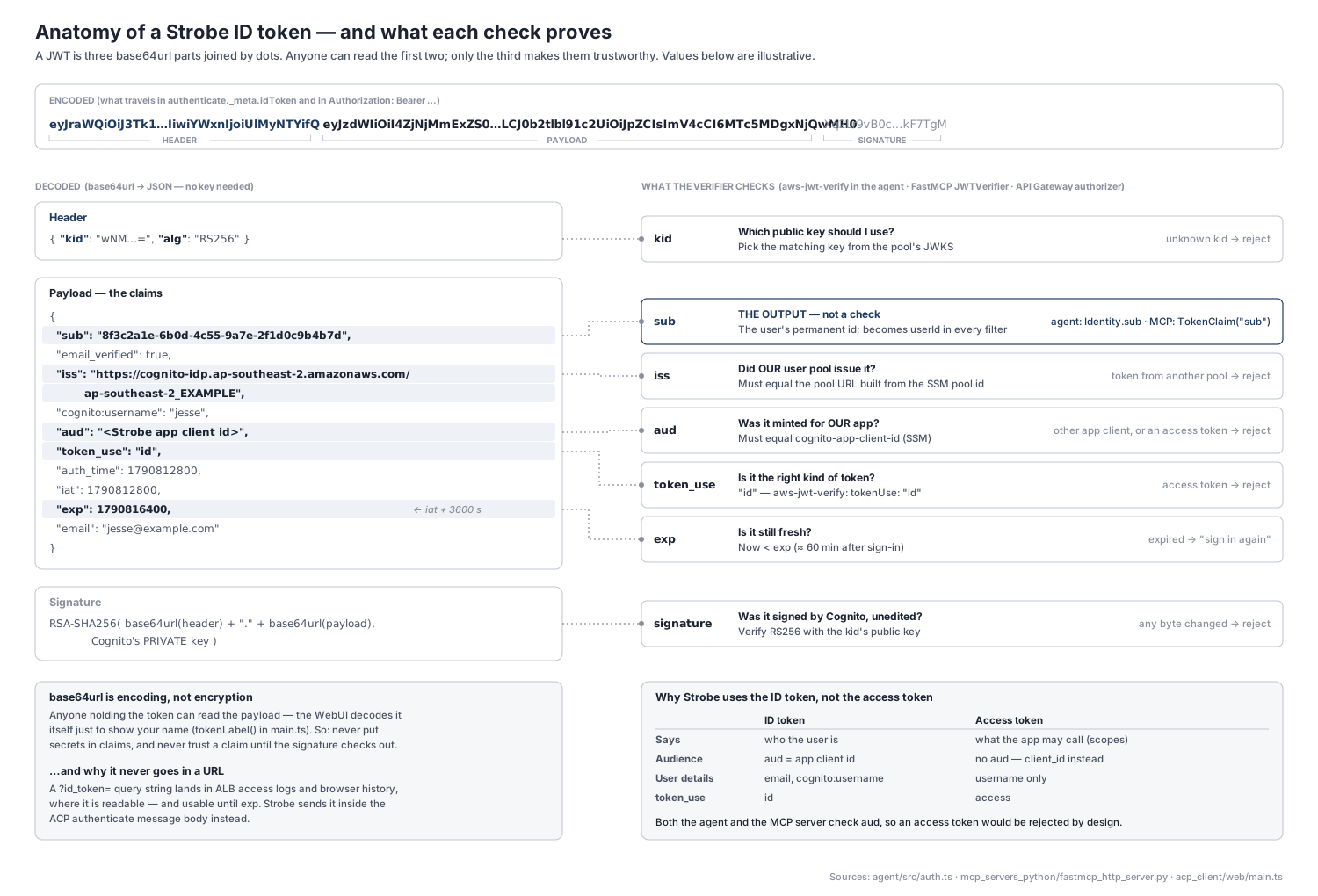
Note that the signature proves the token is authentic and unedited; it does nothing to hide what's inside. This design has two consequences worth remembering:
- Readable ≠ trustworthy. base64url is an encoding, not encryption, so anyone holding the token can read the payload. Secrets must never go in the claims. The Strobe Assistant WebUI decodes the token itself just to show your name (
tokenLabel()inmain.ts), without verifying anything. That's fine for display, but never for decisions. - Bearer = whoever holds it. A valid token works for anyone who has it until
exp. So it must travel only over TLS, never sit in a URL (where it ends up in logs and browser history), and stay short-lived. And because nobody asks Cognito per request, a service can't see a sign-out either. Even revoking a refresh token doesn't reach it: AWS notes that revoked tokens still pass any library that checks only the signature and expiry. That's why ID and access tokens are short-lived (Cognito's default is 60 minutes) and the refresh token is the revocable part.
User identity vs workload identity
There are two kinds of identity in this system, and they shouldn't be confused:
- User identity: the Cognito JWT. It answers whose data is this request for?
- Workload identity: an IAM role. It answers which component is calling AWS? The agent's and MCP server's ECS task roles and the Lambda execution roles sign every AWS API call (SigV4).
In Strobe, the user's token never unlocks AWS. Bedrock, S3 Vectors and DynamoDB are reached with IAM roles; the token only decides which rows those calls ask for.
Where Cognito sits in the Strobe app
In Assessment 1 (the photo-sharing app that Strobe Assistant extends; see the series intro), Cognito sits behind a thin auth Lambda, and API Gateway's JWT authorizer guards every protected route.
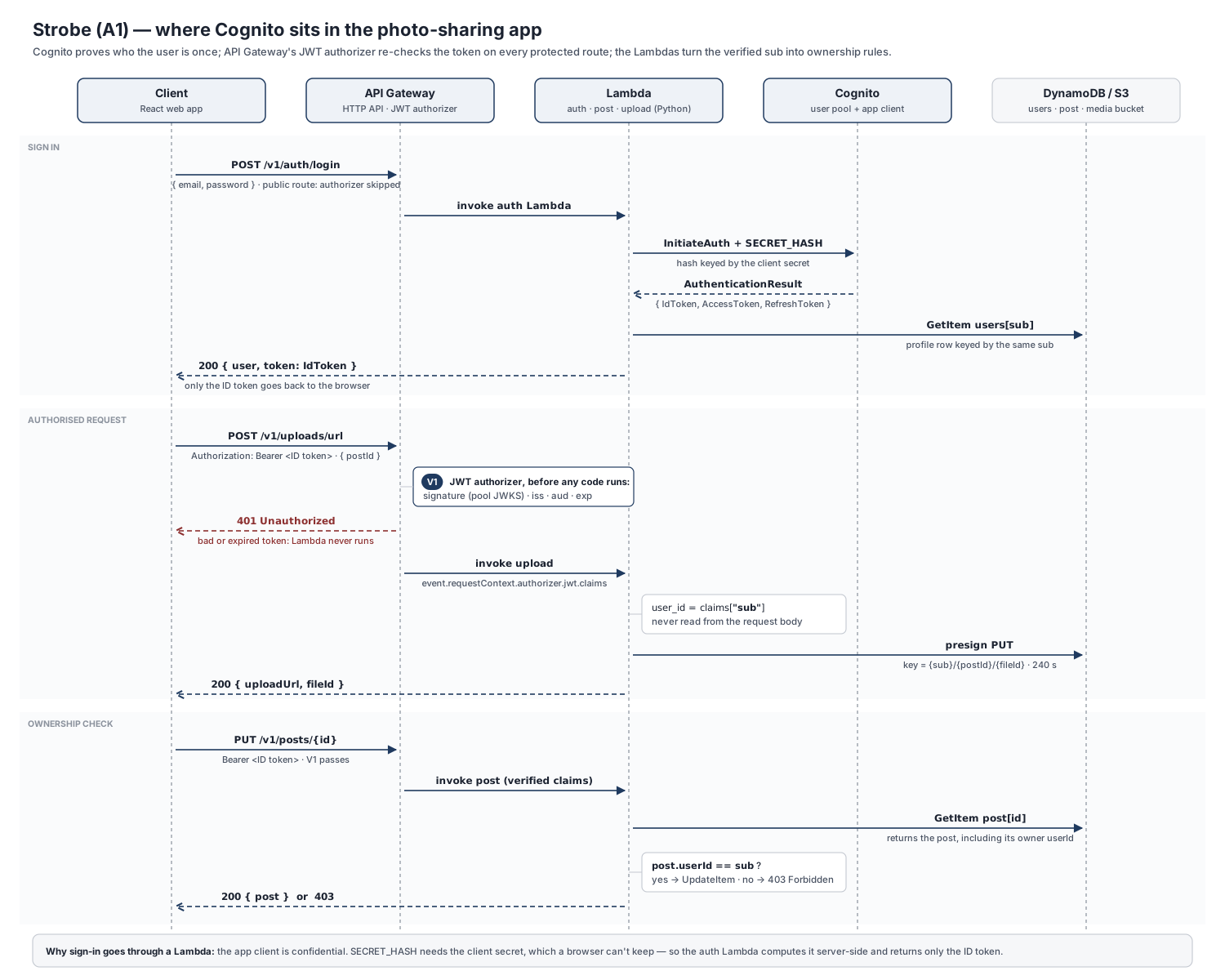
Sign-in goes through a Lambda, not straight from the browser to Cognito. The app client is confidential: it has a client secret, and every InitiateAuth call needs a secret hash computed from it. A browser can't keep a secret, so POST /v1/auth/login (a public route) invokes the auth Lambda, which calls Cognito server-side and returns { user, token }, where token is the ID token.
Protected routes are checked before any code runs. The HTTP API's JWT authorizer verifies the signature, iss, audience (aud, or client_id for access tokens) and exp against the pool. A bad token gets a 401 and the Lambda is never invoked, so you don't pay for the invocation and no code path can forget the check. The Lambda receives the verified claims in its event. Below is the shape for an HTTP API event. It's illustrative, because the A1 Lambdas aren't in the A2 repo:
claims = event["requestContext"]["authorizer"]["jwt"]["claims"]
user_id = claims["sub"]   # never read the user id from the request body
sub becomes rules in two places:
- Ownership checks. For example, editing a post requires
post.userId == sub; otherwise it's a403. - Storage keys. The upload Lambda presigns a PUT for the key
{sub}/{postId}/{fileId}. The client never chooses the{sub}part. This matters later, because the A2 ingestion worker trusts that prefix (see Part 4).
Cognito is also where the moderator group lives. Group membership appears in the ID token as cognito:groups.
Further reading
- Understanding user pool JSON web tokens (JWTs) — the three Cognito tokens and what each one is for.
- Verifying JSON web tokens — Cognito's own checklist: the JWKS URL,
iss,aud/client_id,token_useandexp. - Ending user sessions with token revocation — what revocation does, and why locally verified tokens survive it until they expire.
- aws-jwt-verify — AWS's JavaScript library for verifying Cognito JWTs, which the agent uses.
- Control access to HTTP APIs with JWT authorizers in API Gateway — what the authorizer validates, including when it falls back from
audtoclient_id. - How to secure API Gateway HTTP endpoints with JWT authorizer (AWS Security Blog) — a step-by-step walkthrough with a Cognito user pool.
- JSON Web Token Introduction (jwt.io) — a friendly primer on JWT structure. The site's debugger is handy for decoding a token, but use a test token, not a live one.
- RFC 7519: JSON Web Token and RFC 6750: Bearer Token Usage — the specs behind JWTs and bearer tokens.