
- The big picture
- One front door: the ALB
- The agent: an ACP server facing the client
- From the agent to the tools: the MCP client
- The MCP server: its own component, its own auth boundary
- Bedrock, used twice for different jobs
- Wrapping up
- Further reading
One of the key architectural decisions in the Strobe Assistant was how to connect the ACP client, the ACP server (the agent service) and the MCP server. This chain is the functional foundation of the app: every chat message, every tool call and every scheduled run passes through it, so it sits at the centre of the whole architecture.
This is Part 3 of the series. Part 1 covers the ALB and target groups in front of the services, and Part 2 covers how ECS runs them. This post steps back to the pipeline itself: what each piece does, how the pieces talk to each other, and why they are split the way they are.
The big picture
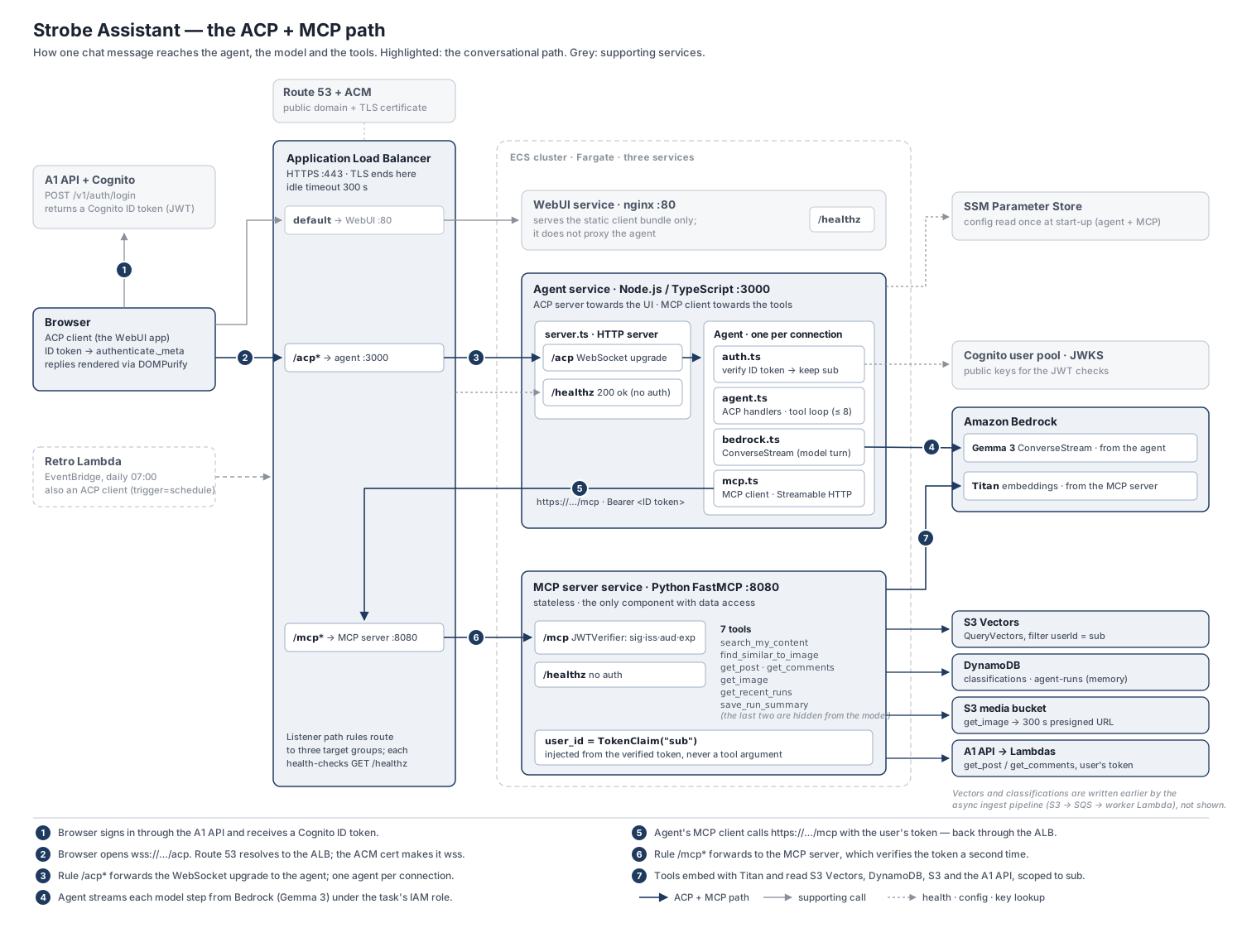
The following diagram details the design of this architectural unit of the system:
There are three services in the chain:
- The ACP client, i.e. the chat WebUI. Strictly speaking, the client runs in the user's browser; the WebUI service is just nginx serving the static bundle, and it doesn't proxy the agent. (A second ACP client, the scheduled retrospective Lambda, talks to the agent in the same way.)
- The agent service (Node.js / TypeScript). It is an ACP server towards the client and an MCP client towards the tools, and it runs the Bedrock tool-calling loop in between.
- The MCP server (Python / FastMCP). It exposes the tools and is the only component with access to the user's data.
Each of the three is its own ECS service on Fargate, with its own task definition, target group and desired count. They are therefore fully decoupled: I can redeploy, scale or even stop one without touching the others.
The one caveat is that the agent keeps its sessions in memory, so running more than one agent task would require sticky sessions or an external session store. How ECS turns a container image into a running, load-balanced task deserves a post of its own, which is what Part 2 is for.
One front door: the ALB
The ALB gives the ACP client a stable endpoint, wss://…/acp on HTTPS:443, regardless of how the services and configurations behind it change. To be precise, what stays stable is the ALB's DNS name rather than an IP address: an ALB's IP addresses can change over time, which is why Route 53 points my custom domain at it with an alias record. Behind that name, the listener rules send /acp* to the agent, /mcp* to the MCP server and everything else to the WebUI.
I chose an ALB over API Gateway for three reasons:
- WebSocket. The ACP client needs a continuous, open WSS connection to the agent, because a single turn streams many updates back over several seconds (sometimes much longer, while tools run). API Gateway's REST and HTTP APIs are request/response only, with an integration timeout of around 29–30 seconds, and they can't proxy a WebSocket upgrade. API Gateway does have a separate WebSocket API, but it terminates the socket itself and calls the backend once per message, routed by a route key; replies have to be posted back through a callback API, and connections are capped at two hours (with a 10-minute idle timeout). The agent would no longer own the connection, and I'd have had to build a custom layer around ACP: splitting or offloading large image messages, decoupling each response from its request to get around the 29 s limit, and keeping session state outside the process. An ALB simply proxies the WebSocket through to the agent.
- One front door for all three services. Path-based rules let the static UI, the agent and the MCP server share one domain and one TLS certificate.
- A native fit with ECS. ECS registers each task in its target group automatically, and the target group's health checks feed straight back into ECS's decisions to replace unhealthy tasks.
On the agent's side, server.ts is what the ALB actually talks to. It answers the target group's health check on /healthz, serves ACP on /acp, and only allows a WebSocket upgrade on that one path:
// server.ts
// one AcpServer; createAgent() runs once per connection, so identity is connection-scoped
const acpServer = new AcpServer({ createAgent: () => createStrobeAgent({ config, verifier, model }) });
const acpHttpHandler = createNodeHttpHandler(acpServer);
const webSocketServer = withKeepalive(new WebSocketServer({ noServer: true, maxPayload: 8 * 1024 * 1024 }));
const acpWebSocketUpgradeHandler = createNodeWebSocketUpgradeHandler(acpServer, webSocketServer);

const server = createServer((request, response) => {
  const pathname = pathName(request);
  if (pathname === "/healthz") {
    // the ALB health check: cheap, unauthenticated, never /acp
    sendJson(response, 200, { status: "ok", service: AGENT_NAME, version: AGENT_VERSION });
  } else if (pathname === "/acp") {
    // ACP over Streamable HTTP (handy for curl and scripts)
    acpHttpHandler(request, response);
  } else {
    sendJson(response, 404, { error: "Not found" });
  }
});

// ACP over WebSocket: only /acp may be upgraded
server.on("upgrade", (request, socket, head) => {
  if (pathName(request) !== "/acp") {
    socket.destroy();
    return;
  }
  acpWebSocketUpgradeHandler(request, socket, head);
});

server.listen(PORT, HOST, () => {...});

// close the ACP server cleanly on SIGTERM, e.g. when ECS stops the task
const shutdown = () => {...};
The withKeepalive wrapper exists because of the ALB too. The ALB closes a connection once no data has moved for the length of its idle timeout (I raised it from 60 s to 300 s), and a turn can go quiet while a tool runs. So the agent pings every open socket every 30 seconds:
// server.ts: inside withKeepalive(), for every upgraded socket
const timer = setInterval(() => {
  if (ws.readyState === ws.OPEN) ws.ping();
}, PING_INTERVAL_MS); // 30 s, well inside the ALB's 300 s idle timeout
ws.once("close", () => clearInterval(timer));
The agent: an ACP server facing the client
The Agent Client Protocol (ACP) is a JSON-RPC 2.0 protocol that Zed created for connecting code editors to coding agents, usually over stdio. Here, the ACP TypeScript SDK's server module runs it over a WebSocket instead, so a browser can play the role of the editor. The sequence diagram below shows one session from handshake to cancel:
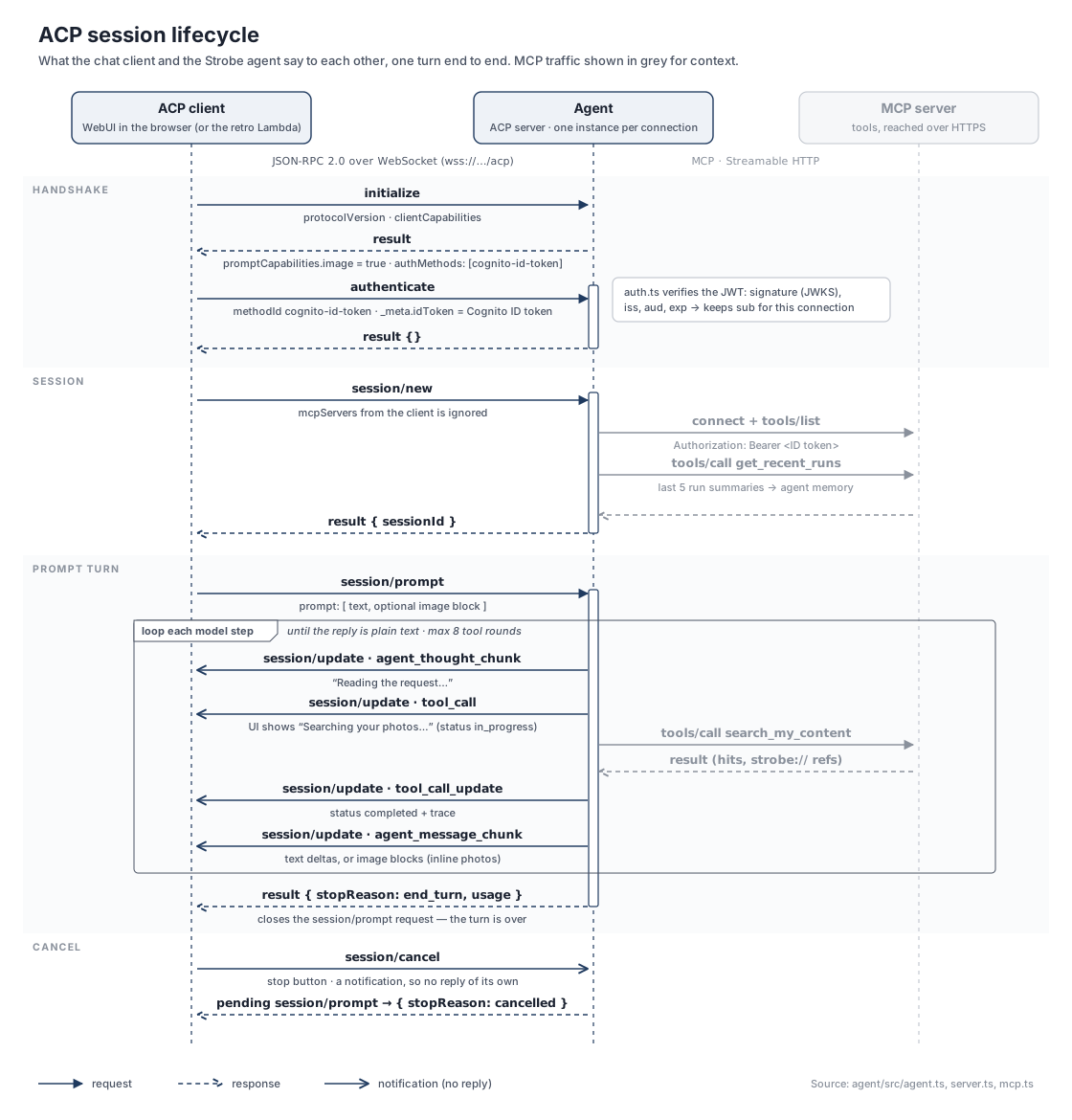
agent.ts maps almost one-to-one onto that diagram. Because createStrobeAgent() runs once per WebSocket connection, the variables in its closure are per-connection state: the verified identity and the sessions opened on that connection. The two guardrails make sure no session can be opened without a verified (and unexpired) Cognito ID token, and that a request can only touch a session that belongs to its own connection:
// agent.ts
export function createStrobeAgent(deps: AgentDependencies): acp.AgentApp {
  let identity: Identity | null = null;          // set by authenticate, per connection
  const sessions = new Map<string, Session>();   // sessions opened on this connection

  // auth guardrail: no verified, unexpired ID token -> no session, no prompt
  const requireIdentity = (): Identity => {...};
  // session guardrail: the sessionId must belong to this connection
  const requireSession = (sessionId: string): Session => {...};
  // lazily (re)connect this session's MCP client, using the user's ID token
  const ensureTools = async (session: Session, who: Identity): Promise<StrobeTools> => {...};

  return acp
    .agent({ name: AGENT_NAME })
    // clean up all sessions (and their MCP clients) when the connection closes
    .onConnect((connection) => {...})
    // advertise the Cognito auth method and image prompts
    .onRequest(acp.methods.agent.initialize, (context) => {...})
    // verify the ID token passed in _meta.idToken; keep `sub` for this connection
    .onRequest(acp.methods.agent.authenticate, async (context) => {...})
    // this is where ACP meets MCP
    .onRequest(acp.methods.agent.session.new, async (context) => {
      const who = requireIdentity();
      // `params.mcpServers` is ignored on purpose: the agent owns its MCP connection
      const session: Session = { id: crypto.randomUUID(), tools: null, ... };
      sessions.set(session.id, session);
      try {
        const tools = await ensureTools(session, who);
        session.recentRuns = await tools.recentRuns(MEMORY_RUNS); // agent memory
      } catch (error) {
        // degrade rather than refuse: the first prompt will retry and explain
      }
      return { sessionId: session.id };
    })
    // the Bedrock tool loop, streamed back as session/update notifications
    .onRequest(acp.methods.agent.session.prompt, async (context) => {...})
    // abort the pending turn
    .onNotification(acp.methods.agent.session.cancel, (context) => {...});
}
Two details in the handshake are worth pointing out. First, the token travels inside ACP's own authenticate call rather than in a header or the URL, because the browser's WebSocket API can't set an Authorization header and a token in the URL would end up in access logs and browser history. Second, ACP lets the client tell the agent which MCP servers to use (mcpServers on session/new). The agent deliberately ignores that list: the browser is untrusted and must not choose where the agent's tools come from. Part 4 covers the auth side of this in detail.
From the agent to the tools: the MCP client
Each ACP session gets its own MCP client. It speaks MCP's Streamable HTTP transport over the network rather than launching the tools as a stdio subprocess, which is what makes the MCP server a separately deployed component. The end user's Cognito ID token rides as the bearer token on every request:
// mcp.ts
export class StrobeTools {
  // set on a transport failure, so ensureTools() reconnects on the next turn
  broken = false;

  constructor(private readonly mcpUrl: string, private readonly idToken: string) {}

  // connect to the MCP server over Streamable HTTP, with the user's ID token
  async connect(): Promise<McpTool[]> {
    const transport = new StreamableHTTPClientTransport(new URL(this.mcpUrl), {
      requestInit: { headers: { Authorization: `Bearer ${this.idToken}` } },
    });
    const client = new Client({ name: ..., version: "0.1.0" });
    await client.connect(transport);
    this.client = client;
    this.tools = (await client.listTools()).tools;
    return this.tools;
  }

  // the tool list as the model sees it: the agent-only memory tools are removed
  modelVisibleTools(): McpTool[] {...}

  // tool calling (60 s timeout); a transport failure marks the client as broken
  async call(name: string, args: Record<string, unknown>, signal?: AbortSignal): Promise<CallToolResult> {...}

  // close the connection
  async close(): Promise<void> {...}
}
ensureTools() in agent.ts is the other half. It creates the client lazily and replaces it if the previous connection broke, so an MCP restart or redeploy in the middle of a conversation heals itself on the next turn. If the MCP server can't be reached at all, the turn ends with a plain "I can't reach the Strobe tools service right now" instead of hanging:
// agent.ts
const ensureTools = async (session: Session, who: Identity): Promise<StrobeTools> => {
  if (session.tools && !session.tools.broken) return session.tools;
  if (session.tools) {
    void session.tools.close();
    session.tools = null;
  }
  const tools = new StrobeTools(deps.config.mcpUrl, who.idToken);
  session.toolSpecs = await tools.connect();
  session.tools = tools;
  return tools;
};
Most MCP calls happen when the model asks for a tool during a turn, but not all of them. The agent also makes a few calls on its own that the model never sees: it reads the last few run summaries when a session starts (get_recent_runs), writes one back after every turn (save_run_summary), and fetches thumbnails for the top image hits of a search (get_image). Keeping the memory tools out of the model's tool list means a prompt injection hidden in a caption can't rewrite what the assistant "remembers" about the user.
The MCP server: its own component, its own auth boundary
In this project, the MCP server is only accessed by the agent, through the ALB: the MCP URL in Parameter Store is the public https://…/mcp address, so agent-to-MCP calls re-enter the load balancer and match the /mcp* rule. Because the MCP server is deployed independently and has its own auth boundary, it could just as well be reused by other services, such as another agent or a desktop MCP client. That is also why the boundary matters: the MCP server has to treat all incoming traffic as untrusted and verify the token it receives from upstream, even though the agent has already checked it.
FastMCP makes this a few lines. The JWTVerifier checks the token's signature, issuer, audience and expiry before any tool body runs, and each tool receives the user's ID as a server-injected dependency rather than as an argument:
# fastmcp_http_server.py
COGNITO_ISSUER = f"https://cognito-idp.{REGION}.amazonaws.com/{COGNITO_USER_POOL_ID}"

# every request to /mcp must carry a valid Cognito ID token
auth = JWTVerifier(
    jwks_uri=f"{COGNITO_ISSUER}/.well-known/jwks.json",
    issuer=COGNITO_ISSUER,
    audience=COGNITO_APP_CLIENT_ID,
    algorithm="RS256",
)
mcp = FastMCP("Strobe Assistant tools", instructions=..., auth=auth)

@mcp.tool(annotations={"readOnlyHint": True})
async def search_my_content(
    query: str,
    media_type: Literal["all", "image", "text"] = "all",
    limit: int = 10,
    user_id: str = TokenClaim("sub"),           # from the verified token; not in the tool's input schema
    token: AccessToken = CurrentAccessToken(),  # forwarded to the A1 API to enrich results
) -> dict:
    ...

def _query_index(index_name, embedding, user_id, top_k):
    response = s3vectors.query_vectors(
        ...,
        queryVector={"float32": embedding},
        topK=top_k,
        filter={"userId": user_id},  # every vector query is scoped to the caller
        ...
    )
Since user_id never appears in the tool's input schema, the model has no way to ask for another user's content, however it is prompted.
The MCP server is also the only component that touches the downstream services needed to fulfil a tool call: S3 Vectors for semantic search, DynamoDB for image classifications and the agent's run history, the S3 media bucket for presigned URLs and thumbnails, and the A1 API (with the user's own token) for posts and comments. The agent never accesses these services directly. One honest caveat: in my build, this separation is enforced by the code rather than by IAM, because all three task definitions use the same pre-provisioned task role. In production, I'd give each service its own least-privilege role so the boundary holds even if the agent were compromised.
Bedrock, used twice for different jobs
Amazon Bedrock is accessed by both the agent and the MCP server, for different purposes, and both authenticate with their ECS task role rather than an API key:
- The agent uses Bedrock's ConverseStream API with Gemma 3 12B to converse with the user. This is the model that reads the request, decides which tools to call (up to eight rounds per turn) and streams the answer back. Gemma 3 doesn't return native tool-use blocks on Bedrock, so the agent describes the tools in the system prompt and parses the model's tool calls out of its text; see LLMs Can't Run Code—How Tool Calling Actually Works for the details.
- The MCP server uses Bedrock's InvokeModel API with the Titan embedding models (Titan Multimodal Embeddings G1 for images, Titan Text Embeddings V2 for posts and comments) to embed the user's search query, or a photo pasted into the chat, into the same vector spaces as the indexed content. The semantic search itself then happens in S3 Vectors, filtered by
userId, and the two result lists are merged with reciprocal rank fusion. Part 5 and Part 7 cover that side.
Splitting the work this way means the agent only needs to know how to talk to a language model and to an MCP server, while everything that depends on how Strobe stores its data stays behind the MCP boundary.
Wrapping up
Put together, the pipeline is a chain of three narrow contracts. ACP over a WebSocket connects the client to the agent, MCP over Streamable HTTP connects the agent to the tools, and the user's Cognito ID token travels the whole way and is verified at each hop. The ALB gives the chain one stable front door, and ECS keeps each link running on its own. Each link can be replaced, redeployed or reused without the others noticing, which is exactly what I wanted from the centre of the architecture.
Further reading
- Agent Client Protocol — the protocol overview, message types and SDKs.
- MCP transports — stdio vs Streamable HTTP in the MCP specification.
- Quotas for configuring and running a WebSocket API in API Gateway — connection duration, idle timeout and integration timeout limits.
- Carry out a conversation with the Converse API operations — Bedrock's Converse and ConverseStream APIs, including tool use.