
- Why the Lambda has to be in the VPC
- First scare: "public" subnets don't help a Lambda
- Correction: the private subnets were there all along
- The real blocker: the execution role can't create ENIs
- Workaround: move the API into a container
- Takeaways
For the Interlixir project (one of the assignments of the Cloud Computing unit), I wanted the API on Lambda with a Memcached cache (ElastiCache) in front of DynamoDB. On paper it's simple: attach the Lambda to the VPC and point it at the cache. In practice it took three rounds of "wait, actually…" to find out it couldn't be done in our shared AWS account. Each round taught me something about how Lambda and VPCs fit together.
Why the Lambda has to be in the VPC
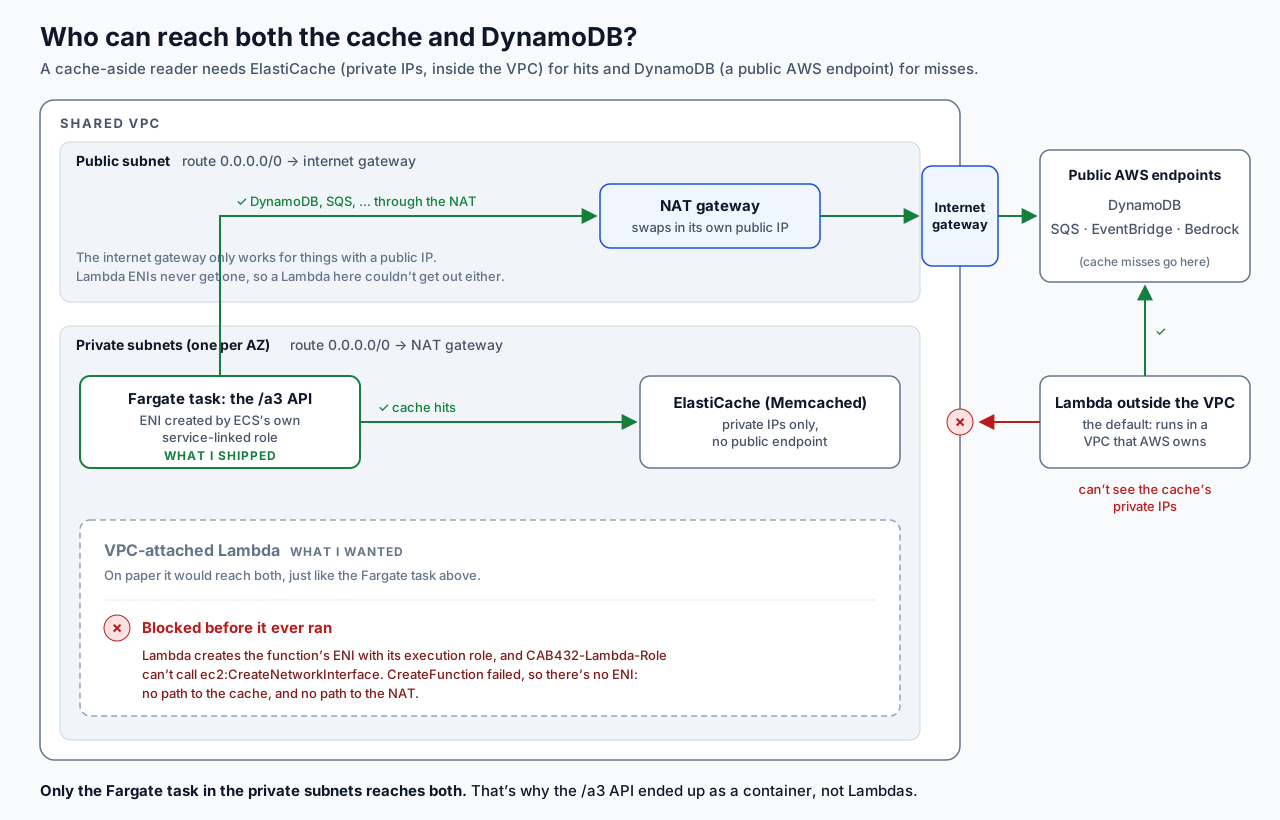
ElastiCache lives inside my VPC.
It only has private IPs in the shared subnets, and there's no public endpoint option. Nothing outside the VPC can reach it. That's why, in the ElastiCache tutorial, we were told to run the example from an EC2 instance and not from our laptops.
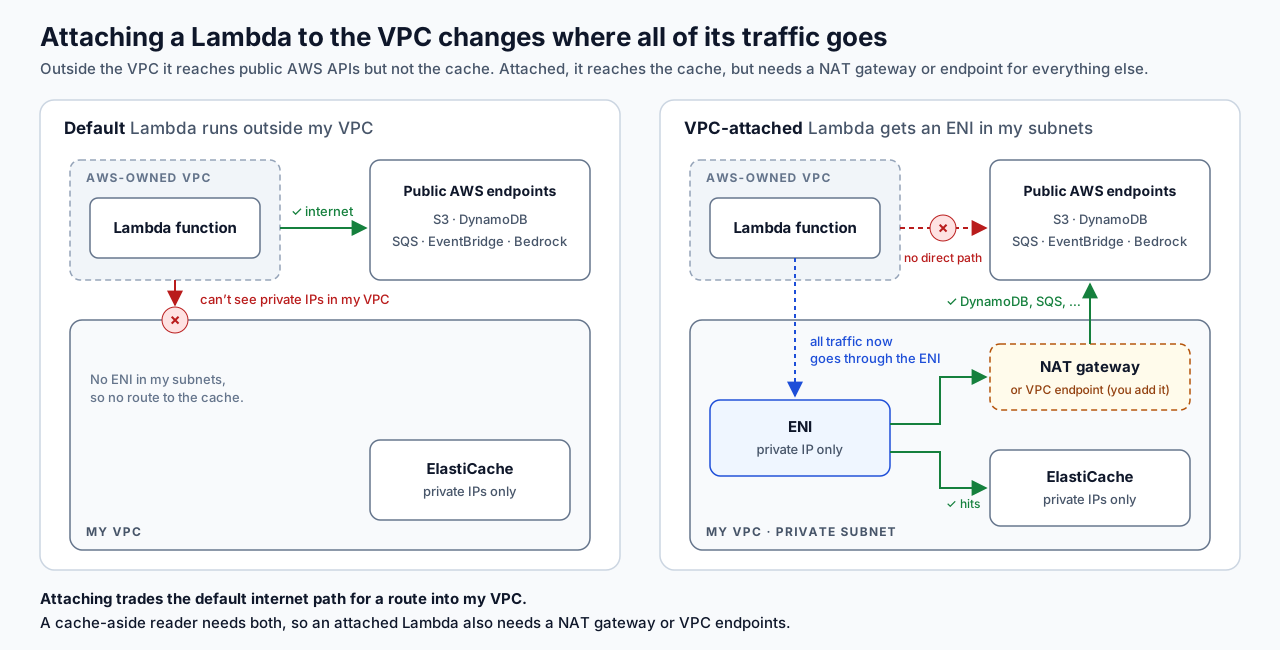
A Lambda doesn't run in my VPC by default.
It runs in a VPC that AWS owns, with internet access. It can call public AWS APIs (S3, DynamoDB, SQS, …) but can't see private IPs in my VPC. To reach the cache, I need to attach the function to my VPC: pick subnets and a security group, and Lambda puts a network interface (ENI) in those subnets.
The catch: once attached, all of the function's traffic goes through my VPC. It can reach the cache now, but it needs its own way out for everything else. A cache-aside reader needs both: the cache for hits, and DynamoDB for misses.
First scare: "public" subnets don't help a Lambda
My first look at the shared VPC found only public subnets, an S3 gateway endpoint, and no DynamoDB endpoint. I thought the design was dead.
A "public subnet" means the subnet's route table sends internet traffic (0.0.0.0/0) to an internet gateway. The internet gateway only works for things that have a public IP:
- An EC2 instance or Fargate task with a public IP gets out.
- A Lambda attached to the VPC gets an ENI with a private IP only. AWS never gives Lambda ENIs public IPs (the Lambda docs say so directly), so its internet-bound traffic goes nowhere, even in a public subnet.
So a VPC-attached Lambda there could reach S3 (through the endpoint) and the cache, but not DynamoDB. My options were to ask the teaching team for a (free) DynamoDB gateway endpoint, or to keep the API Lambdas outside the VPC and move the cached reads into a small Fargate "query service".
Correction: the private subnets were there all along
I'd been reading subnet names and endpoints, not route tables. When I checked the route tables properly, the VPC also had three private subnets, each routing 0.0.0.0/0 to a NAT gateway in its own AZ. The S3 endpoint was attached to those private route tables too.
A NAT gateway swaps the private source IP for its own public one, which is exactly what a Lambda ENI needs. So a Lambda in the private subnets could reach DynamoDB through the NAT. A DynamoDB endpoint would only have saved NAT per-GB charges; it wasn't a requirement.
Lesson: before deciding what a VPC can reach, check the route tables and NAT gateways, not just the subnet names.
So the question became: am I even allowed to run VPC-attached Lambdas?
The real blocker: the execution role can't create ENIs
VPC attachment isn't only a networking setting; it's an IAM one too. Lambda creates the ENIs with the function's execution role, so that role needs:
ec2:CreateNetworkInterfaceec2:DescribeNetworkInterfacesec2:DeleteNetworkInterface
The AWS managed policy AWSLambdaVPCAccessExecutionRole bundles these, plus a few related ones.
In the shared student account we have to use CAB432-Lambda-Role, and I can't read its policies. But Lambda checks those permissions when the function is created, so a single create call tests a permission I'm not allowed to see. I wrote a throwaway probe and got:
InvalidParameterValueException: The provided execution role does not have permissions to call CreateNetworkInterface on EC2aws lambda list-functions backed it up: no existing Lambda in our region was VPC-attached. No Lambda can be attached to the VPC, so no Lambda can reach Memcached. Full stop.
Workaround: move the API into a container
I ran the whole /a3 API as one ECS Fargate service in the private subnets. ECS creates task ENIs through its own service-linked role, not the Lambda role, so the missing permission doesn't matter. The first deploy confirmed it: the task started in a private subnet with no public IP and was healthy behind the load balancer within a minute.
The request path is now API Gateway (JWT authorizer) → HTTP proxy → ALB → Fargate task. Lambdas still run the event pipeline, but outside the VPC, and they never touch the cache.
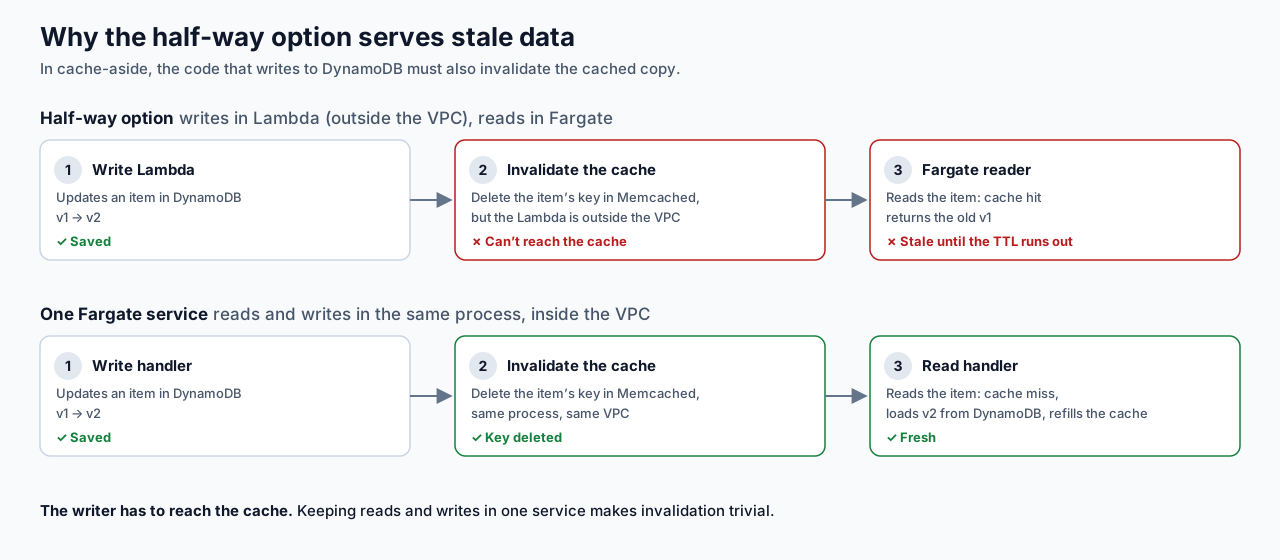
Why not the half-way option (Lambdas for writes, a small Fargate service for cached reads)? Cache-aside needs the writer to invalidate the cache after a write. Write Lambdas can't reach the cache, so readers would serve stale data until the TTL ran out. Putting reads and writes in the same process keeps invalidation trivial.
The trade-off: the API is always on, so no scale-to-zero, and with a single task, a restart means a short outage. So I run two tasks in two AZs for the load test and the demo.
Who can reach what in this account:
| Compute | S3 | DynamoDB | SQS / EventBridge / Bedrock | ElastiCache |
|---|---|---|---|---|
| Lambda (always outside the VPC; attachment denied) | Yes | Yes | Yes | No |
| Lambda in the private subnets (what I wanted, if it were allowed) | Via S3 endpoint | Via NAT | Via NAT | Yes |
| Fargate task, private subnet, no public IP (API service) | Via S3 endpoint | Via NAT | Via NAT | Yes |
Takeaways
If a Lambda needs a private resource like ElastiCache or RDS, it has to be attached to the VPC, and from then on it needs a NAT gateway or VPC endpoints for everything else. A "public subnet" doesn't change that: Lambda ENIs never get public IPs, so the internet gateway is no use to them. What a VPC can actually reach is in its route tables, not its subnet names.
VPC attachment is also an IAM question, not only a networking one. I couldn't read the role's policies in a locked-down account, but one throwaway create call told me what I needed to know. Next time I'd run that kind of probe on day one, before the design depends on the answer.
And when a Lambda can't go somewhere, a container often can. It cost me scale-to-zero and some always-on compute, but it kept the cache in the design.