
- The wall between design and delivery
- AI moved the job, and the source of truth
- Two Figma problems I couldn't design my way out of
- What I do now: design lives in Git
- AI removed the chores, not the need to understand
- Why this series
If you've ever named a Figma page 240711, duplicated a frame before touching it "just in case", or kept a private copy of the component library inside a file so that someone else's change couldn't break your screens, you've built a version control system by hand.
I've done all three. For most of the past four years, those conventions were how I kept track of what changed, when and why. They mostly worked. What took me much longer to see was that none of them were solving design problems.
This post is about that realisation, why AI has made it more urgent rather than less, and what I do instead now. It's also the start of a short series, Design in Git, on the workflow I've settled on with Claude Code and GitHub, written for designers rather than for engineers.
The wall between design and delivery
Most designers work in Figma, Adobe's tools or something similar, and most of us have spent years getting good at them: components, variants, auto layout, variables, libraries. When we think systematically, we usually think at the level of the design system inside the design tool. How should this component be named? Which variants does it need? Which tokens should it use?
What happens after the handoff has rarely been our concern. Developers worked out how to turn our frames into live screens, how to release a change safely, how to roll it back when it broke something, and how to keep two versions of a component alive while a migration finished. The software lifecycle (versions, releases, reviews, rollbacks) sat on the other side of a wall, and design systems thinking mostly stopped at that wall.
That made sense for a long time. When producing a credible screen took days, the screen was where a designer's time should go.
AI moved the job, and the source of truth
With AI, shaping an idea into a screen has become close to trivial. I wrote about this in Designing the System, Not the Screen: when making the asset is cheap, the valuable work moves from making design assets to managing design intent, and to building the infrastructure that carries that intent from design to code without losing it on the way. In other words, from designing the product to designing the system underneath it. As I put it then:
Design and engineering are converging on the identical realisation from opposite directions: when generation is cheap and fast, the thing worth protecting and making portable is the specification, not any particular output of it.
At the same time, design's source of truth has been shifting towards code, as this UX Collective article argues. The boundary between design and development is getting blurrier, and handoff matters less and less, because the component that ships increasingly is the design and the frame in Figma is a picture of it. Once that's true, a designer has to answer questions that used to belong to engineers. Which version of this component is live? What else uses it? Who approved this change, and why?
Two Figma problems I couldn't design my way out of
Working as both the product designer and a frontend engineer, I gradually shifted my attention from making design assets to managing what I'd made and streamlining how it moved. Two problems kept coming back.
Version control by naming convention
The first was version control. I needed to be able to answer a simple question at any time: what did this screen look like last week, and why did it change? Figma's version history saves snapshots of a file, but it can't hold two lines of work side by side, and it can't show anyone a clean before and after for review.
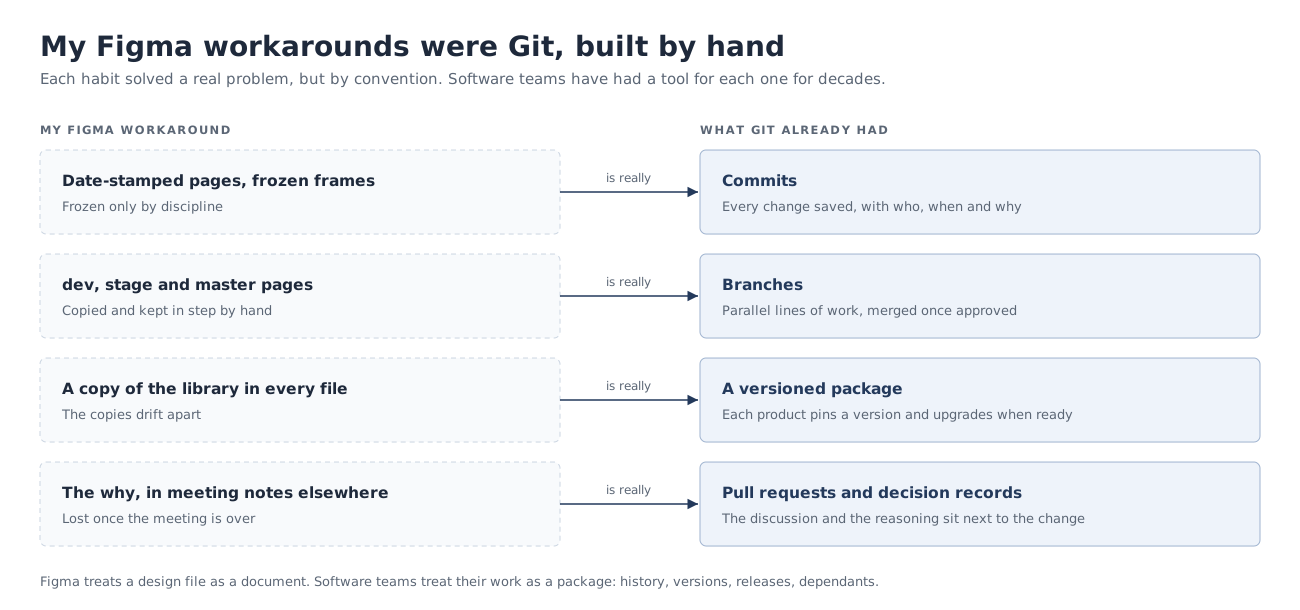
So I built an ad hoc system. Date-stamped pages. Versioned frames. Frames that, once dated, were never touched again. Separate dev, stage and master pages, a convention I'd picked up in a previous role. It worked well enough that every frame from that period can still be traced to a date and a task. But it ran entirely on discipline. Nothing stopped anyone, including me on a busy day, from editing a "frozen" frame, and the why behind each change lived in meeting notes somewhere else. (I'll write up the conventions themselves in a separate post, because they're still useful if your team can't move off Figma.)
Figma does offer branching, which could have helped. But it's only on the Organization and Enterprise plans, and I haven't been able to try it: the price is beyond what most startups will pay for a single feature, even one the design team considers important.
Component updates I couldn't scope
The second problem was update propagation. When you change a component, every screen in the file that uses it changes too, and you can't limit the scope. Most of the time that's what you want. But when you're redesigning a component for the next release, the screens for the current release mustn't move.
My workaround was to split designs into separate files and duplicate the component library into each one. That fixed the scope and created a new problem: the copies drifted apart, and before long there was no canonical library anyone could point to. Publishing a shared library and accepting updates file by file softens this a bit, but updates are still accepted per file, not per screen, and there's no clean, official way to say "these screens stay on the old version for now".
These are engineering problems
Looking back, both of these are engineering problems, not design problems. You could call them problems of tool design, and that's fair, but it doesn't change what they are underneath. Figma treats a design file as a document. Software teams treat their work as a package: something with a history, versions, releases and dependants. My date-stamped pages were commits. My dev/stage/master pages were branches. My duplicated libraries were a versioned package that each file could pin, built badly by hand. Software teams solved all of these decades ago, in tools most designers never open.
What I do now: design lives in Git
So instead of rebuilding those tools in Figma, I started using the real ones. In my AI-integrated workflow for a startup's product, a Git repository became the place where design is versioned:
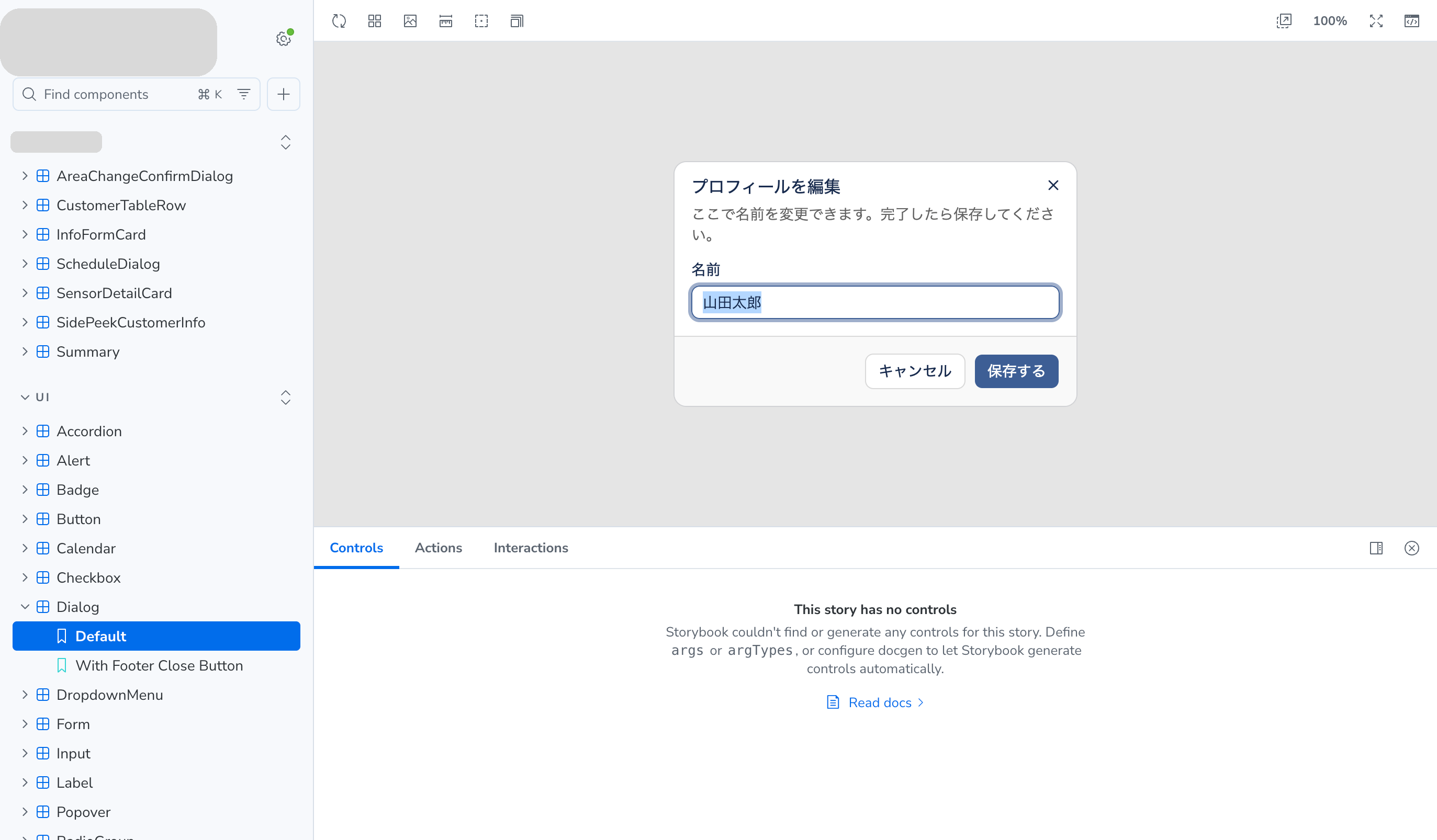
- Storybook is the component inventory for the development team.
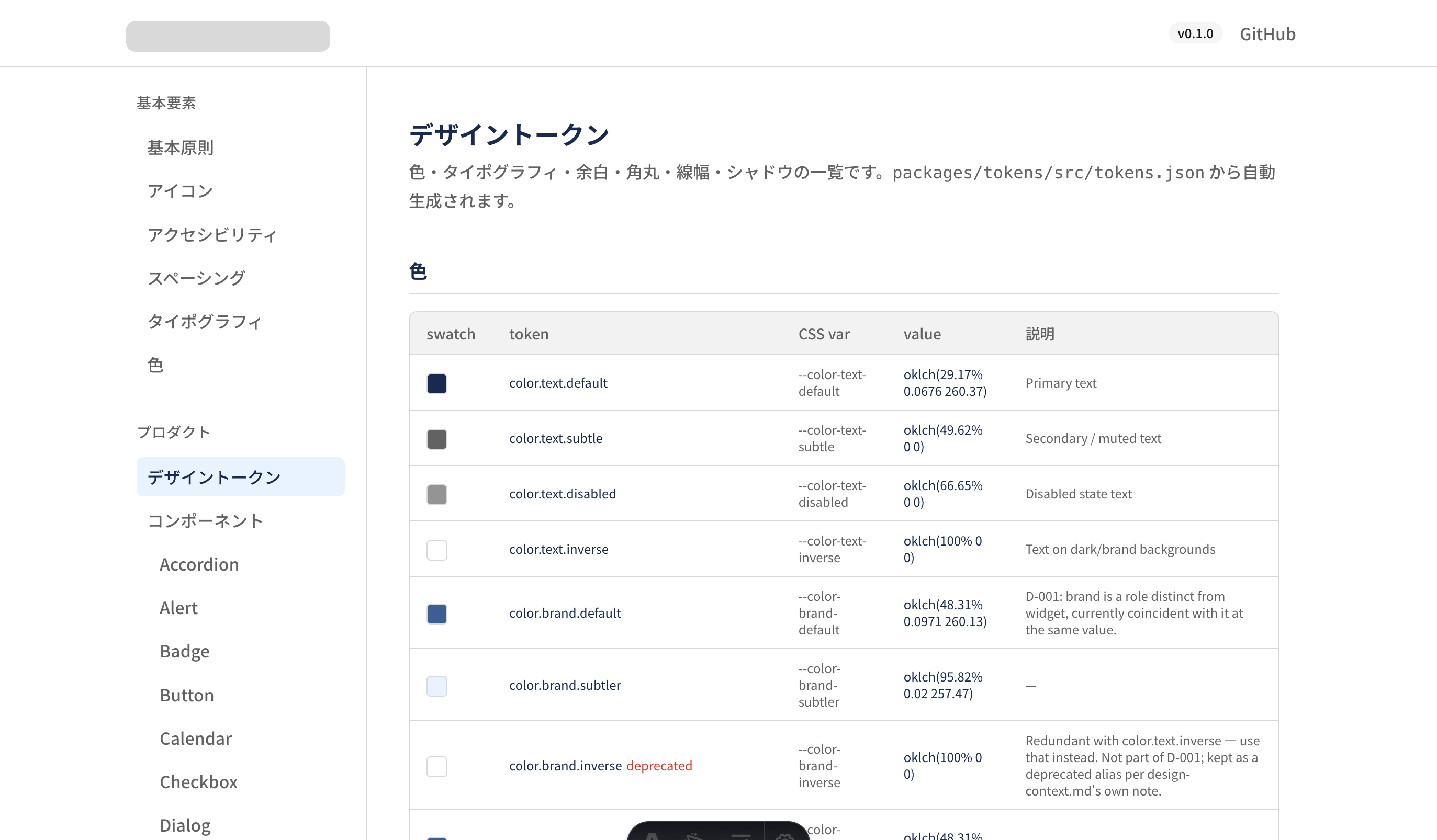
- A dedicated design system site, built from the same repo, is for everyone else in the organisation: the token library, principles, component specs, and the inventory and history of design decisions.
- Design decisions are written down as I implement them. Each one is a short record (D-001, D-002 and so on) with the rule, the reasoning and what it replaces. A decision is never edited, only superseded by a new one, so the history of why survives. Because Claude writes the first draft while it implements the change, the record costs me a review, not an afternoon.
- Figma is synced from code through the Figma MCP server. I still make changes in both worlds and go back and forth, but the last step of every change is bringing Figma in line with what's actually been implemented.
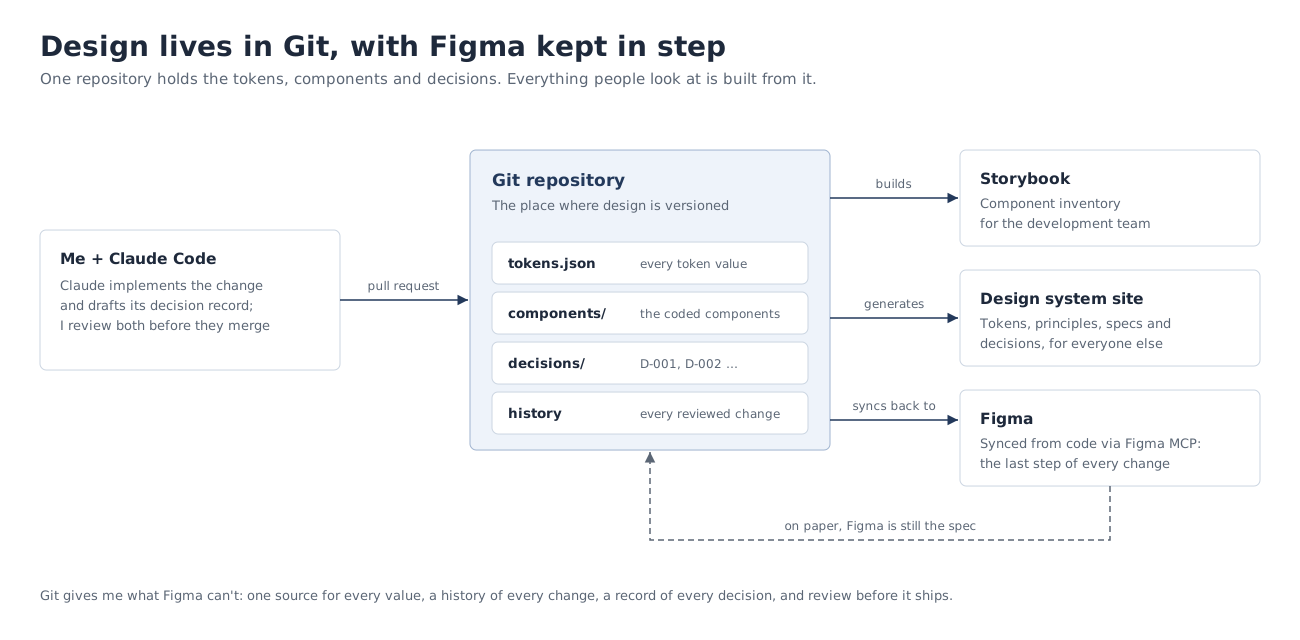
One honest nuance: on paper, Figma is still the spec. The repository's instructions to Claude literally say "Figma is the source of truth" and "Figma wins, but say so out loud". What Git gives me is everything around it that Figma can't: one file where every token value lives, a history of every change, a record of every decision, and a way to review all of it before it ships.
The wider team did use it. The frontend team used Storybook to update some of the components on one screen. A full switch to the component package was planned but put on hold over operational concerns, such as the risk of a production outage or a large-scale degradation. And the documentation site was used by marketing, development and design alike. The full story of how this system came together, including what didn't work, is a separate case study that I'll publish later.
AI removed the chores, not the need to understand
Now that design and code live side by side, designers need to understand how code works, and how to work with engineers, more than before. That sounds backwards. A lot of people assume AI has reduced the need for designers to touch engineering at all. My experience has been the opposite.
Two moments from building that design system with Claude made this concrete for me.
The first was about spacing tokens. Our token spacing.4 meant 4 pixels. In Tailwind, the CSS framework the components use, p-4 already means 16 pixels, and every component used it. Registering our tokens as they were would have quietly redefined every p-4 in the codebase. Nothing would have failed; the spacing would just have been wrong everywhere. Claude caught the collision and stopped to ask, because I'd told it to flag rather than decide anything that touched the token system. But the decision was mine, and I could only make it because I understood what p-4 means. We renamed the token keys to match Tailwind's scale, and all nine of our spacing values turned out to line up exactly.
The second was about trusting a green build. At one point every button in the playground app was rendering with no background at all, and most of the component styling was simply missing. The build passed, lint passed, type checks passed. The cause was a configuration detail in how Tailwind finds class names across packages in a monorepo. It was caught because one of the rules I'd written into the repo says a component isn't done until it has been compared with its Figma frame, so Claude took a screenshot instead of trusting the clean build. To a designer, "it built" and "it looks right" are obviously different facts. To an agent, they aren't, unless someone tells it.
In both cases AI did the chores. It wrote the code, found the problem and proposed the fix. What it couldn't supply was the understanding that made the rules and the decisions possible. AI has stripped away a lot of work humans used to do, but it hasn't removed, and I don't think it can remove, the need for humans to understand.
So I think the product designer worth hiring now brings a hybrid skill set: design thinking, design methods, technical sophistication and AI fluency. That's good news, not a threat. With AI, I can understand much more in much less time, because I can ask about every line I don't follow. It's one of the clearest cases I know where AI makes us better designers, not worse ones or unnecessary ones.
Why this series
Git and GitHub make this way of working much smoother, and Claude Code makes it far more approachable for someone who didn't come from engineering. The rest of the series is the practical side:
- Part 1: Explore privately, critique in public. The two loops behind every change, and where Claude works.
- Part 2: A design-system repo even Claude can't break. The one-time setup, with the rules that protect tokens and components.
- Part 3: Design crit with a paper trail. Which Claude review to run, and what a code review can't see.
- Part 4: One line-height change, from issue to merge. A real design decision taken all the way through.
One caveat. I haven't tested this in a real team yet. I've set the pipeline up for several academic and side projects, and for that startup's design system, as if I were working in a team. If you've run something like it with designers and engineers together, I'd like to hear what broke.