
- The model that wrote its tool calls as text
- The 15-second URL
- The image never passes through the model
- Where a turn's time goes
- When the tool server dies mid-conversation
- When I'd just use a model with native tool calling
- What I'd change, and where this transfers
The reply that changed how I built Strobe Assistant took 15.4 seconds to show me one photo. The search behind it had taken about half a second. The rest of the time went on the model typing out a URL, one token at a time.
Strobe Assistant is a chat agent over a user's own photo library (the project overview has the whole system). Its model is Gemma 3 12B on Amazon Bedrock. That wasn't really my choice: it was the chat and vision model enabled for the course account. This post is about what changes when the model is small and has no native tool calling, and about the work that ended up happening around the model rather than in it.
The model that wrote its tool calls as text
Gemma 3 on Bedrock accepts a toolConfig, but it never returns a toolUse block. Instead, it writes something that looks like a tool call into its reply text, a fenced tool_code block, and stops. The agent loop saw an ordinary end_turn, so no tool ran, and in the next message the model happily described photos it had never retrieved.
The fix was to do by hand what native tool calling does for you: put the tool catalogue and a calling protocol in the system prompt, parse the call out of the reply, run it, and feed the result back as text. I've written up how tool calling works, and this prompt-based version of it, in LLMs Can't Run Code, so I won't repeat it here. What that post doesn't cover is what it cost:
- About 600 extra input tokens on every model call, for the catalogue and the protocol.
- One tool call per reply. Tools run one after another, and a reply that calls a tool and starts answering is cut at the call, because the stream filter hides everything from the opening fence onwards.
- Best effort, not trained behaviour. The parser accepts the JSON format I asked for, and also Gemma's habit of writing a Python-style call. Anything else is treated as text and ends the turn, so no tool ever runs on a guess.
The agent chooses the mode from the model ID: prompt mode for Gemma, native mode for models that support it, such as Claude or Nova. Switching models is one Parameter Store value.
The 15-second URL
With tools working, the next problem was speed. get_image returned a presigned S3 URL, about 1,200 characters of bucket name, credentials and signature. To show the photo, the model had to write that URL back out inside a Markdown image.
That's expensive in a way I hadn't thought about. A signature is random text, so the tokeniser has no words to merge, and every few characters cost a token. One reply showing one photo produced 1,266 output tokens and took 15.4 s. Output is generated one token at a time, so reply time is roughly tokens written divided by decoding speed, here about 82 tokens per second. It was also fragile: one wrong character breaks the signature, and small models are good at inventing plausible URLs around real IDs.
The fix was to stop showing the model real URLs at all:
- Before a tool result reaches the model, the agent rewrites every
httpsURL in it to a short reference,strobe://image/<imageId>, and keeps the real URL in a map for that turn. - The model writes the reference, which costs a handful of tokens.
- As the reply streams, a filter holds each Markdown link until it's complete, swaps a known reference for the real URL, and replaces anything it doesn't recognise with the link's label.
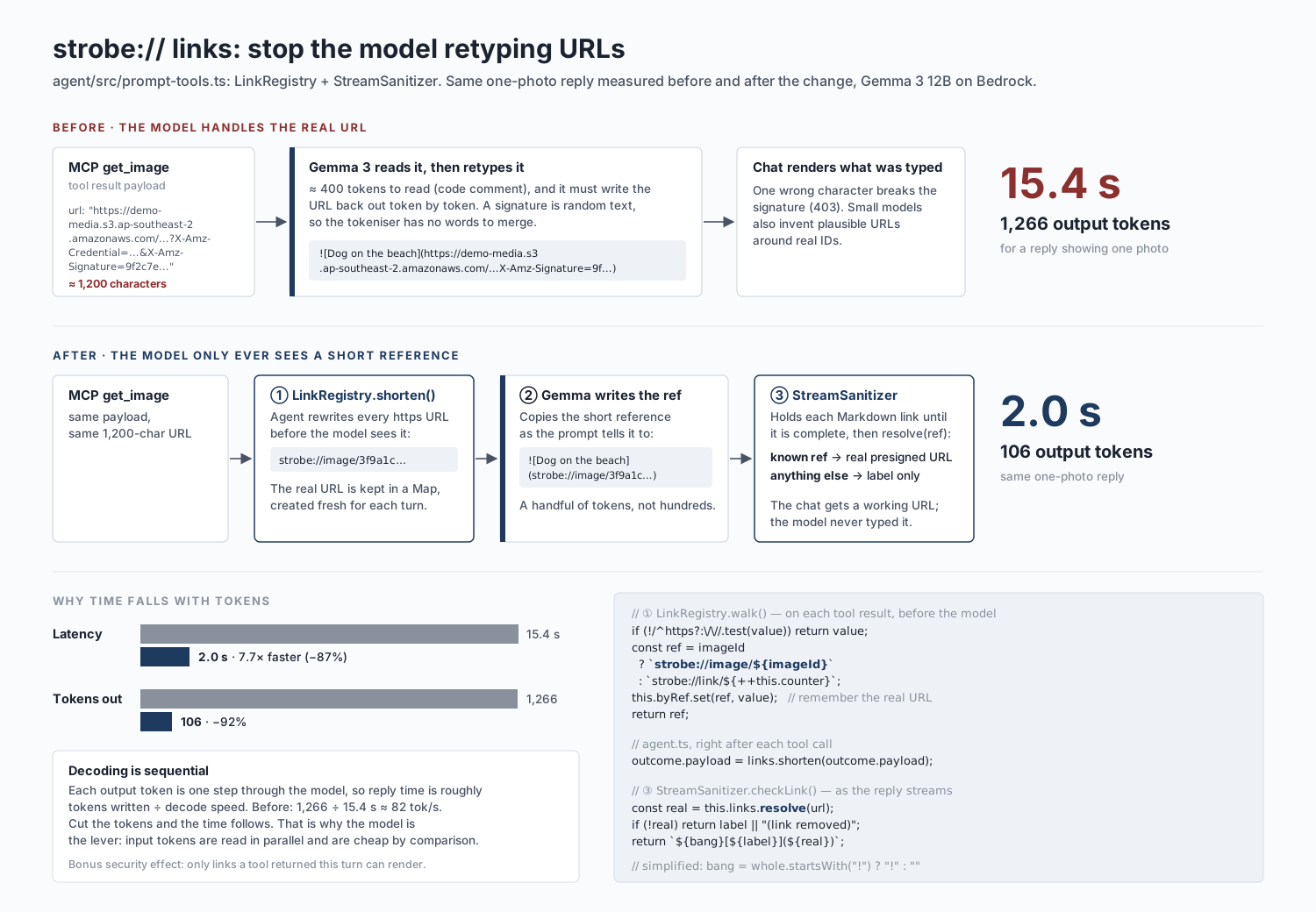
The same reply then took 2.0 s and 106 output tokens. It also brought a security property for free: the only links that can appear in a reply are ones a tool returned in that turn. A link the model makes up has nothing to resolve to, so the user sees plain text instead.
The image never passes through the model
The same idea, keeping bulky, opaque data out of the model, applied to images in both directions.
Searching by image. find_similar_to_image needs the photo the user attached. Base64-encoded, a phone photo is several megabytes of text, and asking the model to copy it into a tool argument would have been the URL problem a thousand times over. So the tool's schema has no image argument for the model to fill. The model calls it with nothing, and the agent inserts the attachment it already holds from the user's message.
Showing results. After a search, the agent fetches thumbnails of the top three photos itself and sends them straight to the user as image blocks in the chat. The model gets each photo's caption and labels, plus a note that three thumbnails were shown, so it doesn't pay image tokens to look at photos it only needs to mention. Image bytes from earlier turns are also replaced with a placeholder in the history, so they aren't billed again on every turn.
The rule that came out of this is that the model handles references and decisions, and the agent moves the bytes.
Where a turn's time goes
I added telemetry so that every turn logs its total time split into model time, tool time and agent overhead. Over six instrumented chat turns, a turn averaged 3.9 s: 2.3 s in the model (57%), 1.6 s in tools (43%) and almost nothing in the agent itself. Across the twelve chat turns in the run log, the median was 3.4 s and the 95th percentile 9.2 s.
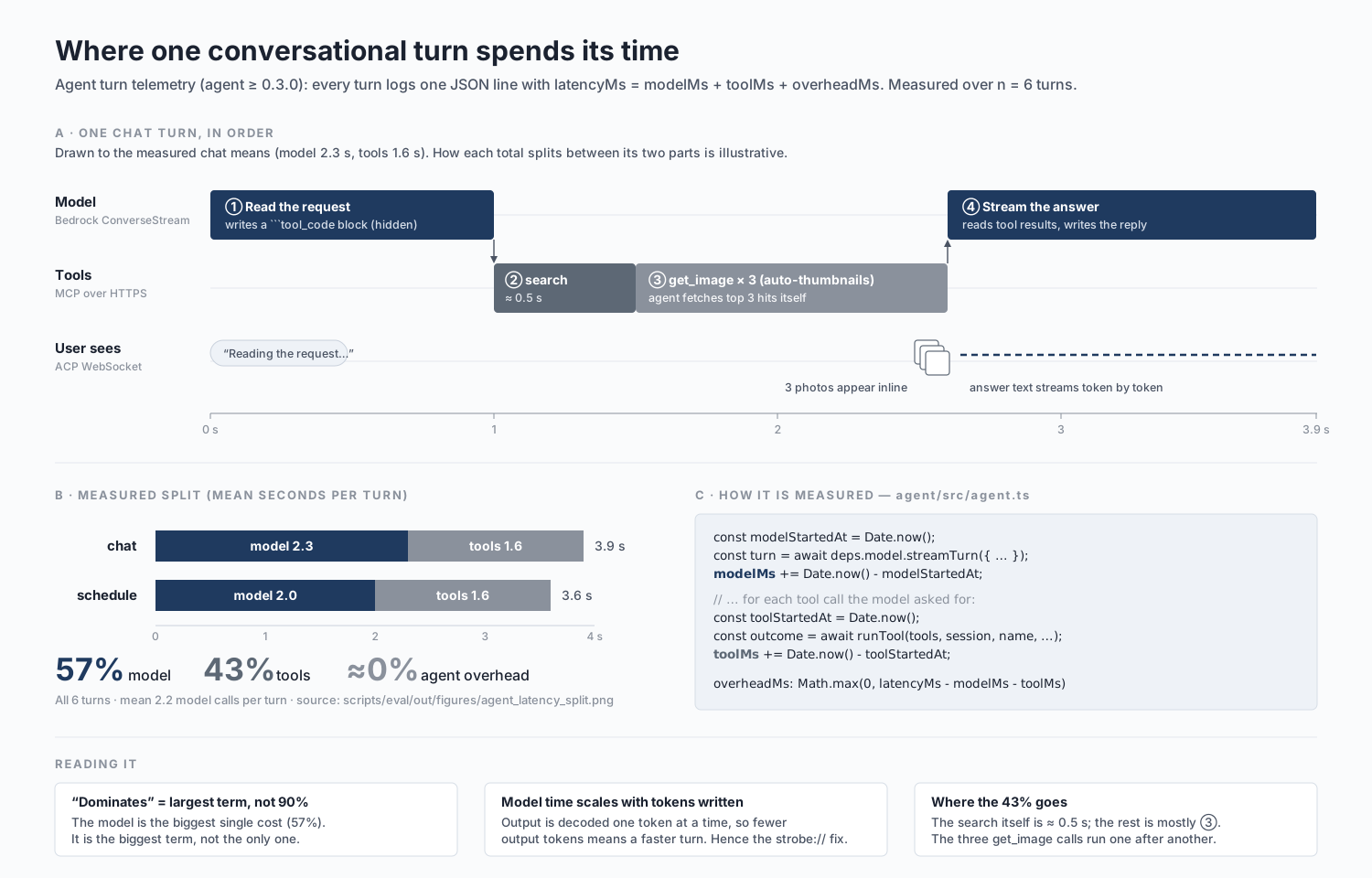
Two things in that split surprised me. The model is the largest term, but not by as much as I'd assumed. And the search itself, two embeddings and two vector queries run in parallel, takes only about 0.5 s. Most of the tool time goes on the three thumbnail fetches, which the agent awaits one after another. Running them concurrently is the cheapest latency win left in the system.
The model's share is also where the URL lesson generalises: input tokens are processed in parallel and are cheap, but output tokens are generated one at a time. Anything long and opaque that the model has to write is where the time goes.
When the tool server dies mid-conversation
Designing a failure drill for the MCP server, I found a worse problem than the outage itself. If the server restarted mid-conversation, the first tool call failed, which was fine. Every later call in that conversation failed too, even after the server was back, because the agent was still holding a client whose connection was dead.
Now a transport failure (connection refused, socket closed, timeout) marks the client as broken, and the agent reconnects at the start of the next turn. A call the server rejects doesn't count, since reconnecting wouldn't help. If the tool server can't be reached when a conversation starts, the first reply is one clear sentence saying so, rather than a hang. Model throttling gets similar treatment: the agent retries after 1 s and then 3 s, but only if nothing has streamed yet. A retry after the user has seen half an answer would repeat it, so after that the user gets an honest "the model is busy right now".
When I'd just use a model with native tool calling
Prompt mode was the right call under the constraint, and having it as a fallback is useful. With a free choice, though, I'd use a model with native tool calling: several tool calls per reply, about 600 fewer tokens per call, and no fences to hide. Since the switch is one parameter, that would be a configuration change rather than a rewrite.
What I'd keep with any model is everything that happens around it: references instead of URLs, a filter on what the reply can link to, bytes that never pass through the model, and a client that reconnects. None of those exist because Gemma is small. They exist because a model shouldn't be trusted to copy data exactly, and shouldn't have to be.
What I'd change, and where this transfers
- Fetch thumbnails concurrently, and skip them when a text question happens to match photos.
- Store post excerpts in the vector metadata. Fetching them from the original API at query time costs about 300 ms per search.
- Make the tool-calling mode a tested matrix, running the same conversation scripts against prompt mode and native mode.
In client work, the model is often fixed before I arrive: by data residency, by an approved-vendor list, or by what's available in a region. The engineering then sits around the model. You decide what goes into it, what it's allowed to write, and what it never touches. It's the same discipline I use in document pipelines: let the model refer to things by short IDs, and resolve them outside it.