
- What an ALB is, and why it is useful
- Three configuration layers, three questions
- Target types
- Who actually manages the targets?
- Health checks: deciding who gets traffic
- How I set it up for the Strobe Assistant
- Lessons learned
- Wrapping up
- Further reading
When I built the Strobe Assistant pipeline for my cloud computing assignment, two pieces of AWS ended up doing more of the heavy lifting than I expected: the Application Load Balancer (ALB) and its target groups. I'd treated load balancers as a black box before: traffic goes in, traffic comes out. Wiring one up for three containerised services, one of which uses WebSocket, made me dig into what each piece actually does. This post is what I wish I'd read before I started.
This is Part 1 of the Strobe Assistant series. Part 2 covers how ECS ties tasks, services and target groups together, and Part 3 walks through the ACP + MCP pipeline that sits behind all of this.
What an ALB is, and why it is useful
An Application Load Balancer is one of the load balancer types in AWS Elastic Load Balancing (ELB). It works at layer 7 of the OSI model, which means it understands HTTP and HTTPS. Because of that, it can route requests based on the URL path, host name, headers, query string or HTTP method, not just IP addresses and ports as a layer-4 load balancer (such as AWS's Network Load Balancer) does. It also terminates TLS and supports WebSockets and HTTP/2.
The more fundamental reason to put one in front of an app, though, is that whatever actually serves the requests—containers, EC2 instances, Lambda functions—isn't stable. It scales in and out, gets replaced when it crashes, and comes back with a new IP address after every deployment. Clients need a single address that doesn't move. The ALB gives them that address and quietly keeps track of who's behind it.
Three configuration layers, three questions
A handy mental model is that an ALB is configured in three layers, each answering one question:
- Listener: Where do I listen? A protocol and port (e.g. HTTPS:443), plus a TLS certificate for HTTPS.
- Rules: Which requests go where? Conditions on the request (path, host, header, method, query string, source IP) and an action to take when they match.
- Target group: Who serves them, and are they alive? A set of targets, the port and protocol used to reach them, and a health check.
These are layers of configuration, not network layers: the ALB as a whole sits at layer 7. In short, the ALB takes incoming traffic, checks it against the listener's rules, and (most of the time) forwards it to the right target group.
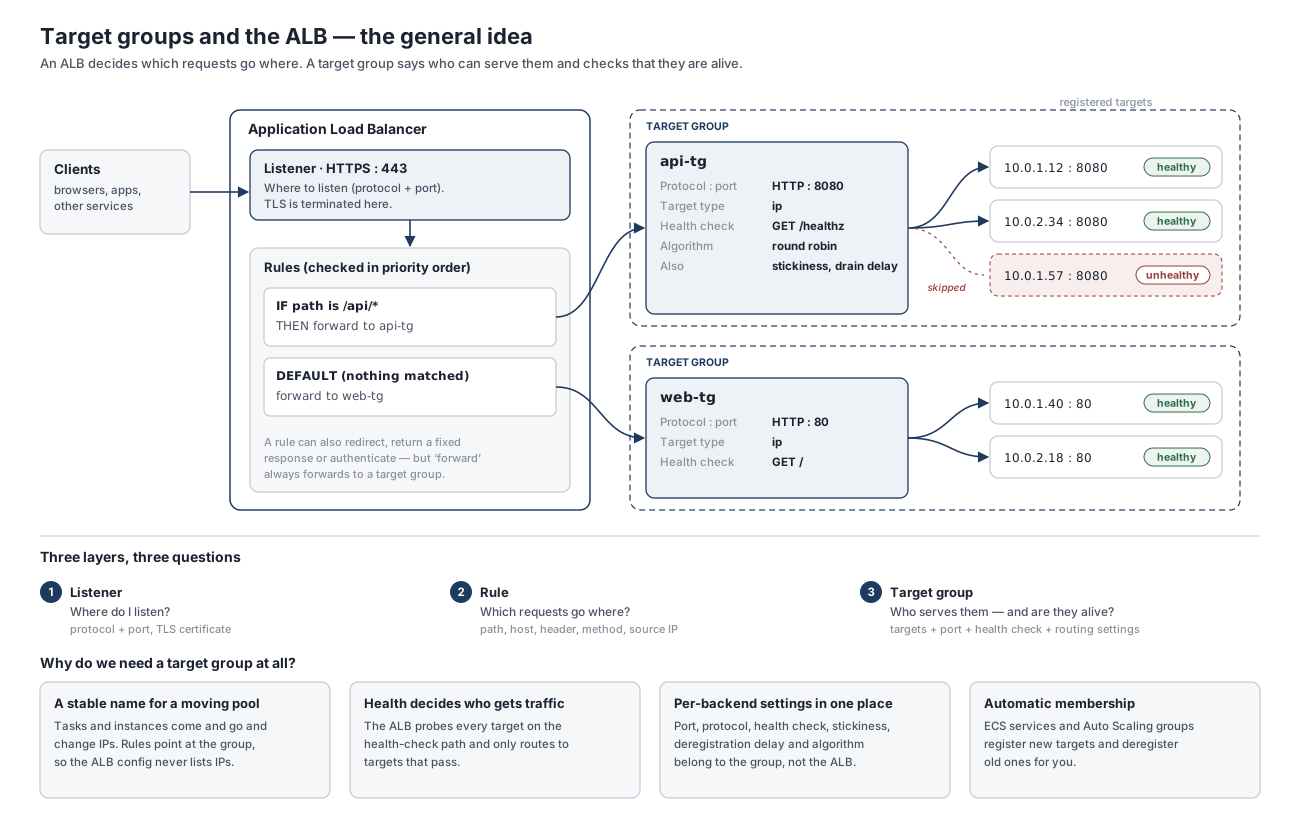
In the example above, the ALB listens on port 443, sends anything under /api/* to api-tg, and lets everything else fall through to web-tg via the default rule. Each target group then hands the request to one of its healthy targets.
Listeners
A listener is the ALB's front door: it accepts connections on a given protocol and port. An ALB can have several listeners—a common pattern is an HTTP:80 listener whose only job is to redirect to HTTPS:443. On an HTTPS listener you attach a certificate, usually from AWS Certificate Manager (ACM), and TLS is terminated at the ALB. From there, traffic to your targets can travel as plain HTTP inside the VPC (or be re-encrypted, if the target group uses HTTPS).
Listener rules
Each listener has an ordered list of rules. When a request arrives, the ALB evaluates the rules in priority order, from the lowest number to the highest, and the first rule whose conditions all match wins. Every listener also has a default rule with no conditions; it's always evaluated last and catches anything the other rules didn't.
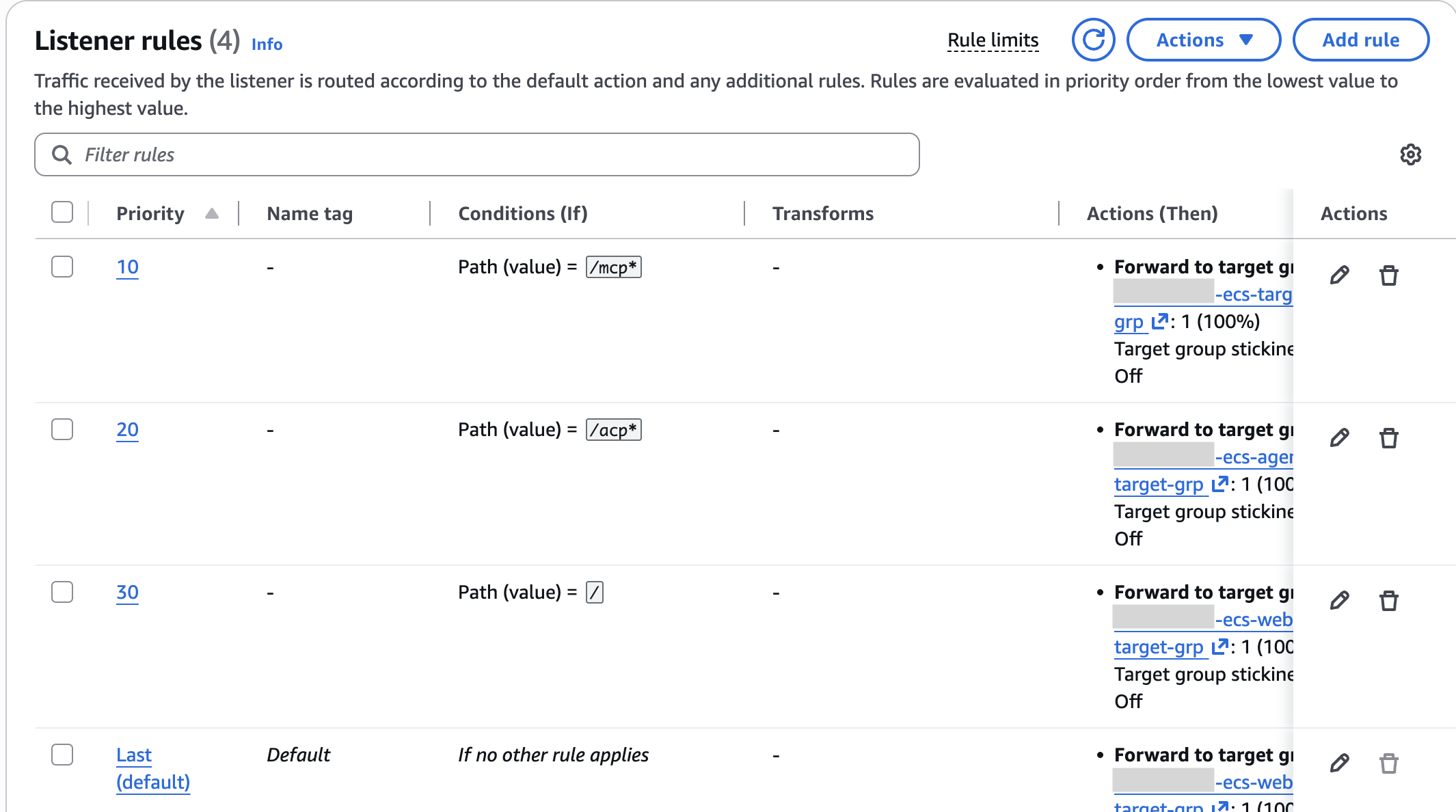
A rule's action is most often forward to a target group, but it can also redirect the request (e.g. HTTP → HTTPS), return a fixed response (handy for a maintenance page), or authenticate the user with Amazon Cognito or an OIDC provider before forwarding.
Two details about path conditions caught me out. First, path patterns are case-sensitive and are matched against the path only, not the query string. Second, they don't rewrite the request: a rule for /api/* forwards /api/users to the target as /api/users, so the service behind it has to handle the prefix itself.
Target groups
A target group is a named pool of targets that share the same settings: protocol and port, health check, and routing behaviour. Rules point at a target group, never at individual servers, and that indirection is exactly what lets the servers change underneath without anyone touching the ALB's configuration.
The group also owns a few routing settings that are easy to overlook: the load-balancing algorithm (round robin by default), the deregistration delay (how long a departing target keeps serving in-flight requests; 300 s by default), slow start, and stickiness (a cookie that keeps a client on the same target).
Target types
When you create a target group, you choose its target type, and you can't change it later. An ALB supports three:
| Target type | What you register | Typical use |
|---|---|---|
instance | An EC2 instance ID | EC2 fleets, often managed by an Auto Scaling group |
ip | A private IP address (plus a port) | Containers with their own network interface, such as ECS tasks on Fargate |
lambda | A single Lambda function | Serverless HTTP handlers |
In the Strobe Assistant, every target group uses the ip type, so each target is just task-IP:port. Why ip rather than instance? Fargate runs tasks in awsvpc network mode, where each task gets its own elastic network interface and private IP address. There's no EC2 instance for you to register, so AWS requires the ip target type for these services. (Part 2 explains what a task is.)
Who actually manages the targets?
This was the part I found most confusing at first, so it's worth being precise: the target group is a list, not a manager. It never launches, stops or replaces anything.
In an ECS setup, the ECS service is the manager. It launches and stops tasks, registers each new task's IP:port in the target group when the task starts, and deregisters it when the task stops. You never edit the target list by hand. Outside ECS, an EC2 Auto Scaling group does the same job, or you register targets yourself.
The relationship does run both ways, though. ECS watches the target group's health checks too: if a task fails them, ECS stops it and launches a replacement. So the target group doesn't manage its targets, but its health verdict is one of the signals the ECS service acts on.
Health checks: deciding who gets traffic
The load balancer periodically sends a request to every registered target, using the health-check settings defined on the target group, and only targets in the healthy state receive new requests. The defaults for instance and ip targets are:
| Setting | Default |
|---|---|
| Path | / |
| Interval | 30 s |
| Timeout | 5 s |
| Healthy threshold | 5 consecutive successes |
| Unhealthy threshold | 2 consecutive failures |
| Success codes | 200 |
Over its lifetime, a target moves through a small set of states:
- initial: just registered; the first health checks are in progress, so no traffic yet.
- healthy: passing health checks; receives traffic.
- unhealthy: failed the unhealthy-threshold number of checks in a row; receives no new traffic.
- draining: being deregistered; no new requests, but in-flight requests can finish until the deregistration delay runs out.
One nuance I got wrong in my first version of the diagram below: a newly registered target only needs to pass one health check to become healthy. The healthy threshold applies to a target that's recovering from the unhealthy state.
The diagram follows a single Fargate task through its life in a target group:
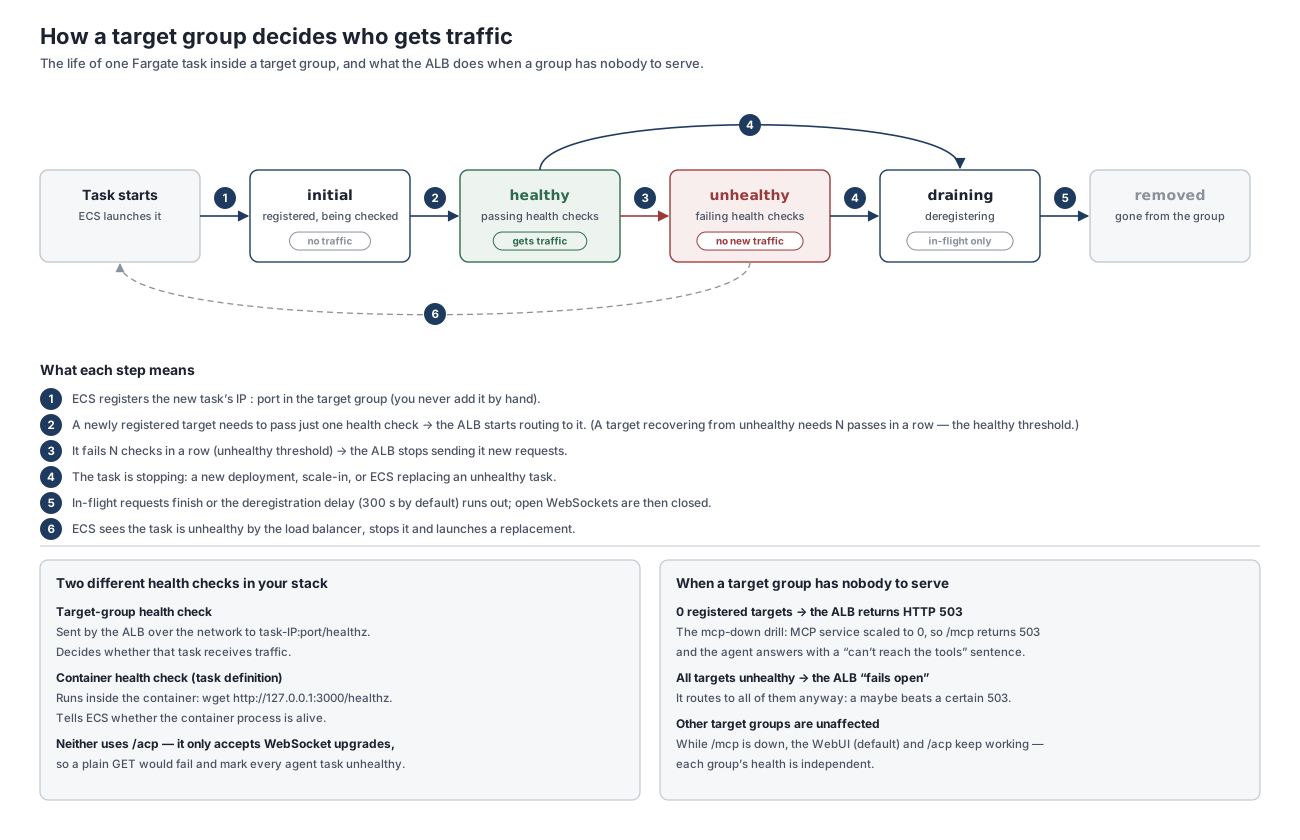
Two edge cases are worth knowing, because they explain error codes you'll eventually run into:
- No registered targets → HTTP 503. If the target group behind a rule is empty, the ALB has nobody to forward to and returns
503 Service Unavailable. - All targets unhealthy → the ALB fails open. Counter-intuitively, if every target in a group is unhealthy, the ALB routes to all of them anyway, on the basis that a maybe beats a guaranteed error. A health check protects you from some bad targets, not from a service that's completely broken.
Health is also tracked per target group, so one group going down doesn't affect the others.
How I set it up for the Strobe Assistant
The Strobe Assistant is made of three services, each running as its own ECS service on Fargate:
- a WebUI: static files served by nginx;
- an agent (TypeScript) that the browser talks to over the Agent Client Protocol (ACP) on a WebSocket, and that runs the Bedrock tool-calling loop; and
- an MCP server (FastMCP) that exposes the tools and is the only component that touches S3 Vectors, DynamoDB and Strobe's API.
All three sit behind one internet-facing ALB, with a single HTTPS listener on port 443 and these rules:
| Rule | Condition | Forwards to | Target port |
|---|---|---|---|
| Path rule | path is /acp* | agent target group | 3000 |
| Path rule | path is /mcp* | MCP server target group | 8080 |
| Default | anything else (/, /index.html, /assets/*) | WebUI target group | 80 |
Because the two path patterns don't overlap, their relative priority doesn't matter; the default rule quietly catches everything else. A Route 53 alias record points my custom domain at the ALB, and an ACM certificate on the listener terminates TLS—which is what makes wss:// work from an HTTPS page.
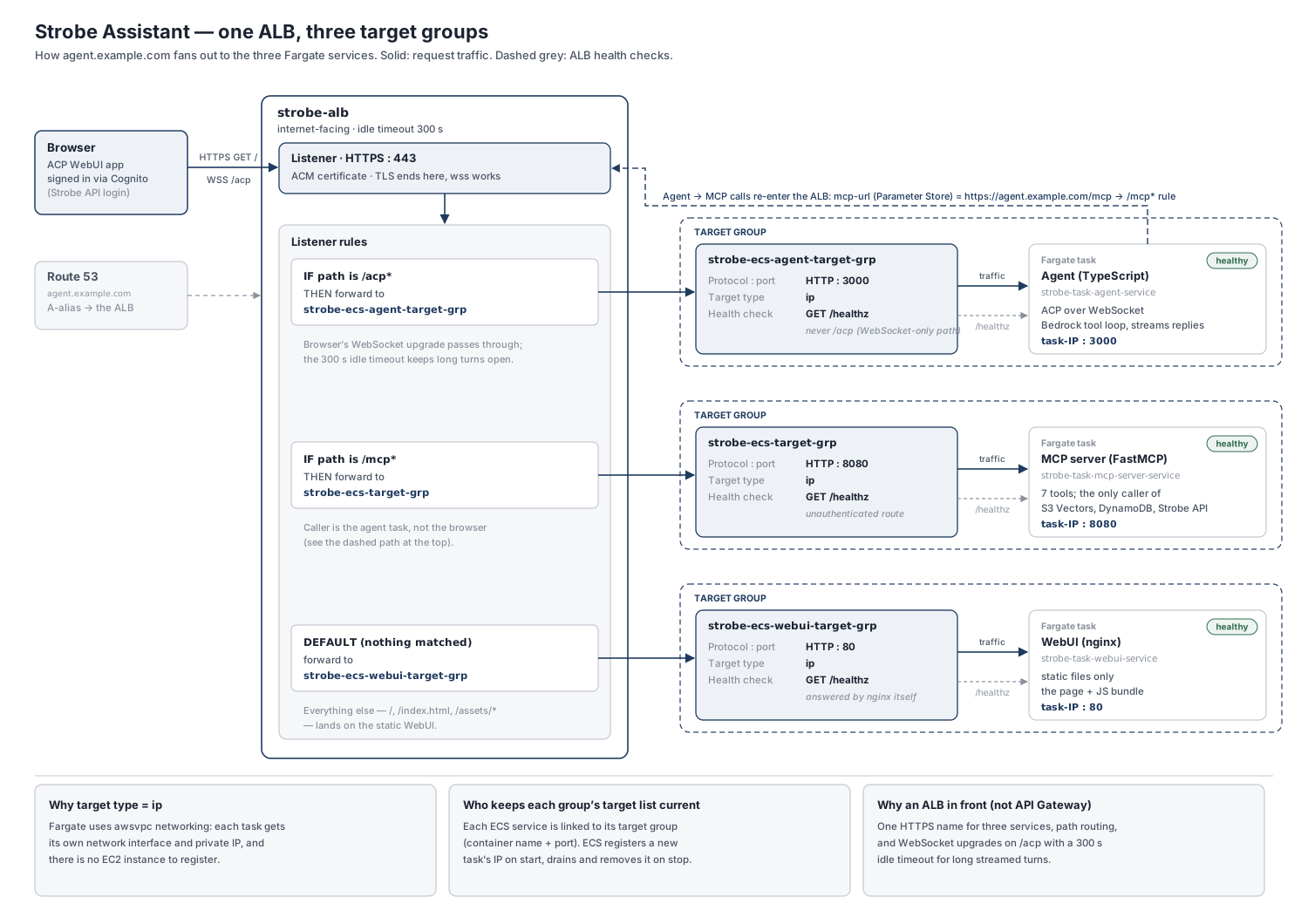
A few design decisions are worth calling out:
- Why an ALB rather than API Gateway. API Gateway's HTTP API can't proxy WebSocket upgrades, and its separate WebSocket API is route-based, so I'd have had to re-frame ACP's JSON-RPC messages to fit it. An ALB proxies WebSockets natively and gives me one HTTPS name for all three services.
- Idle timeout raised from 60 s to 300 s. The ALB closes a connection when no data has moved for the length of its idle timeout. An agent turn can go quiet while a tool runs, so I raised the timeout and had the agent send a ping every 30 s to keep the WebSocket alive.
- Health checks hit
/healthz, never/acpor/mcp./acponly accepts WebSocket upgrades and/mcpexpects a token, so a plainGETthere would fail and mark every task unhealthy—and ECS would then keep killing and replacing perfectly good tasks. Each service exposes a cheap, unauthenticated/healthzinstead; for the WebUI, nginx answers it directly. - The agent calls the MCP server through the ALB. The MCP URL stored in Parameter Store is the public
https://…/mcpaddress, so agent-to-MCP calls re-enter the load balancer and match the/mcp*rule. It's simple and reuses the same TLS front door, at the cost of an extra hop. At a larger scale, ECS Service Connect or an internal ALB would be the tidier option. - Testing the failure path. Scaling the MCP service to zero empties its target group, so
/mcpreturns a 503 while the WebUI and/acpkeep working. The agent turns that into a "can't reach the tools" reply instead of crashing—a nice demonstration that each target group's health is independent.
Lessons learned
If I were starting again, here's what I'd tell myself:
- Choose the health-check path deliberately. It should be cheap, unauthenticated, and never a WebSocket or streaming endpoint.
- Tune health checks for faster deployments. With the defaults, a target that has gone unhealthy needs 5 × 30 s = 2.5 minutes of passing checks before it gets traffic again. AWS's ECS guidance suggests something like a 5 s interval and a threshold of 2 for services that start quickly. Pair that with the ECS service's health-check grace period so slow-starting tasks aren't killed before they're ready.
- Watch your wildcards.
/acp*matches/acpand/acp/anything—but also/acpx. That's harmless here, but/api/*and/api*are not the same rule. - Only let the ALB in. The ALB's security group opens 443 to the internet. Tasks in public subnets with public IPs are otherwise reachable directly, so their security group should accept the container ports only from the ALB's security group (see Networking and VPC).
- In-memory sessions limit scaling. The agent keeps session state in memory, so running more than one agent task would need target-group stickiness or an external session store such as DynamoDB.
Wrapping up
Once the pieces clicked, the ALB turned out to be a neat division of labour: the listener decides where to listen, the rules decide where each request goes, the target group knows who can serve it and whether they're alive, and the ECS service keeps that list up to date. In Part 2, I'll zoom in on that last piece and look at how ECS glues tasks, services and target groups together.
Further reading
- What is an Application Load Balancer?: AWS's overview of load balancers, listeners, rules and target groups.
- Target groups for your Application Load Balancers: target types, routing algorithms, deregistration delay, slow start and stickiness.
- Health checks for Application Load Balancer target groups: default settings, target health states and fail-open behaviour.
- Listener rules for your Application Load Balancer: rule priority, actions and conditions.
- Use an Application Load Balancer for Amazon ECS: why
awsvpctasks need theiptarget type, and how ECS registers tasks. - Optimize load balancer health check parameters for Amazon ECS: practical tuning advice for faster deployments.