
- The blueprints: container image and task definition
- The manager: the ECS service
- The running copies: tasks on Fargate
- The handover: how a task becomes a target
- Who is who
- Strobe's three services side by side
- Wrapping up
- Further reading
Each of the three Strobe Assistant services (the WebUI, the agent and the MCP server) runs as its own ECS service on Fargate. In Part 1, I looked at the ALB and its target groups from the load balancer's side. This post looks at the other side: how ECS turns a container image into a running task, and how that task ends up as a target the ALB can send traffic to.
This is Part 2 of the Strobe Assistant series. Part 3 then walks through the ACP + MCP pipeline that runs on top of all this.
The terminology confused me at first. Container image, task definition, task, container, service, cluster and target group all sound like they could mean the same thing, and the AWS console doesn't make the boundaries obvious. So I listed the terms, looked each one up in the AWS docs, and poked at them in the console until I could explain how they relate. That turned out to be the key to understanding how the whole deployment works. The diagram below is the result, using the agent as the worked example:
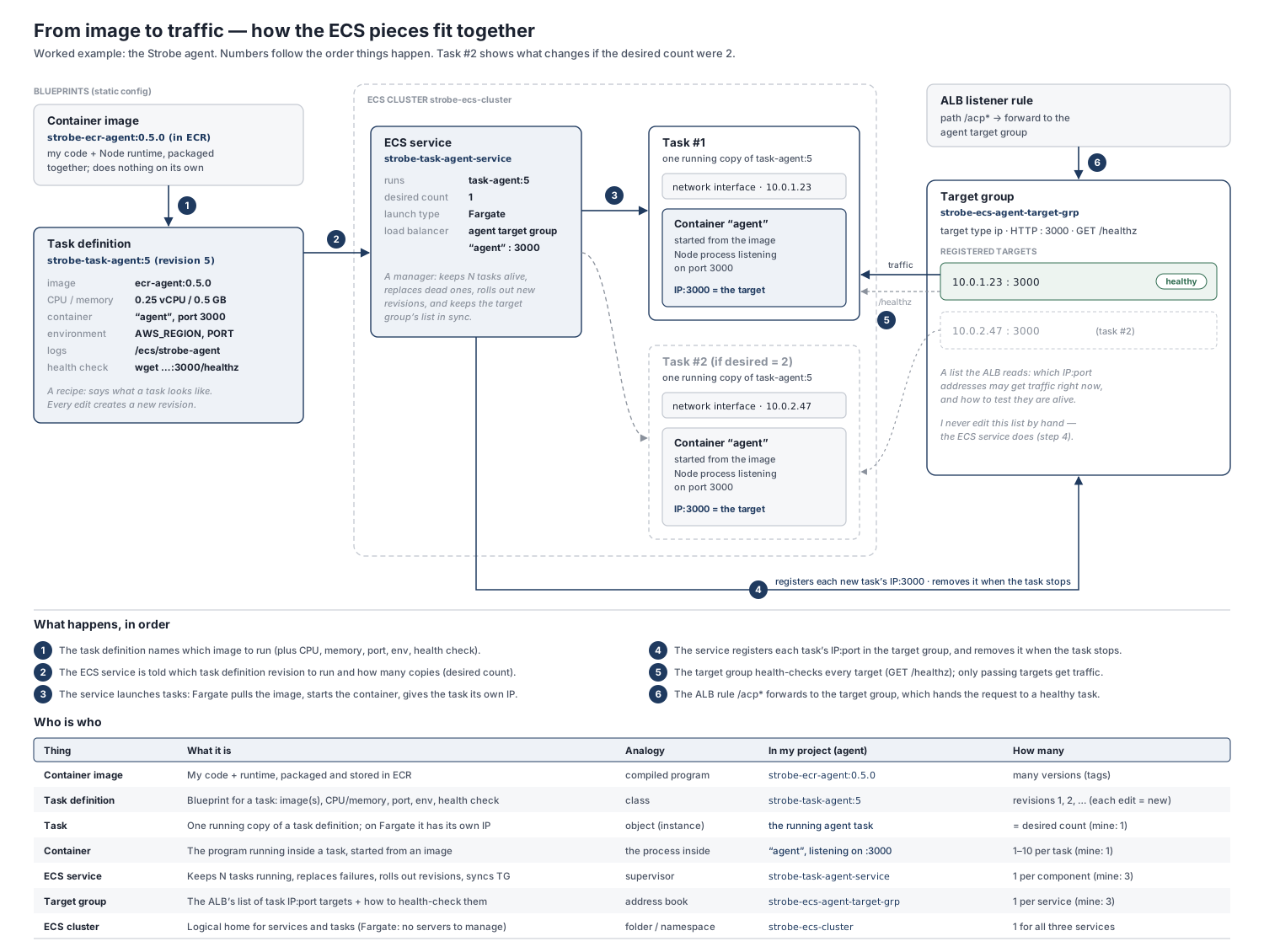
The numbers in the diagram follow the order in which things happen. The rest of this post walks through them in four groups: the blueprints, the manager, the running copies, and the handover to the ALB.
The blueprints: container image and task definition
Everything starts with a container image: my code, its runtime and its dependencies, packaged together and stored in Amazon ECR under a version tag (for the agent, ecr-agent:0.5.0). An image is inert. It doesn't run, listen or cost compute; it's just something to start from.
A task definition is the recipe that says what a running task should look like: which image(s) to use, how much CPU and memory to reserve, which port each container listens on, the environment variables, where the logs go, and an optional container health check. One task definition can describe up to ten containers, though each of mine has just one.
The detail that helped me most is that task definitions are immutable. Every edit creates a new revision (task-agent:1, task-agent:2, …), and a service always points at one specific revision. So "deploying a new version" really means two steps: push a new image, then register a revision that references it and tell the service to use that revision.
The manager: the ECS service
The ECS service is where things come to life. It's a long-running manager that holds three key settings:
- Which task definition revision to run, and how many copies (the desired count). If a task crashes, stops or fails a health check, the service scheduler launches a replacement to get back to the desired count. When I point the service at a new revision, it rolls the change out by starting new tasks and retiring old ones. I kept the desired count at 1 for each service. That's enough for the assignment, and the agent keeps its ACP sessions in memory anyway, so a second agent task would need sticky sessions or an external session store first (see Part 3).
- Where the tasks run (the launch type). I chose Fargate, the serverless option: there are no EC2 instances for me to provision, patch or size, and I pay only for the CPU and memory each task reserves. One correction to my own notes, though: I'd written that Fargate "scales automatically". It doesn't, at least not in the sense of adding tasks under load. Fargate finds capacity for whatever tasks the service asks for, but changing how many tasks there are is the job of the desired count, or of Service Auto Scaling if you configure it.
- Which load balancer target group to use, as a mapping from a container name and port to a target group (for the agent, container
agenton port 3000 → the agent target group). This one line of configuration is what ties ECS to the ALB. Why the services sit behind an ALB at all is covered in Part 3.
The cluster that contains the services is less exciting than it sounds. With Fargate it's just a logical grouping, a namespace for services and tasks. Traffic never flows "through" a cluster.
The running copies: tasks on Fargate
A task is one running copy of a task definition revision, and a container is the process running inside it, started from the image. If I think of the task definition as a class, the task is an object: I can have many of them, and each one is created, lives and dies on its own.
Because Fargate tasks use the awsvpc network mode, each task gets its own elastic network interface (ENI) and private IP address, just like a small VM would. Two consequences follow from that. First, the task itself, not a host machine, is what the ALB needs to address, which is why the target groups use the ip target type (see Part 1). Second, a task gets a new IP every time it starts. Nothing outside ECS could keep track of that by hand, which is exactly the problem the next step solves.
The handover: how a task becomes a target
The question I kept circling back to was: does ECS create a task and then register a target for it, and if so, in what order? The answer is yes, and the order is quite tidy. What surprised me is that the ALB and the ECS service never reference each other directly. The listener rule says "send /acp* to the agent target group", and the service says "put my tasks into the agent target group". The target group is the meeting point between the two:
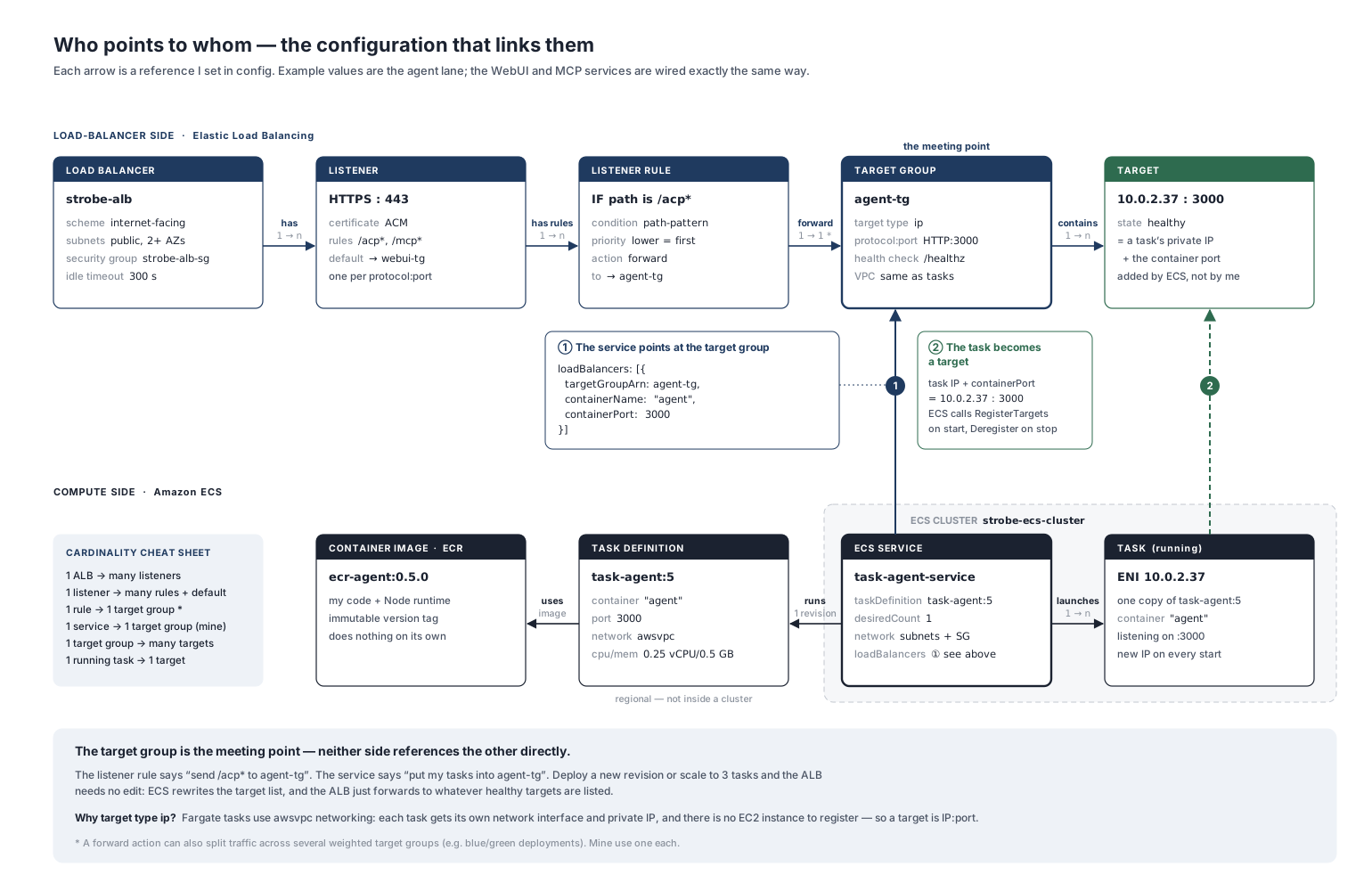
Following a single task through its lifecycle, the flow looks like this:
- Launch. The service decides it needs a task (to meet the desired count, replace a failed task or roll out a new revision). Fargate provisions the ENI and private IP, pulls the image and starts the container.
- Register. While the task is still activating, ECS registers its
IP:portin the target group, using its service-linked role. I never edit that list myself. - Health check. The new target starts in the
initialstate. The ALB health-checks it on/healthz, and only once it passes does it becomehealthyand start receiving traffic. A health check grace period on the service can stop ECS from acting on failed checks while a slow container is still booting. - Serve. The listener rule forwards matching requests to the target group, which picks a healthy target.
- Retire. When the task is stopped (scale-in, a new deployment, or a failed health check), ECS deregisters the target first. The target goes into
draining, so it gets no new requests but in-flight ones can finish, and only then are the containers stopped.
Health is a two-way signal here. There are actually two checks: the container health check in the task definition, which ECS runs inside the container, and the target group health check, which the ALB runs over the network. In Strobe, both hit /healthz. If either one fails, the service scheduler replaces the task, which in turn deregisters the old target and registers a new one. So the target group never manages anything, but its verdict is one of the signals ECS acts on.
The neat result of all this is that I can deploy a new revision or scale a service up and down without touching the ALB at all. ECS keeps the target list current, and the ALB simply forwards to whatever healthy targets are listed.
Who is who
Once the flow made sense, an analogy table helped the terms stick:
| Thing | Analogy | In Strobe (the agent) |
|---|---|---|
| Container image | A compiled program | ecr-agent:0.5.0 in ECR |
| Task definition | A class (with numbered revisions) | task-agent:5 |
| Task | An object (instance) | The running agent task, with its own private IP |
| Container | The process inside the object | agent, listening on port 3000 |
| ECS service | A supervisor | Keeps one agent task running and synced with its target group |
| Target group | An address book | The agent's list of healthy IP:3000 targets |
| Cluster | A folder or namespace | One cluster for all three services |
Strobe's three services side by side
The WebUI and the MCP server are wired in exactly the same way as the agent. Only the image, port and target group differ:
| Service | What it runs | Container port | ALB rule |
|---|---|---|---|
| WebUI | nginx serving the built static UI | 80 | default (everything else) |
| Agent | Node.js ACP server and Bedrock tool loop | 3000 | /acp* |
| MCP server | Python FastMCP tool server | 8080 | /mcp* |
Each has its own task definition (kept in infra/taskdef-*.json), its own ECS service with a desired count of 1, and its own target group, all in one cluster behind one ALB:
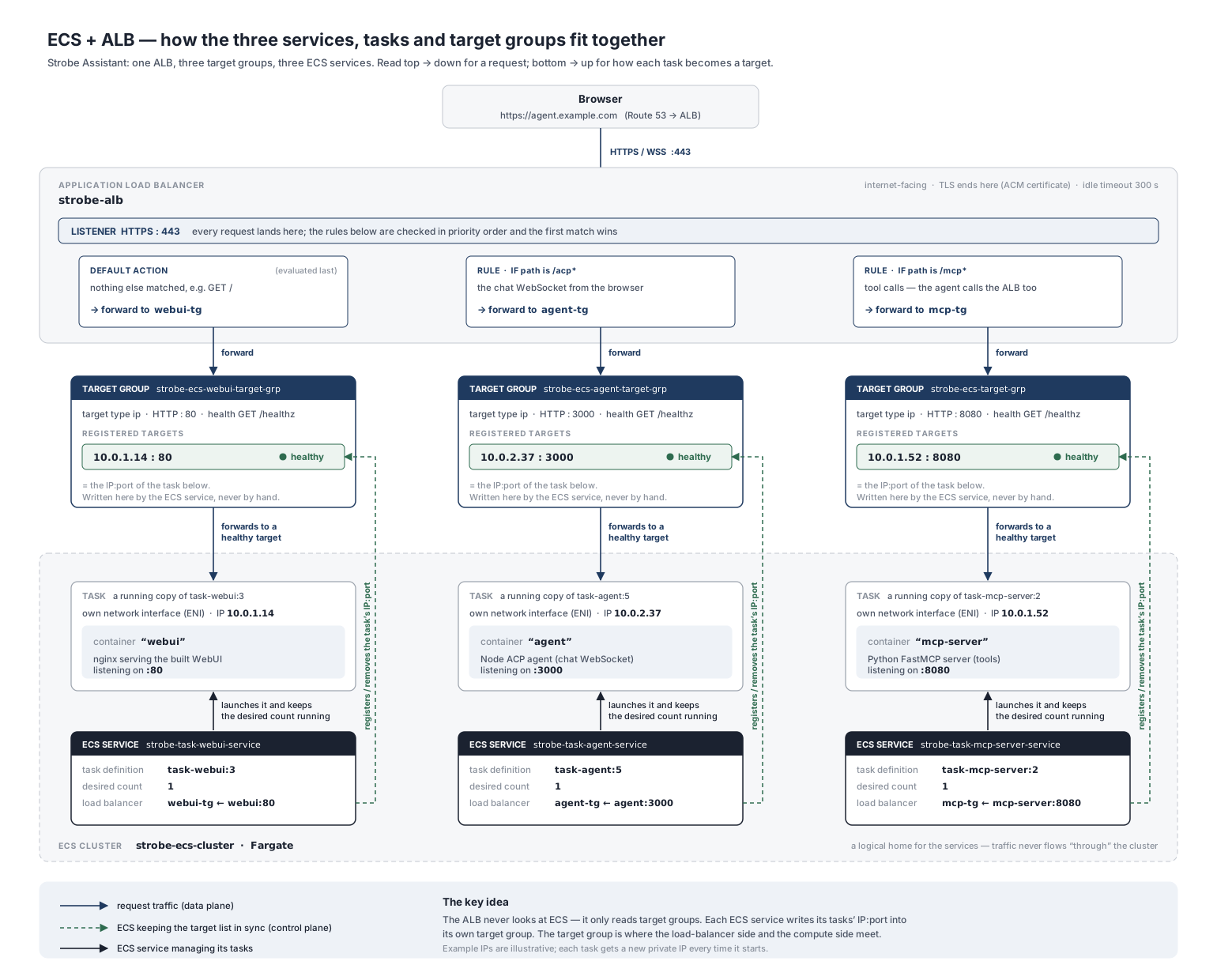
Because the three services share nothing but the ALB and the cluster, I can redeploy, scale or stop one without affecting the others. I relied on that when testing failure paths: scaling the MCP service to zero empties its target group, so /mcp returns a 503 while the WebUI and the agent keep running.
Wrapping up
The thing that made ECS click for me was separating what to run from keeping it running from routing to it. The image and task definition are static blueprints, the service is the manager that keeps the right number of tasks alive, the tasks are the disposable running copies, and the target group is where ECS and the ALB meet. Once I saw that the service, not me and not the ALB, keeps the target list up to date, the rest of the architecture became much easier to reason about.
In Part 3, I'll move up a level and look at what actually runs inside these tasks: the ACP + MCP pipeline that connects the chat UI, the agent and the tools.
Further reading
- What is Amazon Elastic Container Service?: the overview of ECS concepts.
- Amazon ECS task definitions: what goes into a task definition and how revisions work.
- Amazon ECS services: desired count, the service scheduler and how unhealthy tasks are replaced.
- Amazon ECS task lifecycle: the task states, including when target registration and deregistration happen.
- Amazon ECS task networking for Fargate: why each task gets its own ENI and private IP.
- Use an Application Load Balancer for Amazon ECS: how ECS registers tasks with target groups.
- Determine Amazon ECS task health using container health checks: container health checks and how they decide task health.
- Deploy Amazon ECS services by replacing tasks: how rolling updates swap old tasks for new ones.