
- Stage 1: publishing by hand
- Stage 2: handing the repetitive steps to Claude
- Stage 3: one source of truth, one pipeline
- Wrapping up
I run this site in two languages, English and Japanese. For a long time, the hardest part of a post wasn't writing it. It was everything that came after: copying images, filling in frontmatter, deciding what to publish next, remembering to translate it, and then doing half of it again for the other language.
Over the past few months, I've handed most of that work to Claude. Not all at once, though. The workflow went through three stages: publishing by hand, a first AI-mediated workflow built on a few Claude Code skills, and finally a consolidated pipeline where my Obsidian vault is the single source of truth and one Claude routine does the rest.
This post walks through each stage: what it fixed, and what it didn't. The short version? Making each step faster helped, but the real fix was deciding where the state of my posts should live.
Stage 1: publishing by hand
Before AI, publishing a post looked like this: write the draft in the repo, set its frontmatter, review it, then commit and deploy. Four steps. Simple on paper, but almost every one of them came with its own friction.
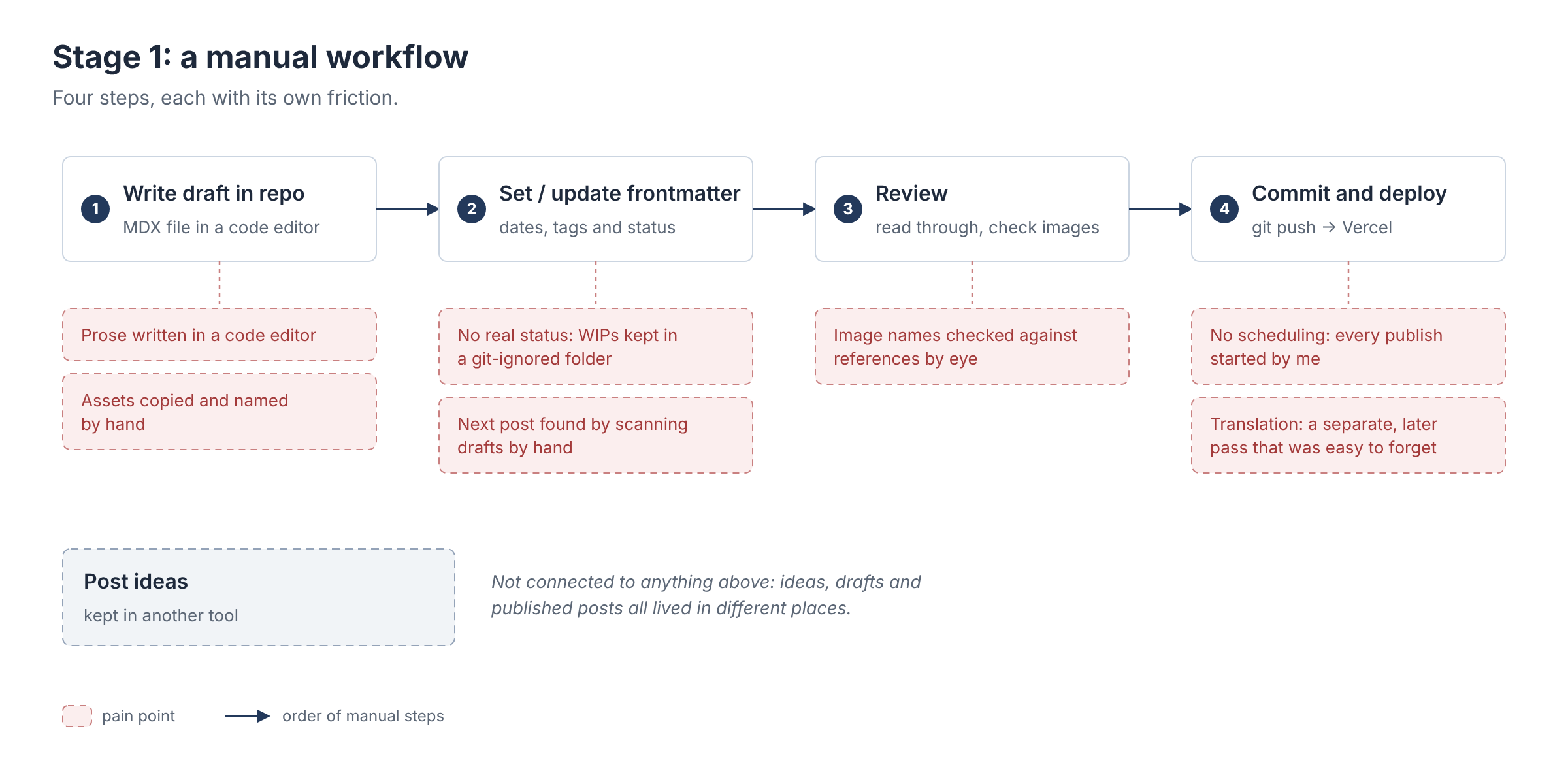
Assets were copied by hand. Every image had to be copied into a dedicated directory in the repo, and its name checked against the reference in the post. Get one wrong and the live page shows a broken image. Tedious, and exactly the kind of mistake that's easy to make and hard to spot.
Drafts had no real status. A post was a work in progress, ready to go, or published, but nothing actually recorded that. To keep WIPs from going live, I kept them in a separate, git-ignored directory, and choosing what to publish next meant opening the drafts and scanning them by hand.
The editor was made for code, not prose. VS Code is a great place to write code. For writing, though, cross-referencing other notes, embedding images and managing folders all took more effort than they should have.
Translation was an afterthought. It was slow, and it only happened after the original was already live. Not every post needs a second language, and nothing tracked which ones did, so it was easy to forget a translation altogether.
Nothing could be scheduled, and nothing was in one place. I couldn't schedule a post, which was probably the biggest issue of all. And with my post ideas living in yet another tool, the backlog, the posts ready to go and the published ones were never quite in sync.
Stage 2: handing the repetitive steps to Claude
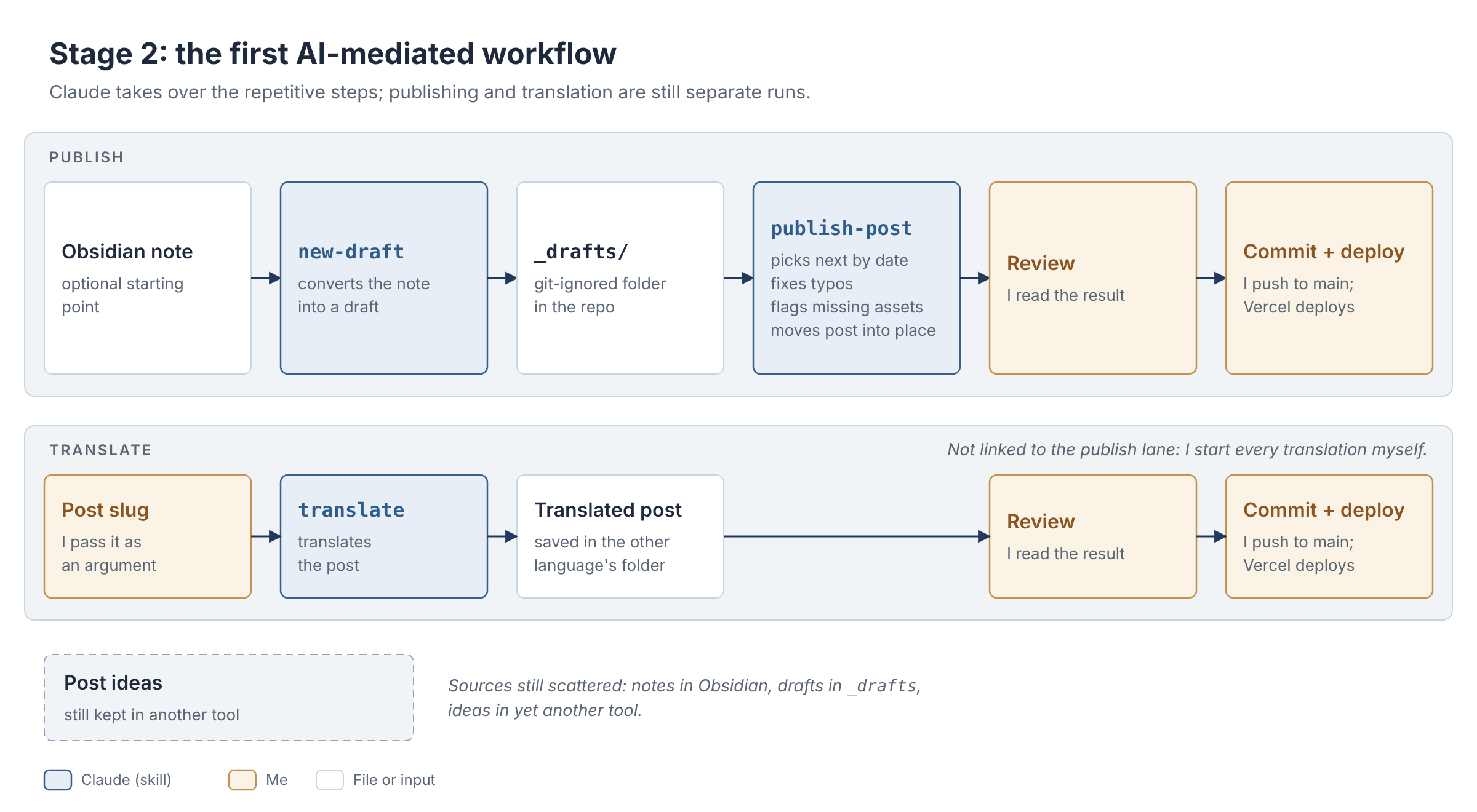
My first move was to hand the repetitive parts to Claude Code through two custom skills:
publish-postpicked the next draft from the git-ignored_draftsdirectory by the scheduled date in its frontmatter, fixed typos, flagged problems such as missing assets, and moved the post into place.translatetook the slug of a published post, which I passed in as an argument, and saved its translation in the other language's directory.
A third skill, new-draft, turned an Obsidian note into a draft in _drafts, so I could start writing in Obsidian if I wanted to. After each run, I still reviewed, committed and deployed the result myself.
What got better
Publishing went from a checklist of manual steps to a few skill runs. Claude found the next post for me, so the manual scan was gone, and translation became much faster.
Just as importantly, Claude flagged anything that blocked a publish instead of letting it slip through. And since I still reviewed and deployed every change myself, there was a human in the loop to catch what it missed.
What didn't
The skills sped up each step, but the structural problems were all still there:
- Assets were still managed by hand.
- Drafts still had no real status.
- Drafts still lived in several places: notes in Obsidian, converted drafts in
_drafts, and ideas in another tool. - Nothing tracked which posts needed a translation, or which already had one.
- Translation was still a separate run that I had to remember to start.
- Nothing could be scheduled. Every run still started with me.
Looking at that list, almost everything left was about state: where a draft lives, what status it has, and whether it needs a translation. Faster steps couldn't fix that. The next stage had to change where the state lived.
Stage 3: one source of truth, one pipeline
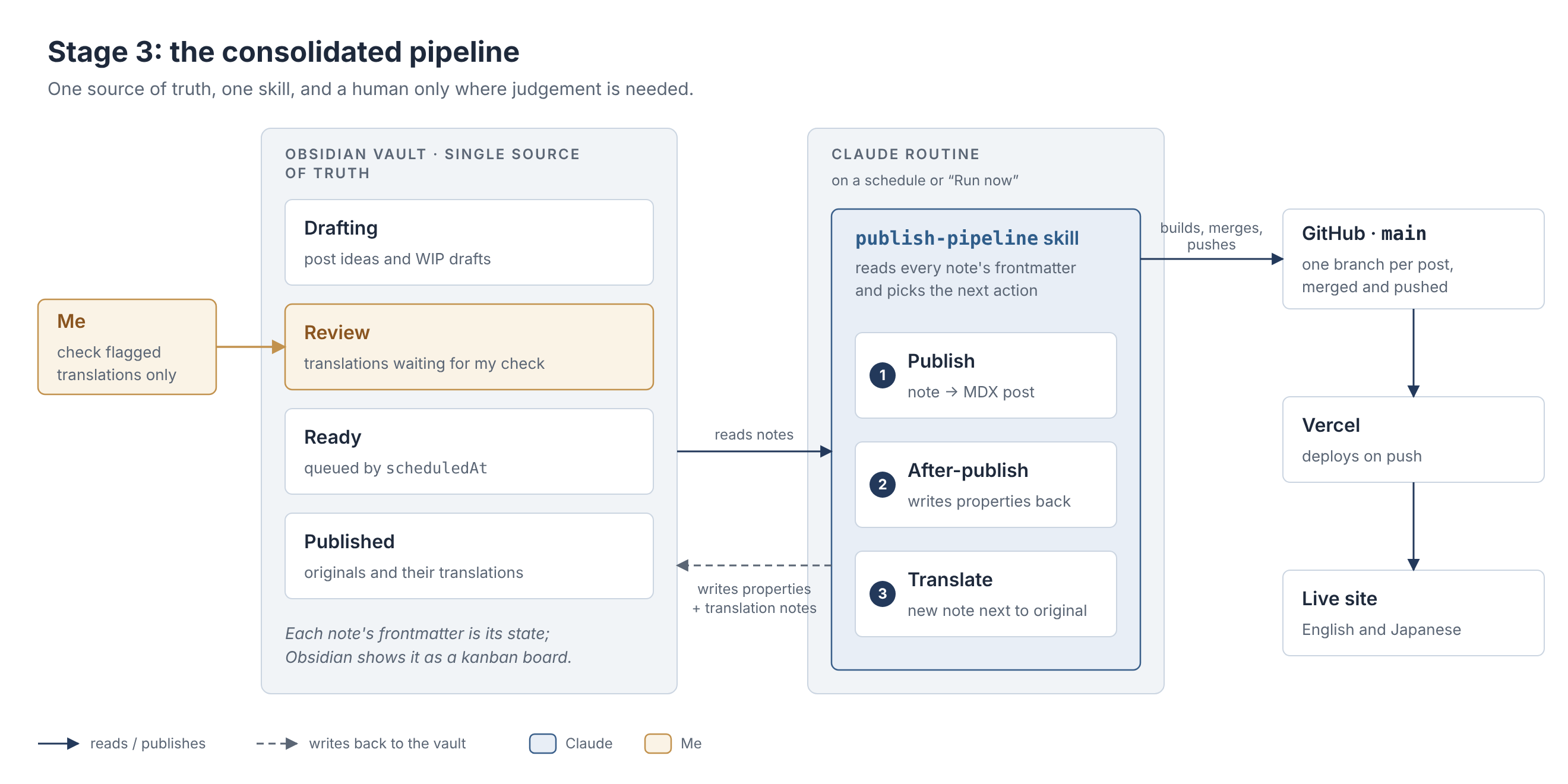
Here's where things stand today. My Obsidian vault holds everything: post ideas, drafts, posts ready to go, published posts and their translations. A single Claude routine runs one custom skill, publish-pipeline, which picks up a note and publishes it, translates it or updates its properties. I only check the translations Claude flags. Everything else, committing and deploying included, the pipeline handles on its own.
Getting there
This didn't happen in one go. It took a handful of small steps, each one removing another place where state lived.
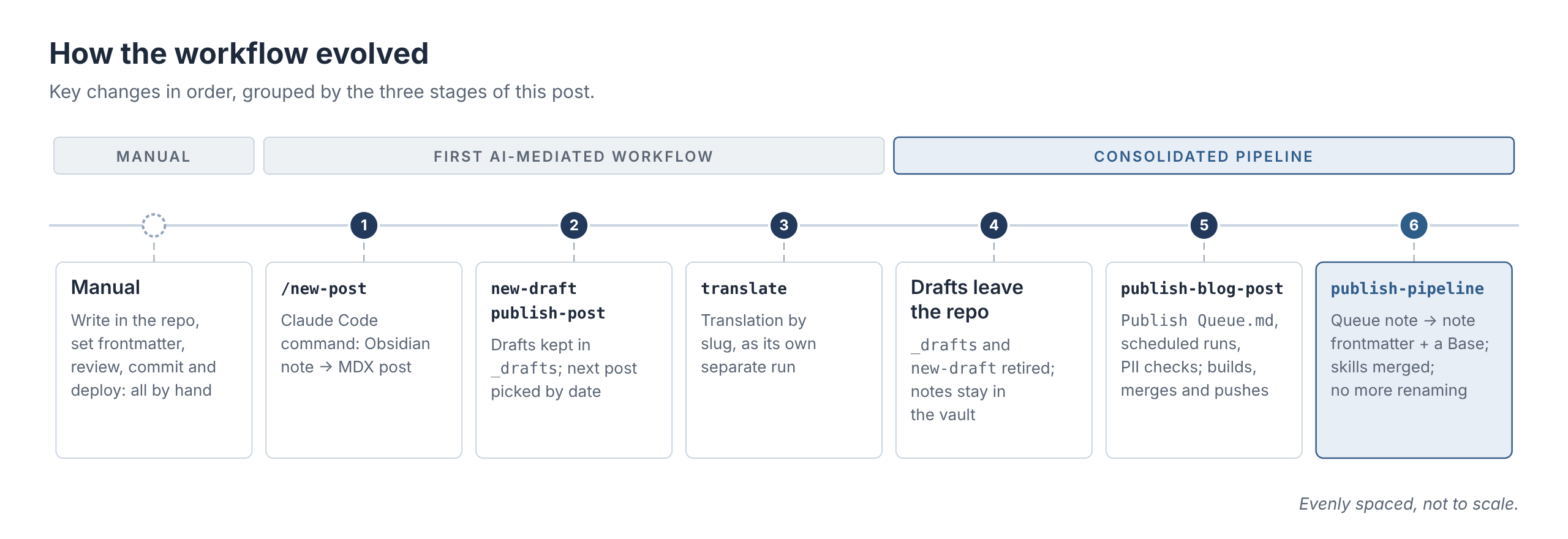
First, drafts left the repo. I retired the _drafts directory and the new-draft skill. The publishing skill now took the path to a note in my vault, and it never modified that note.
Then, a queue note took over. With drafts in the vault, I needed a way to say which ones were ready and in what order. So a new skill, publish-blog-post, worked from a single note, Publish Queue.md. It was a checklist: the top line was the next post, a 📅 date meant "not before", and published posts moved down into a ## Log section, where a require translation label told the translate skill what to pick up next. This version also brought scheduled runs, PII checks, and building, merging and pushing into the skill itself. In skill-creator's first evaluation round, it passed 27 of 28 checks, against 18 of 28 for Claude without the skill.
From a queue note to a Base
The queue note worked, but it was a copy. Every post now had its state in two places: in the note itself, and in its line in the queue. Moving a post along meant editing the queue, both by me (reordering lines, adding dates) and by the skills (moving lines into the log, flipping labels, adding a ⚠️ when something was blocked). Rename a note, and its link in the queue broke. In other words, I'd just built another thing to keep in sync, which was the very problem I was trying to get rid of.
So I moved the queue into the notes themselves. A line in the queue like this:
- [ ] [[My next post]] 📅 2026-11-02 | require translationbecame properties on the note:
status:
  - Ready
scheduledAt: 2026-11-02
requireTranslate: true
To see the queue, I now use an Obsidian Base: a view, defined in a small .base file, that queries notes by their properties. Mine, Posts.base, picks up every note with a status property and groups them into a kanban board:
views:
  - type: kanban
    name: Status
    filters:
      and:
        - file.hasProperty("status")
    groupBy:
      property: status
The difference matters more than it looks. The queue note was a document that I, and the skills, had to maintain. The Base is just a view over the notes, so there's nothing left to sync: change a note's status, and it moves on the board. The skills stopped writing to a shared file and started reading and writing each note's own properties instead.
With all the state in one place, the last two steps followed naturally:
- Publishing and translation merged. Translation no longer needed its own skill or its own list.
publish-blog-postandtranslatebecame one skill,publish-pipeline, with translation as one of its stages. - No more renaming. The pipeline used to mark published notes by adding a ✅ prefix to their file names. That broke links from other notes, so it now records everything in properties only.
Everything in one place
Today, a note's frontmatter is its state in the pipeline, and the Base shows every note on a board with four columns: Drafting, Review, Ready and Published. This post is one of those cards, sitting in Drafting as I write.
I set a handful of properties myself: status, scheduledAt (the earliest date a post may go out, and its place in the queue), requireTranslate, series, project, and a free-text note for any extra instructions to Claude. The pipeline writes the rest back after each run: the post's path in the repo, its publish date and language, and the links between an original and its translation.
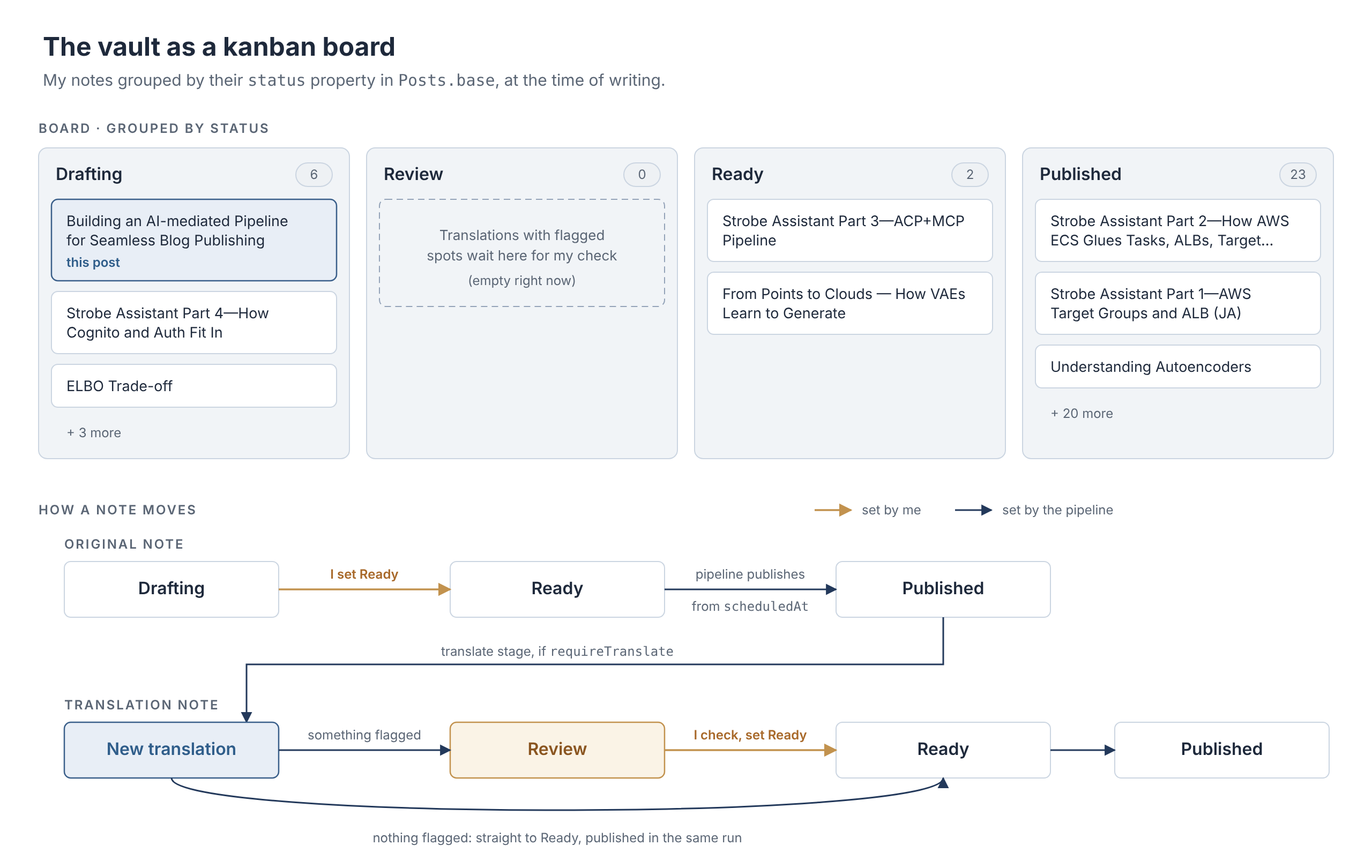
That one change solved most of the earlier problems at once. A draft's status is a property on the note. Whether a post needs a translation, and whether it has one, is right there on the note and on the board. Ideas, drafts and published posts all sit in the same place. And because I write in Obsidian, cross-referencing, embedding images and organising folders are no longer a chore. The pipeline copies the images into the repo and converts them into the site's format when it publishes.
One skill, three stages
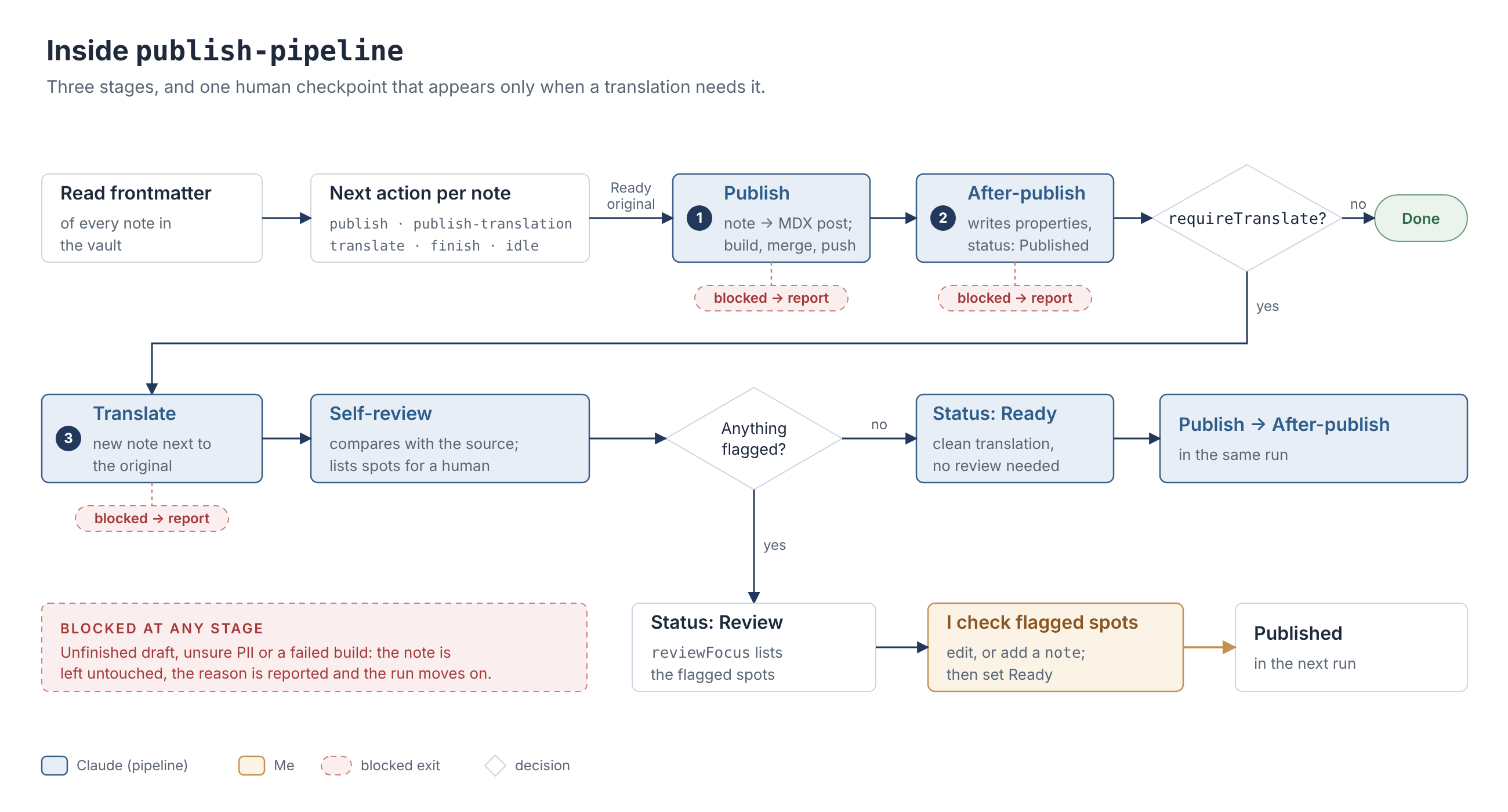
Every run of publish-pipeline starts by reading the frontmatter of every note in the vault and working out the next action for each one: publish an original, publish a reviewed translation, translate a published post, fill in missing properties, or do nothing. Then it runs up to three stages:
- Publish turns a Ready note into an MDX post. It copies the images, converts Obsidian syntax, proofreads, writes the site's frontmatter, then builds, merges and pushes.
- After-publish writes the pipeline's properties back to the note and sets its
statusto Published. - Translate writes the translation as a new note next to the original. It translates from the published post rather than from the note, so the translation carries the publish stage's edits too.
Because progress is recorded in frontmatter, a run that stops halfway picks up at the first unfinished stage next time. And a failed translation never undoes a published original.
Where I still come in
This is a human-in-the-loop workflow, but with as little human as possible. The main checkpoint is translation review. After translating a post, the skill compares the translation with the source, section by section, and lists only the spots that need a human decision: where it had to choose between two readings, adapted an idiom, or used a term with no established translation on the site.
If that list is empty, the translation goes out in the same run. If it isn't, the translation note waits in the Review column with the flagged spots listed in its frontmatter. I check those spots, edit the note if needed and set it to Ready, or leave instructions in its note for Claude to apply. For posts I always want to check, or never need to, I can override this per post.
Publishing on a schedule
This is the part I'd wanted from the very beginning. Publishing is now as simple as hitting "Run now" on the Claude routine or, better still, letting the routine run the pipeline on a schedule. A scheduled run publishes at most one new original, in order of scheduledAt, along with any reviewed translations, and ends quietly when there's nothing to do. To schedule a post, I give its note a scheduledAt date and set it to Ready. That's it.
What the skill won't do
It publishes; it doesn't write. Drafting, revising and retouching are deliberately left out of the skill, because they belong to the writing phase, not the publishing phase. If a note has placeholder text, a section that's only a heading, or a bullet-point skeleton where prose should be, the skill doesn't fill it in. It stops and tells me what's unfinished. Its editing stops at proofreading and light refinement, without touching the argument, the opinions or the voice. One job, done well.
It doesn't touch more than it needs to. It never edits the body of my notes (except a translation note it's creating), never renames or moves them, and never commits anything from the vault to the repo.
It doesn't fail silently. Every run ends with a report: which notes it handled, where each post ended up, the publish date, any non-trivial edits and personal-information replacements, translations waiting for review, and anything it skipped and why. When a note is blocked, say the draft is unfinished, it isn't sure about some personal information, or the build fails, it leaves the note untouched, reports why and moves on to the next one. In a manual run, it asks me instead.
Wrapping up
Here's how the original problems fared across the three stages:
| Problem | Manual | First AI-mediated workflow | Consolidated pipeline |
|---|---|---|---|
| Asset management | Copied and named by hand | Still manual | Copied and converted by the pipeline |
| Draft statuses | No real status; a separate folder for WIPs | Unchanged | status property, shown on a kanban board |
| Finding the next post | Manual scan | Found by Claude | Queue read from frontmatter |
| Writing environment | Code editor | Code editor or Obsidian, then converted | Obsidian |
| Translation effort | Separate, slow, after publishing | Faster, but a separate run | A stage of the same pipeline |
| Translation tracking | Easy to miss | Easy to miss | requireTranslate and linked translation notes |
| Scheduling | Not possible | Not possible | scheduledAt and scheduled routine runs |
| One place for everything | No | No | The Obsidian vault |
Looking back, the first AI-mediated workflow made each step faster, but I was still the glue holding the steps together. The real change came when I stopped asking which step to automate next and started asking where the state should live. Once every post, its status and its translation lived in one place, a single skill could take care of the rest, and my part shrank to what I actually want to do: writing, and checking the few things that genuinely need a human.