
- The pipeline in one paragraph
- Root cause: a pixel cap, not file size
- Why I could see it at all
- The setting that silently deletes failures
- The 3-second timeout
- The quota is the ceiling
- What I'd change, and where this transfers
While seeding photos for Strobe Assistant's retrieval evaluation, I checked the ingestion pipeline's dead-letter queue (DLQ). It held 18 messages, and every one was a photo I'd taken on my phone.
Strobe Assistant is a chat agent over a user's own photo library (the project overview has the whole system). For a photo to be searchable, it has to be embedded and classified after upload, and that happens in an asynchronous pipeline. This post is about that pipeline: what went wrong, why I could see it go wrong, and the configuration details that decide whether a failure is visible or silently lost.
The pipeline in one paragraph
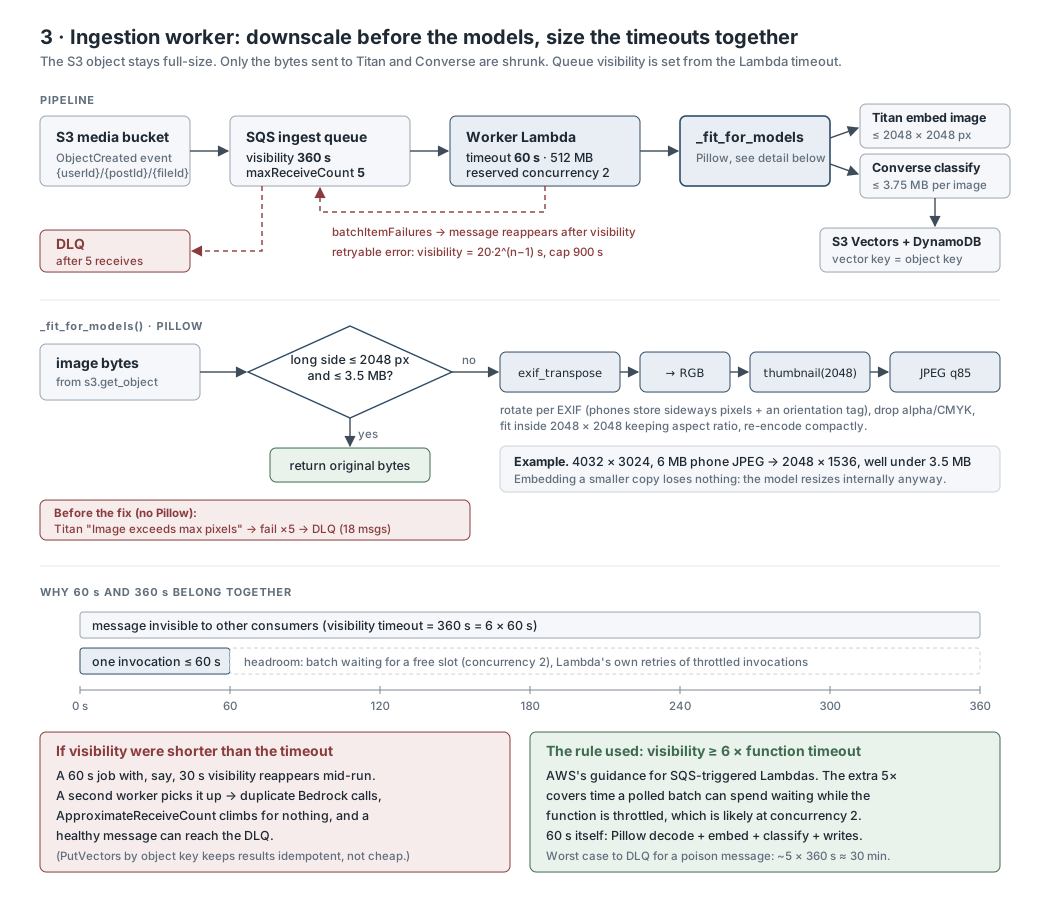
A photo goes from the browser straight to S3 through a presigned URL, so the upload returns immediately. S3 then publishes an ObjectCreated event to an SQS queue, and the post Lambda adds a text job to the same queue whenever someone writes a post or comment. A worker Lambda takes messages in batches of up to 10. For each photo, it calls Titan Multimodal for an embedding and Gemma 3 for a caption and labels, then writes to S3 Vectors and DynamoDB. A message that keeps failing is retried with a growing delay, and after five attempts SQS moves it to the DLQ.
Root cause: a pixel cap, not file size
The worker's logs had the answer: ValidationException: Image exceeds max pixels allowed. Titan Multimodal accepts images up to 2,048 × 2,048 pixels, and Bedrock's Converse API caps an image at 3.75 MB. A 4,000 × 3,000 phone photo breaks the first limit whatever its file size, so I'd been looking at the wrong number. Each photo failed five times, backed off between attempts, and moved to the DLQ.
My tests had never hit this. The test data I'd used while building the original Strobe app was small images from the web. It's a good example of a limitation that only real data exposes.
The fix was to shrink what goes to the models, not what's stored. Before calling either model, the worker checks the image. If its long side is over 2,048 px or the file is over 3.5 MB, the worker applies the EXIF orientation (phones store pixels sideways plus a rotation tag), converts it to RGB, fits it inside 2,048 × 2,048 and re-encodes it as JPEG. The original in S3 is untouched. Embedding the smaller copy loses nothing in practice, because the model downsizes its input internally anyway.
Why I could see it at all
Every asynchronous design buffers work somewhere. The question is who owns the buffer.
- Work inside the upload request: the user is the buffer. They wait for two model calls per photo, and a failure is an error on their screen.
- S3 invoking Lambda directly: Lambda keeps the buffer, in an internal queue you can't inspect. A function error is retried twice, a throttled invocation is retried for up to six hours, and then the event goes to a failure destination if you configured one. If you didn't, it's dropped.
- S3 to SQS to Lambda: I own the buffer. I choose the retry count and backoff, I can see the backlog and the age of the oldest message, and failures wait in a DLQ that I can inspect and redrive.
With S3 invoking the worker directly, those 18 photos would have been retried twice and, with no failure destination set, discarded. I'd have found out much later, when searches couldn't find any of my phone photos. With the queue, they were sitting in the DLQ, with their receive counts and the error in the logs, ready to redrive once the fix was deployed.
The queue earns its place for a second reason, too. The real ceiling on ingestion isn't Lambda but the Bedrock quota: two model calls per photo against a requests-per-minute limit shared across the account. Uploads are bursty, since someone might share a whole album in a minute.
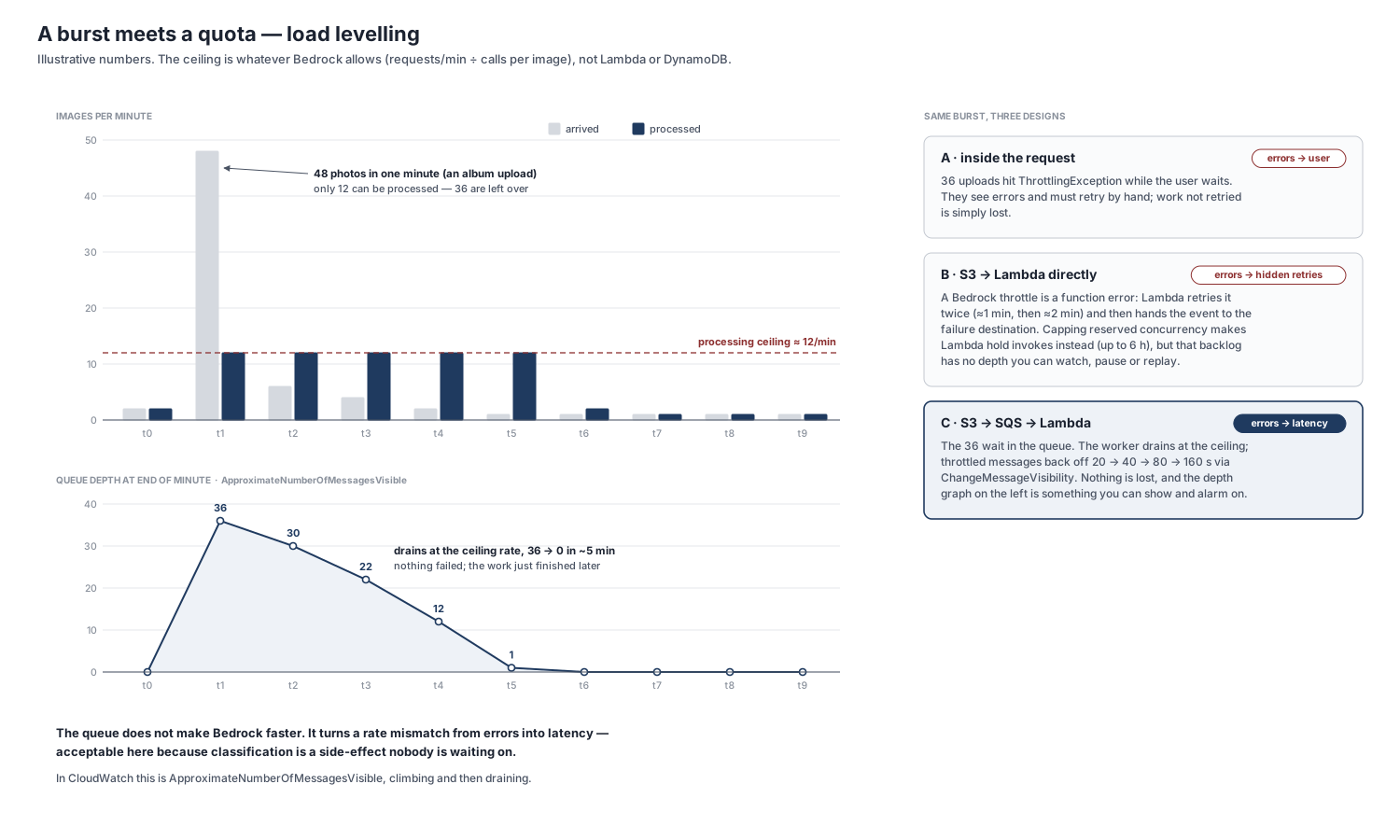
That trade is acceptable only because nobody waits on classification. Latency on this path is a non-goal; completeness is the goal.
The queue has costs. There are more moving parts (a queue, a DLQ, a queue policy and an event source mapping), results arrive seconds after upload rather than in the response, and timeouts need tuning together. SQS also delivers at least once, so every write has to be idempotent. The vector key is the photo's S3 key, so a redelivered message overwrites its earlier result instead of duplicating it. For low, steady volume with no shared quota downstream, S3 invoking Lambda directly would be simpler, and I'd use it there.
The setting that silently deletes failures
The worker processes each message in a batch inside its own try, so one bad photo doesn't take down the other nine. It returns the IDs of the messages that failed, and the Lambda poller deletes the rest. That only works when the event source mapping has ReportBatchItemFailures turned on.
The trap is what happens when it's off. The poller then ignores the return value, and because my handler catches every exception, every invocation looks like a success, so the poller deletes the whole batch, failed messages included. Nothing is retried and nothing reaches the DLQ. The worker's own docstring said the opposite: that Lambda "retries the WHOLE batch". That's only true when the handler raises.
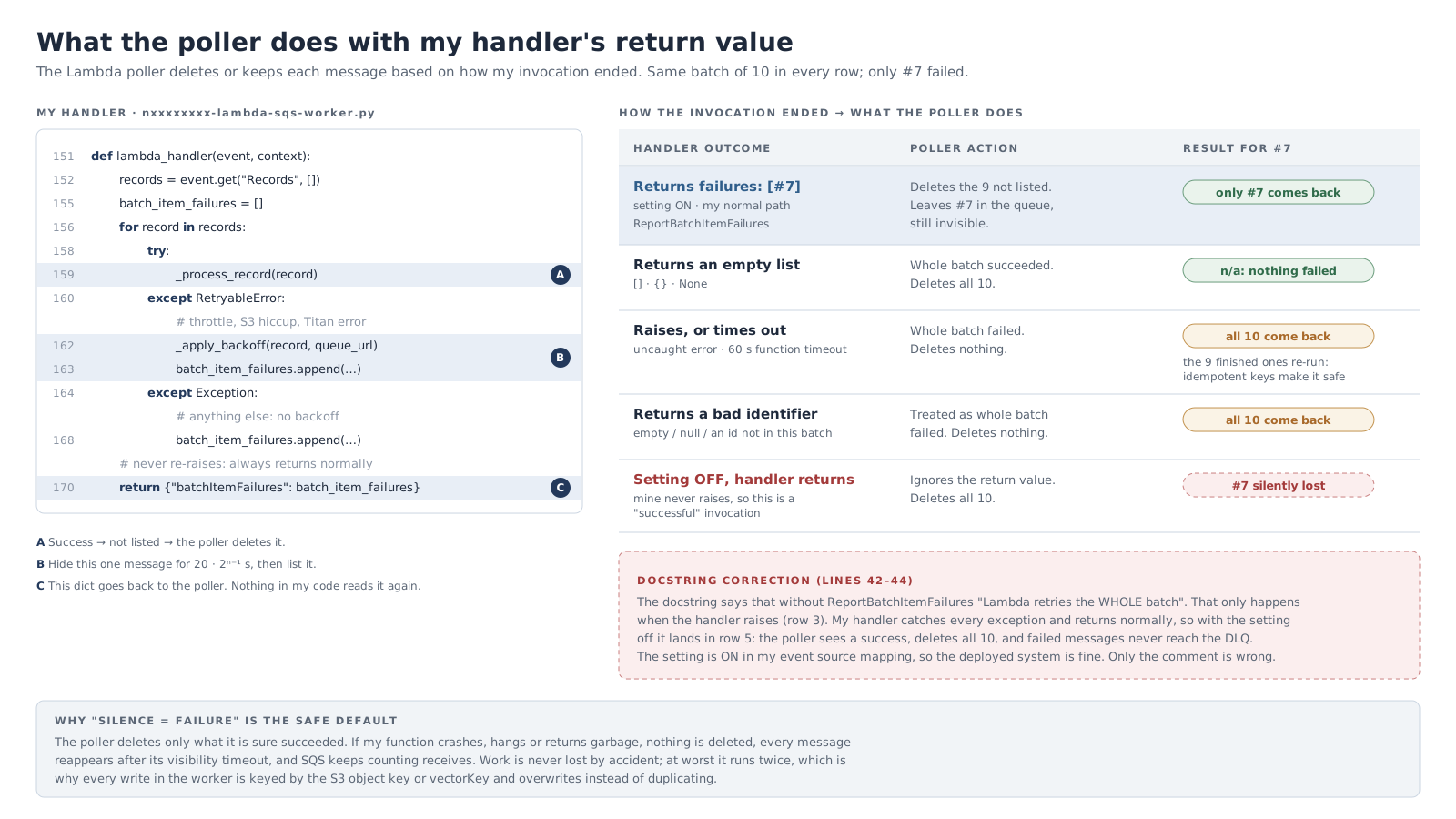
The setting was on, and the deployment checks verify it, so the system was fine and only the comment was wrong. The lesson I kept is that the handler is only half of this contract. The other half is a configuration flag, and getting it wrong doesn't throw an error.
The 3-second timeout
An earlier failure was quieter still. The worker started with Lambda's default timeout of 3 s, and a batch of downloads, resizes and model calls takes far longer than that. A timeout counts as a failure of the whole batch, so every message came back for another attempt, including ones whose work had finished. Nothing in my code logged an error, because my code never got the chance to.
I raised the timeout to 60 s and set the queue's visibility timeout to 360 s. AWS recommends at least six times the function timeout, so a message can't reappear while the invocation holding it is still running. The cost is slow failure: a message that can never succeed takes about 30 minutes (five attempts at 360 s each) to reach the DLQ.
The quota is the ceiling
To keep the worker from overwhelming Bedrock, I set its reserved concurrency to 2. Two workers, each making a few model calls per photo, stay under the quota. Throttled messages back off individually: the worker resets each one's visibility to 20 s, then 40 s, 80 s and so on, up to 900 s, since SQS has no per-message backoff of its own.
Reading more about how Lambda polls SQS afterwards, I found a catch. The poller doesn't know about reserved concurrency. It can receive a batch it then can't hand to a worker; those messages return after the visibility timeout, and the receive still counts. Under a long burst, a healthy message could reach the DLQ without the worker ever seeing it. AWS added a maximum concurrency setting on the event source mapping for exactly this case. It means my DLQ can hold two very different things: messages that will never work, and messages that simply waited out a throttle.
What I'd change, and where this transfers
- Cap concurrency on the event source mapping, not only on the function, so the poller never takes more than the worker can handle.
- Tie throughput to the quota, rather than to a number I set by hand.
- Alarm on DLQ depth and on the age of the oldest message. They were metrics I could see, but I was watching them by hand.
- Make backfill a managed job. Re-processing old photos was a one-off script.
- Test with real inputs from day one. One phone photo in the test set would have caught the pixel cap before anything reached the DLQ.
Document pipelines in client work have the same shape. Scanned PDFs and phone photos of forms are messier than any test set, and model APIs have limits you only meet in production. I'd build those pipelines the same way: own the buffer, so failures wait somewhere visible and replayable, and check the configuration half of every contract as carefully as the code.