
- A year ago: struggling to keep up
- This semester: AI as part of my study infrastructure
- Two examples
- Choosing the right tool for each task
- Wrapping up
IFN680 Advanced Machine Learning and Applications is one of my units at QUT this semester. It moves quickly, from CNNs to Transformers to autoencoders and variational autoencoders (VAEs), and many of its concepts didn't sink in the first time I met them. So I've been spending about 16 hours a week on it, roughly two full days, with AI as my at-home tutor.
Learning faster was only part of it. The bigger change was how much more I enjoyed learning. This post looks back at how studying with AI compares with how I studied a year ago, walks through two topics where the difference was clearest, and describes the toolkit I settled on along the way. The short version? AI made complex ideas easier to digest, and working out how to get the most from each tool made the whole experience even more fulfilling.
A year ago: struggling to keep up
A year ago, I took IFN580 Machine Learning, the prerequisite for IFN680. Its content was more approachable, but it took me more time and effort to digest, and I struggled to keep up with the pace of lectures and tutorials week in, week out.
Back then, AI wasn't the study infrastructure it is now. The models were less capable, and the university wasn't as open to AI use as it is today. Looking at how much time IFN580 took, I'm fairly sure IFN680 would have needed far more than 16 hours a week without AI.
This semester: AI as part of my study infrastructure
IFN680 introduced advanced machine learning concepts and techniques that didn't sink in right away. With AI in the loop, they sank in much more quickly, and three things made most of the difference.
Diagrams broke complex ideas into small pieces. The diagrams Claude generated were clean and intuitive. A good diagram turns a paragraph of notation into something I can take in at a glance, and then keep coming back to while I work through the details.
Explanations started from my own code. Instead of a generic answer, I could point Claude at the exact line in a tutorial notebook or in my own code and ask what it does and why, such as why the Transformer tutorial multiplies its input embeddings by math.sqrt(d_model). An explanation grounded in code I'm already looking at is much easier to follow than one written for nobody in particular. When my own code wasn't enough, other code examples filled the gap.
New concepts came along the way. Explanations often brought in related ideas I hadn't met yet, so each question expanded my knowledge a little beyond the question itself.
Two examples
CNNs: watching the receptive field grow
The receptive field of a neuron in a convolutional neural network (CNN) is the region of the original input image that can influence that neuron's value. A single 3×3 convolution only sees a 3×3 patch. Stack another 3×3 convolution on top, and each of the nine values it sees was itself computed from a 3×3 patch, so the second-layer neuron depends on a 5×5 region of the input. With stride 1, each extra layer adds two pixels.
As a formula, is correct but abstract. Drawn as three grids, it's obvious:
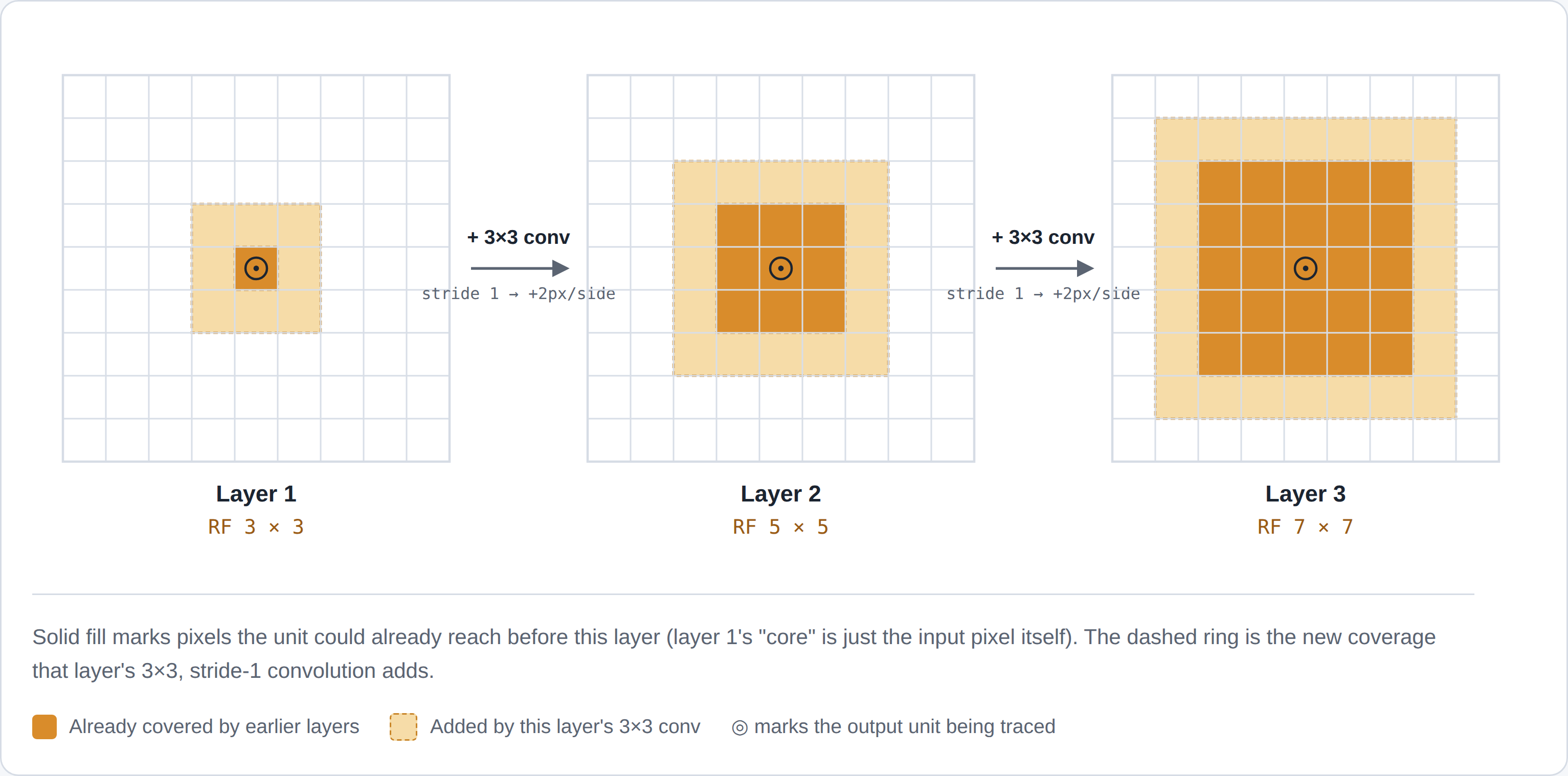
With that picture in place, the follow-up question is much easier to answer: why do CNNs go deep instead of using one big kernel? Three stacked 3×3 layers reach the same 7×7 view as a single 7×7 kernel, but with 27 weights per input channel instead of 49, plus two extra non-linearities in between. I wrote this up in more detail in my CNN series.
Autoencoders vs VAEs: points vs clouds
The second example is the difference between an autoencoder (AE) and a VAE. Both compress an input into a small latent code and decode it back. The difference is what happens in the latent space. An AE maps each image to a single point, and nothing stops those points from scattering into clusters with big gaps between them. A VAE maps each image to a small Gaussian cloud and pulls all of those clouds towards a shared prior, so a randomly sampled code lands somewhere the decoder has actually been trained.
That's accurate, but it's a lot of words for what is essentially a picture:
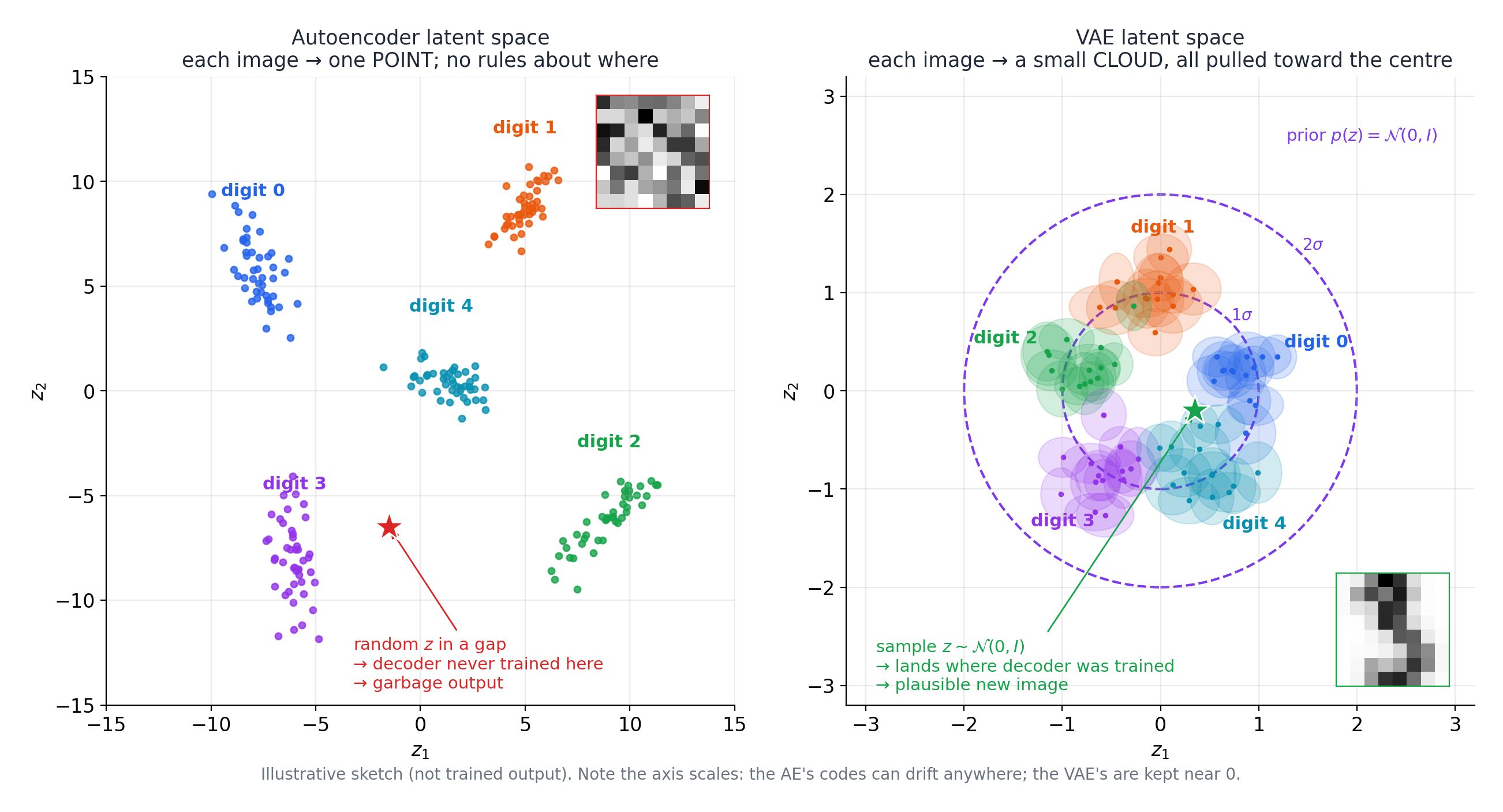
With that picture in mind, the code is easier to read too: why the VAE encoder outputs a mean and a log-variance instead of a single vector, and why its loss adds a KL term to the reconstruction error. It's also the foundation for the conditional VAE (cVAE) I worked on in one of the unit's projects. Both topics are covered in my autoencoder series.
Choosing the right tool for each task
The other thing that made this semester more fulfilling was working out how to make full use of each of my AI tools. Every tool has a usage limit, and each one runs only in certain environments. That encouraged me to understand the features, strengths and pitfalls of each tool, and to manage my usage consciously and make the most of each limit, instead of using the tools without thinking.
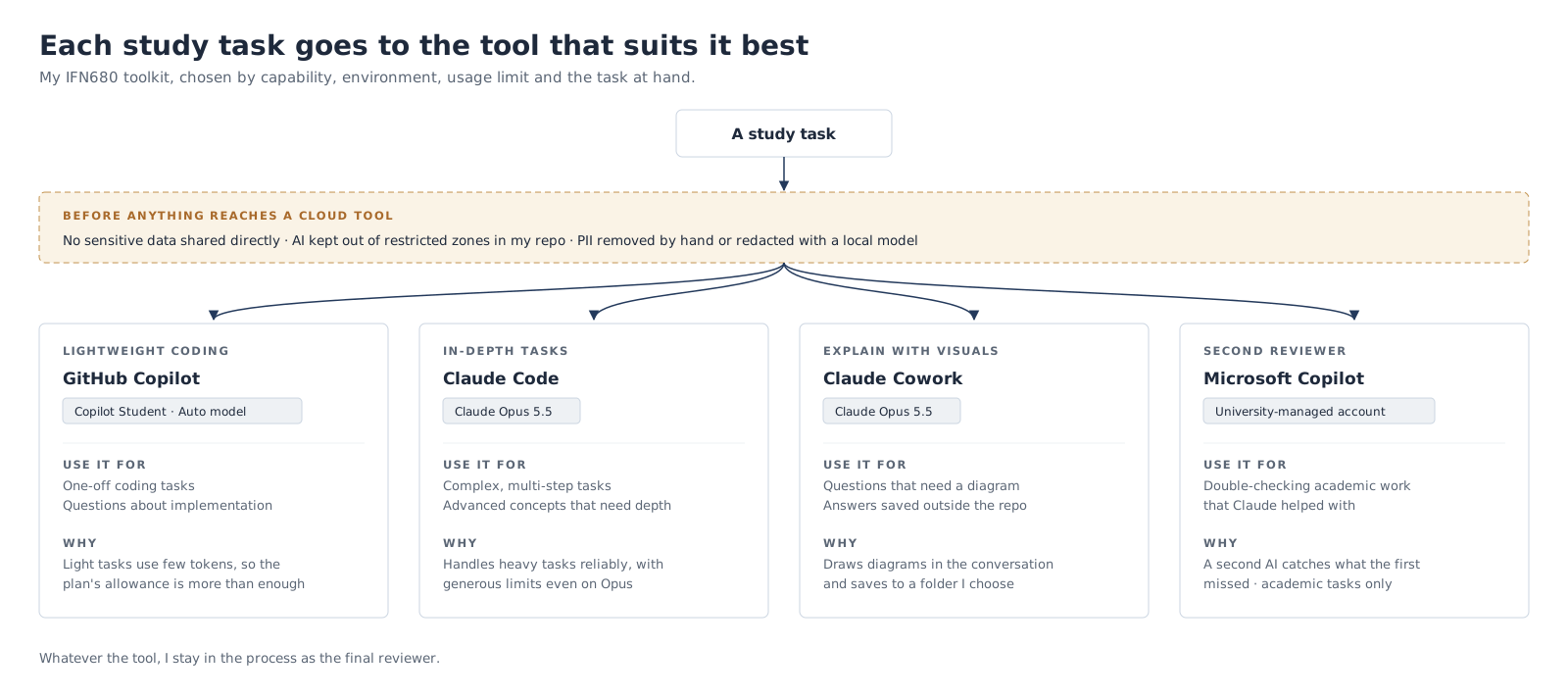
I choose a tool based on four things: what it's capable of (complex tasks, visuals, deep thinking, coding), where it runs, its usage limit, and, of course, the nature of the task at hand. Claude runs in almost any environment, from my local machine to the cloud to a web browser, while GitHub Copilot runs mainly in my IDE and on GitHub.
Security comes before all of them. I never share sensitive data directly with AI. Parts of my repo are off-limits to AI tools by rules in their instruction files, and when a task involves personal or otherwise identifying information, I either remove it by hand or redact it with a local model before passing anything to a cloud-based AI tool.
My toolkit
- GitHub Copilot (Copilot Student plan): one-off, lightweight coding tasks and questions about implementation. The model Copilot picks on my plan handles these well, and they don't use many tokens, so the plan's allowance is more than enough.
- Claude Code with Claude Opus 5.5: more complex, multi-step tasks, and questions about advanced concepts that need a detailed, in-depth explanation.
- Claude Cowork with Claude Opus 5.5: questions that need a diagram to explain, since Cowork draws them right in the conversation, and answers I want saved somewhere outside the repo.
- Microsoft Copilot: a second reviewer for academic tasks.
Why not use Copilot for everything? The model on my plan can't handle the heavier tasks reliably, and they drain its allowance quickly. Claude's plan limits are more generous, even with Opus. And with a few habits, I didn't hit Claude's five-hour or weekly limit once in any of my sessions for this unit: keeping the prompt cache warm, clearing the session before a new task, compacting the history mid-task, batching tasks into one prompt, and sharing just enough context.
Microsoft Copilot is my cross-checker. My account is managed by the university, so for compliance and consistency, I only use it for academic tasks. After Claude has helped me review a (de-identified) report, for example, I ask Microsoft Copilot to double-check it, because AI can make mistakes. In my experience, cross-checking with a different AI tool has significantly reduced hallucinations and fabrications, and improved the quality of the output. I always stay in the process as the final reviewer, so I can see the difference.
Splitting tasks this way echoes separation of concerns in software engineering. It also makes my knowledge easier to manage and find again. Conversation histories are grouped by tool, and by session within each tool, so each category of knowledge has its own place.
Wrapping up
A year ago, I struggled to keep up with IFN580's pace. This semester, with more advanced content, concepts have been sinking in faster, mostly thanks to diagrams that make complex ideas intuitive and explanations that start from my own code.
But speed isn't what I'll remember most. Treating AI as part of my study infrastructure meant learning the tools as well as the content: what each one is good at, where it runs, and how to make its limits go further. That's what turned studying from something I had to keep up with into something I enjoyed.